
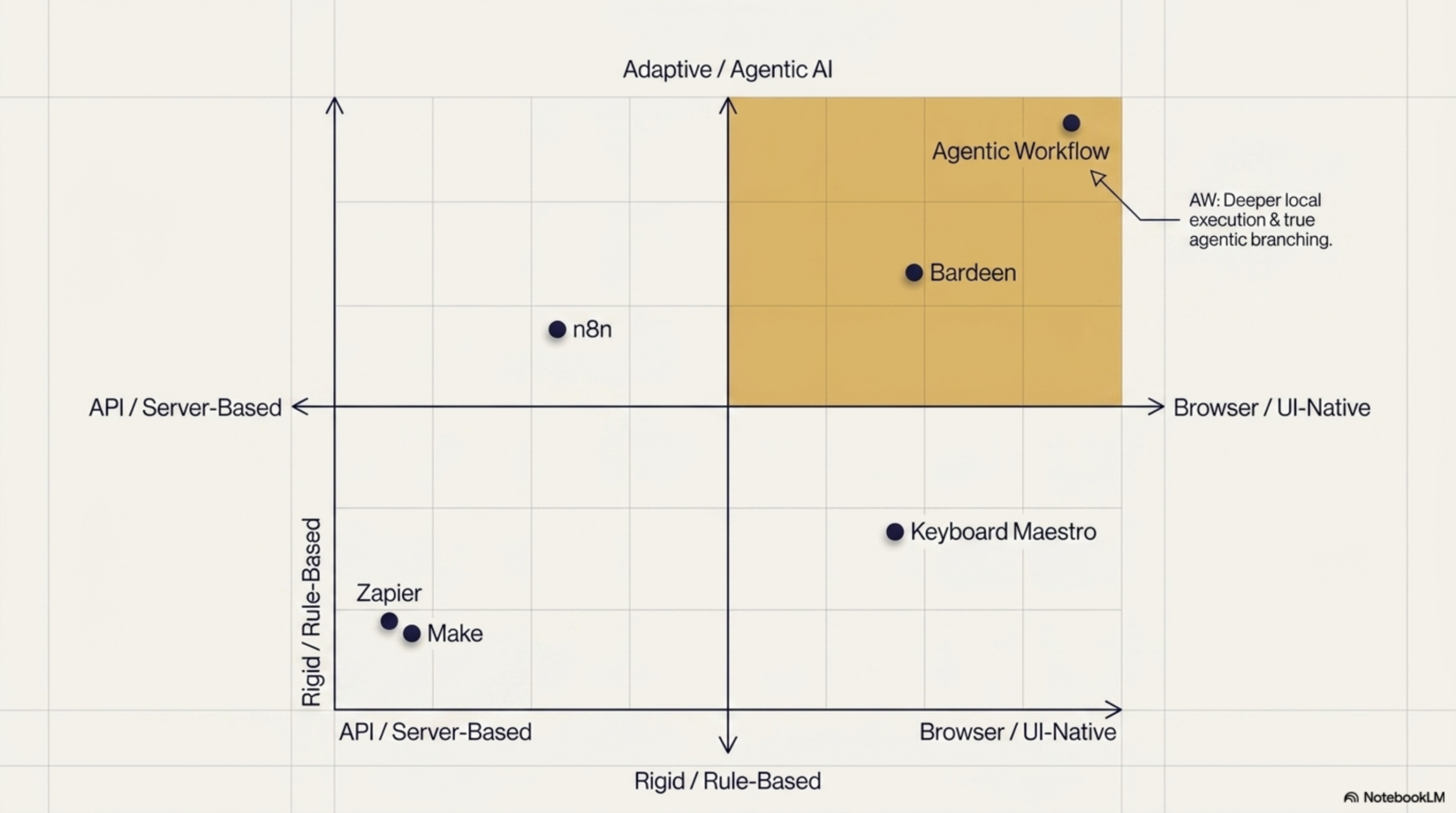
Browser automation has gone from a niche developer skill to a mainstream productivity category. In 2026, there are more tools than ever promising to automate your workflows — but they are not all built the same way, and choosing the wrong one can mean wasted setup time, unexpected costs, or workflows that break the moment a website updates its layout.
This guide cuts through the noise. We have tested the leading browser automation tools and compared them across the dimensions that actually matter: how close they run to the browser, how well they handle AI-powered tasks, whether non-developers can use them, and what you give up in privacy. Here is what you need to know.
What to Look for in a Browser Automation Tool
Before comparing specific tools, it helps to define what a great browser automation tool actually looks like in 2026. The requirements have shifted significantly as AI has become a first-class part of the workflow stack.
- Browser-native execution: Does it run inside the browser, or does it rely on external servers? Server-side tools cannot interact with pages that require a login session or deal with complex dynamic content the same way a browser extension can.
- AI integration: Can it understand page content semantically, not just by CSS selectors? The best tools can parse unstructured text, extract meaning, and make decisions — not just click buttons.
- No-code accessibility: Can a non-developer build and maintain workflows without writing code? This determines who in your team can actually own automations.
- Privacy controls: Where does your data go? Tools that send everything through a cloud server create real exposure for sensitive workflows.
- Free tier: Can you evaluate the tool meaningfully before committing to a paid plan?
Tool #1 — Agentic Workflow (Browser-Native AI, No-Code)
Agentic Workflow is a Chrome extension that brings a visual no-code workflow builder directly into the browser. You build automations by connecting nodes — triggers, DOM selectors, LLM chains, conditionals, output actions — on a drag-and-drop canvas. If you are new to the concept, our article on what is an agentic workflow explains the ideas behind this approach.
What makes it stand out in 2026 is where it runs: entirely inside the browser. There is no backend server, no API key required for basic use, and no cloud account to maintain. Workflows execute in the same browser context as the pages they interact with, which means they handle authenticated sessions, dynamic SPAs, and complex DOM interactions without the workarounds server-side tools require.
For privacy-conscious users, Agentic Workflow supports local AI models via Ollama and WebLLM. Your data stays on your machine. For users who want more powerful cloud models, OpenAI, Anthropic, and others are supported too.
Best for: individuals, small teams, and anyone who wants AI-powered automation without infrastructure overhead.
Tool #2 — Bardeen (Task Automation, Integrations)
Bardeen is a browser extension focused on connecting web apps and automating repetitive tasks with a library of pre-built playbooks. It has strong integrations with tools like Notion, Salesforce, LinkedIn, and Google Sheets, and its scraping capabilities are solid for extracting data from supported sites.
Bardeen has added AI features in recent updates, though AI is more of an enhancement than a core architectural element. The free tier is limited, and more powerful features require a paid plan. Privacy is a consideration: workflows run through Bardeen’s cloud infrastructure. For a detailed head-to-head, see our Agentic Workflow vs Bardeen comparison.
Best for: users who want pre-built integrations with popular SaaS tools and do not need deep AI customization.
Tool #3 — Make (Server-Side, Powerful Workflows)
Make (formerly Integromat) is one of the most powerful visual workflow builders available. It supports hundreds of app integrations, complex branching logic, error handling, and scheduling. For backend automation — moving data between APIs, processing files, orchestrating multi-step business processes — Make is hard to beat.
The key limitation is that Make is server-side. It cannot natively interact with browser pages the way a browser extension can. Browser-based tasks require additional modules or workarounds, and AI capabilities are available but require setup. It is also more complex for non-technical users.
Best for: teams with complex multi-app workflows and technical users comfortable with API-level configuration.
Tool #4 — Zapier (Beginner-Friendly, API-Based)
Zapier is the household name in no-code automation and remains an excellent starting point for users who are new to the category. Its library of app integrations is enormous, the interface is genuinely beginner-friendly, and it has added AI-powered Zaps that can process text and make decisions.
Like Make, Zapier is fundamentally API-driven and server-side. It works best when the apps you want to connect have official Zapier integrations. Direct browser interaction is not its strength, and at scale, Zapier’s pricing can escalate quickly.
Best for: beginners automating tasks between well-supported SaaS apps with minimal setup.
Tool #5 — n8n (Self-Hosted, Developer-Friendly)
n8n is the open-source, self-hostable alternative to Make and Zapier. If you want full control over your infrastructure, n8n lets you run the entire automation engine on your own servers. It supports a large library of integrations, custom JavaScript nodes, and AI agent workflows via its LangChain integrations.
The trade-off is setup complexity. n8n is best suited to developers or teams with DevOps capacity. For browser-native interaction, you still need additional tooling — and desktop automation tools like Keyboard Maestro face similar constraints (see our Agentic Workflow vs Keyboard Maestro comparison for a deeper look at where desktop automation falls short for web tasks). The self-hosted model is a significant privacy and compliance advantage for enterprise use cases.
Best for: developers and engineering teams who want open-source, self-hosted automation with full customization.
Comparison Table
| Tool | Browser-Native | AI-Powered | No-Code | Free Tier | Privacy |
|---|---|---|---|---|---|
| Agentic Workflow | Yes | Core feature | Yes | Yes | Local AI option |
| Bardeen | Yes | Partial | Yes | Limited | Cloud-based |
| Make | No | Via modules | Yes | Yes | Cloud-based |
| Zapier | No | Partial | Yes | Limited | Cloud-based |
| n8n | No | Yes (LangChain) | Partial | Self-hosted | Self-hosted |
Which Tool Is Right for You?
The honest answer depends on where your workflows actually live:
- If your automations happen inside the browser — scraping, form filling, page monitoring, reading content from sites you are logged into — a browser-native tool like Agentic Workflow is the only category that handles these tasks without workarounds.
- If you need to connect dozens of SaaS APIs with complex logic and your team has technical capacity, Make or n8n are powerful choices.
- If you are just starting out and want to automate simple tasks between popular apps, Zapier or Bardeen will get you moving quickly.
- If data privacy is non-negotiable, Agentic Workflow with local AI models or self-hosted n8n are the only options that keep your data off third-party servers.
For most knowledge workers doing research, outreach, data collection, and content work, the browser is where the work happens. That is where your automation tool should live too.
Conclusion
The best browser automation tool in 2026 is not the one with the most integrations or the longest feature list — it is the one that fits how and where you actually work. Server-side tools are powerful, but they have a fundamental blind spot: the browser itself. For tasks that require reading, interacting with, and extracting meaning from live web pages, browser-native AI automation is the category to watch.
Ready to start? Install Agentic Workflow from the Chrome Web Store and see why it is the most privacy-friendly, no-code browser automation tool available today.

Agentic Workflow vs Keyboard Maestro: Browser AI vs Desktop Macros » Agentic Workflow
April 27, 2026[…] Choose Agentic Workflow if your automation needs are centered on the web — reading and reasoning over live webpage content, handling sites with no API, running AI-powered analysis in the browser, or working on Windows or Linux. It’s the only tool that brings genuine AI agency to browser-based automation without requiring any code or server infrastructure. For a broader view of what’s available, see our guide to the best browser automation tools in 2026. […]