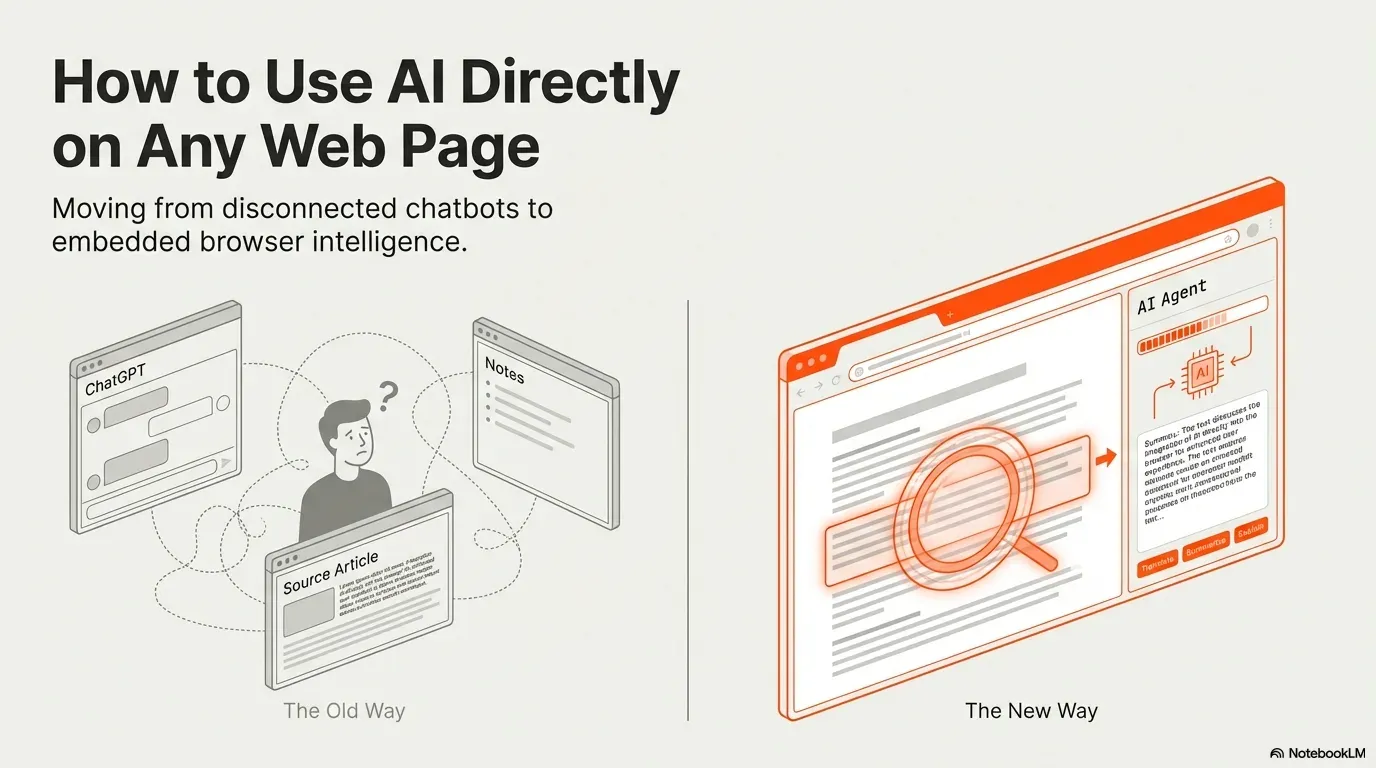
AI tools are powerful. But the way most people use them is inefficient. You copy text from a web page, open another tab, paste it into an AI tool, wait for the answer, then switch back.
- Paragraph 1Copythe introSwitch tabto the chatbotPaste+ your questionWaitan answerSwitch backlost your place
- Paragraph 2Copythe tableSwitch tabto the chatbotPasteit loses the layoutWaita guessSwitch backcheck the page
- Paragraph 3Copythe conclusionSwitch tabto the chatbotPaste+ the context againWaitan answerSwitch backfinally
- Done, after 15 hops between tabs
Done, eventually. That's the copy-paste tax.Example of a typical research loop.
Version texte
- 1. Copy: the intro · Switch tab: to the chatbot · Paste: + your question · Wait: an answer · Switch back: lost your place
- 2. Copy: the table · Switch tab: to the chatbot · Paste: it loses the layout · Wait: a guess · Switch back: check the page
- 3. Copy: the conclusion · Switch tab: to the chatbot · Paste: + the context again · Wait: an answer · Switch back: finally
- Done, after 15 hops between tabs
This breaks your context, adds friction and limits what AI can actually do for you. What if AI could work directly inside the page you’re viewing? That’s where browser-native automation changes the equation.
The problem with the usual way of using AI
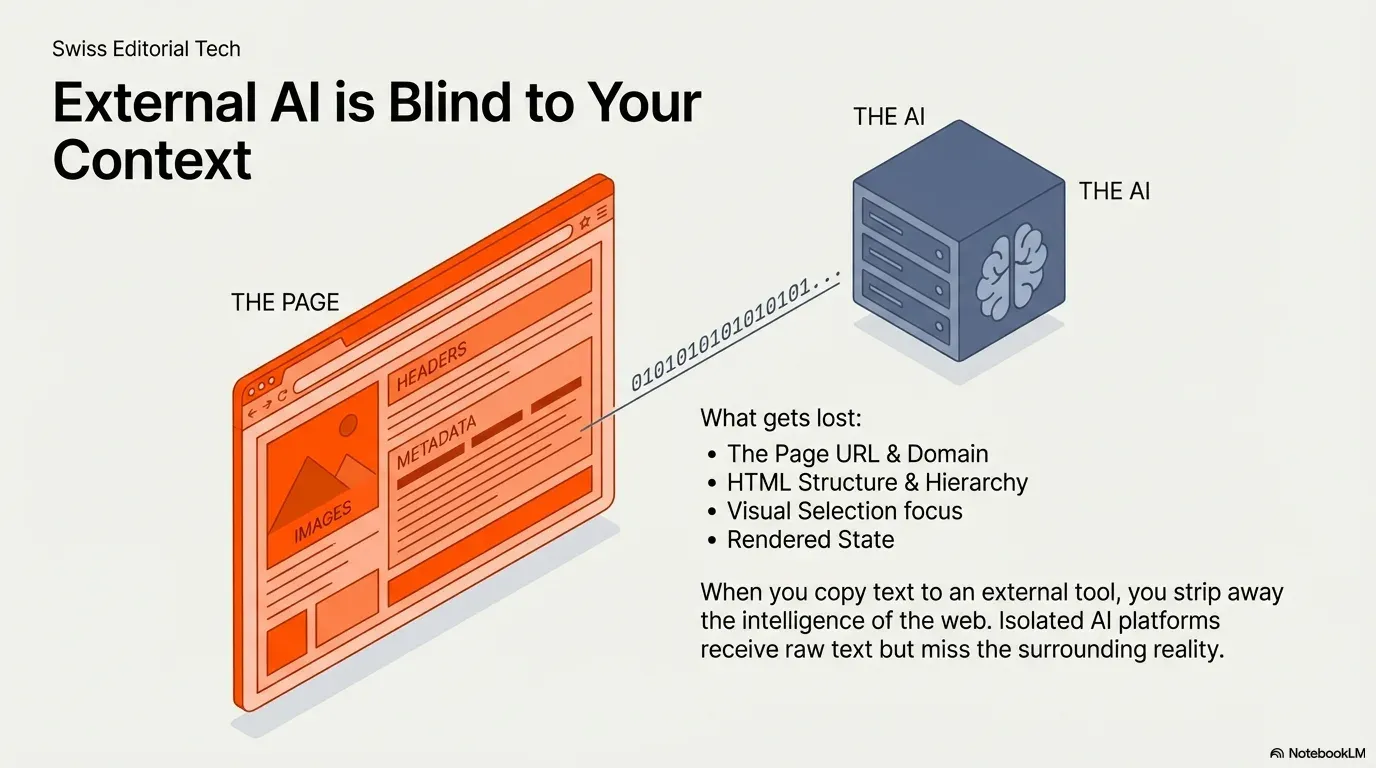
Most AI tools are disconnected from your browsing. Chat apps run in their own window. They don’t know what page you’re reading, what you selected, what links the page has, what structured data is in its HTML, or what content has loaded on screen. So you carry information between them by hand. That isn’t automation; it’s assisted copy-paste.
Bringing AI into the browser
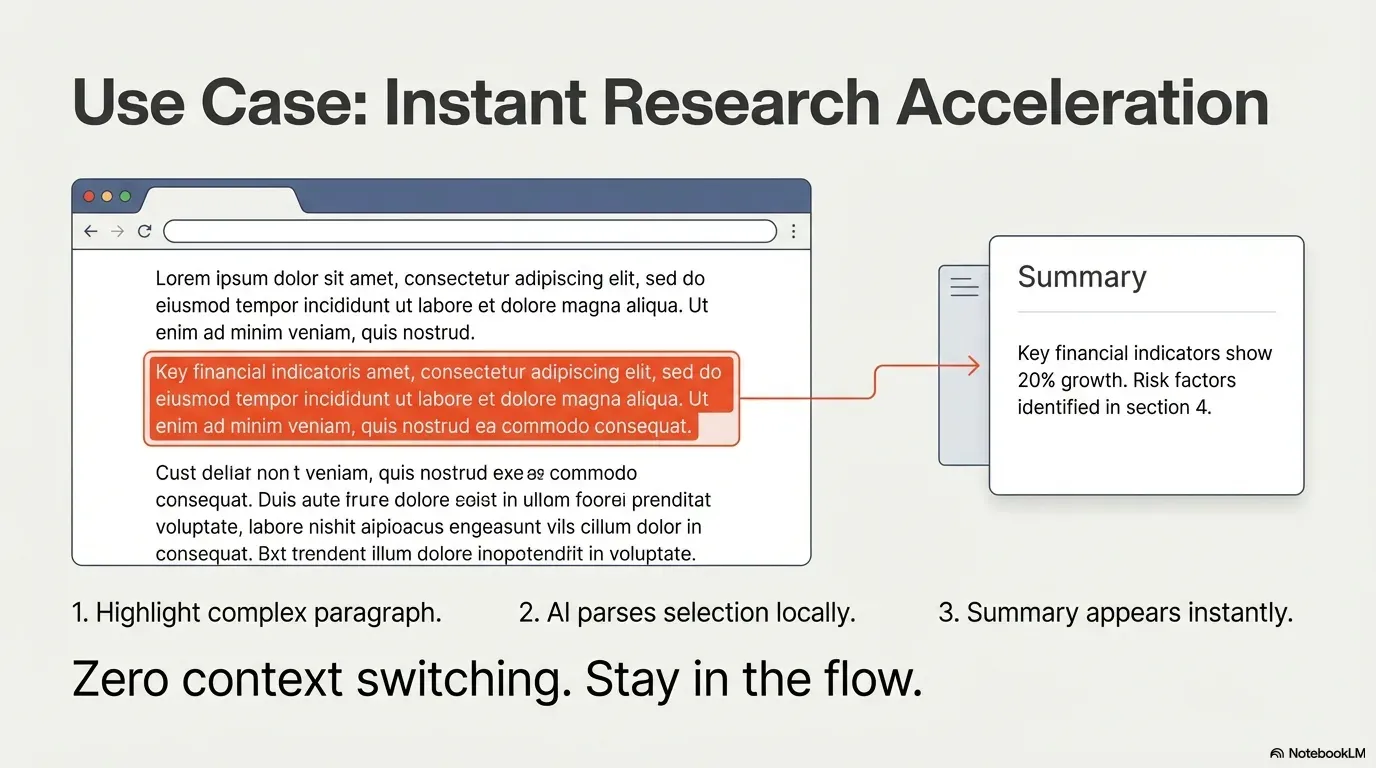
When AI runs inside the browser, it gets the live page as context. Instead of pasting text, a workflow can read the text you selected, the whole page, its full HTML, all its links or images, and what’s rendered right now.
The shift
AI stops being a separate tool and becomes a layer on the page.
A layer on the page: it sees what you see.Selection, text, HTML, links and rendered content as inputs.
Version texte
- The shift: AI stops being a separate tool and becomes a layer on the page.
For example: highlight a paragraph of a research article and summarise it on the spot; extract all product listings from a marketplace page and classify them; analyse a long post without switching tabs; rewrite text on the page to make it simpler.
Running language models in the browser
Most AI tools rely on cloud APIs: your data goes to outside servers, you need a connection, and the model runs remotely. Agentic Workflow gives you another option: run language models inside the browser with WebLLM.
WebLLM uses WebGPU to run optimised models on your own machine’s graphics card. The model runs on your device, your data doesn’t leave the browser, and inference is local.
- Votre demandeTraitée sur votre appareil.
- Moteur WebLLMCharge et exécute le modèle.
- WebGPUPermet à une page d’utiliser la carte graphique.
- Carte graphiqueLe matériel qui fait les calculs.
Couche par couche : votre demande, le moteur, WebGPU, la carte graphique.Prompt → WebLLM (MLC) → compute shaders WebGPU → GPU.
Version texte
- Votre demande / Moteur WebLLM / WebGPU / Carte graphique
- Votre demande: Traitée sur votre appareil. · Moteur WebLLM: Charge et exécute le modèle. · WebGPU: Permet à une page d’utiliser la carte graphique. · Carte graphique: Le matériel qui fait les calculs.
You choose per workflow: cloud models for the biggest capabilities, or local WebLLM models for privacy and offline use. The workflow stays the same; only where it runs changes.
WebLLM : le modèle est téléchargé une fois et tourne dans votre navigateur.Les poids quantifiés sont chargés dans WebGPU ; l’inférence est locale, sans réseau après le premier téléchargement.
Version texte
- Votre appareil: Votre navigateur · Internet: Serveur d’une entreprise d’IA
- Votre navigateur → Serveur d’une entreprise d’IA: votre demande + le texte de la page
- Serveur d’une entreprise d’IA → Votre navigateur: la réponse
- Aller-retour: ≈ 1,5 s · Quitte votre appareil: oui
- Serveur d’une entreprise d’IA → Votre appareil · Réseau: aucun · Quitte votre appareil: non · Fonctionne hors ligne: oui
Why running the model locally matters
- Privacy: sensitive content from a page doesn’t have to be sent anywhere.
- No network round trip: nothing waits on a server (speed then depends on your device).
- Control: you decide whether data is processed locally or by a provider.
- Offline: once the model is downloaded, some workflows run without a connection.
That enables uses like analysing internal dashboards without exposing their data, summarising private documents in the browser, classifying content securely, and running AI in restricted environments.
Real-world examples
- Research: open several articles, select key sections, summarise and extract insights without leaving the page.
- Marketplace analysis: take the visible product data, have a model turn descriptions into clean JSON, send it on to another tool.
- Rewriting: simplify, translate or change the tone of text on the page.
- Link intelligence: extract all links from a page and have AI sort them by type or relevance.
- Understanding HTML: give the rendered HTML to a model to pull out structured fields when no API exists.
| Product card |
|---|
| Lamp 40W, oak, €39 |
| Kettle 1.7L steel €29 |
| Grinder: burr, €89 |
| Product card | JSON |
|---|---|
| Lamp 40W, oak, €39 | {oak lamp, 39} |
| Kettle 1.7L steel €29 | {steel kettle, 29} |
| Grinder: burr, €89 | {burr grinder, 89} |
Clean JSON comes out, ready to send on.Structured fields per item; HTTP Request can post them to an API.
Version texte
- Product card: Lamp 40W, oak, €39 · Kettle 1.7L steel €29 · Grinder: burr, €89
- Information Extractor
- Product card | JSON: Lamp 40W, oak, €39 | {oak lamp, 39} · Kettle 1.7L steel €29 | {steel kettle, 29} · Grinder: burr, €89 | {burr grinder, 89}
All of this happens inside the browser.
Context + AI = agentic workflows
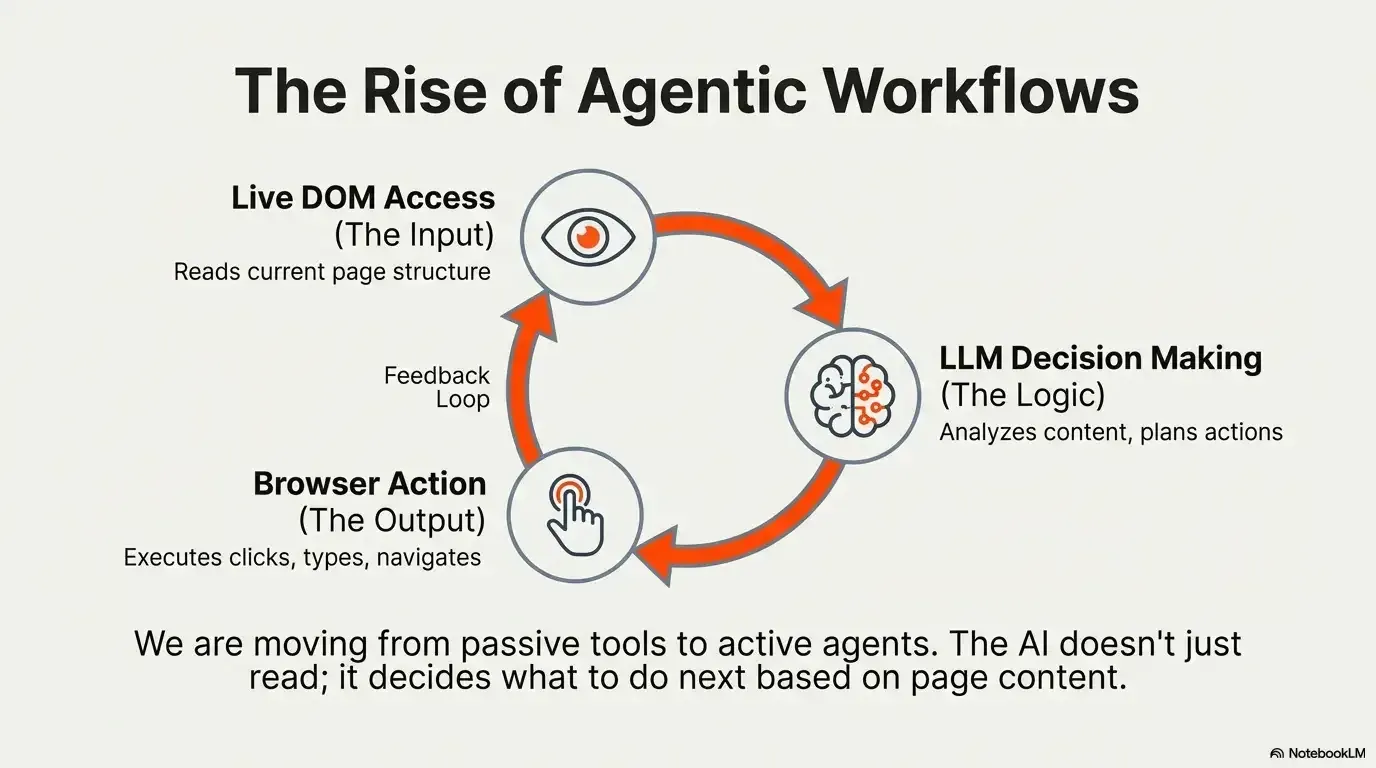
AI gets much more useful when it has context. Instead of asking a model generic questions, you give it the content you selected, live page elements, structured page data and triggers you control. That creates agentic workflows: processes where AI analyses, decides and acts based on what’s on the page. The browser stops being only a viewer and becomes a place where work runs.
Traditional AI use is API-centred: the model works on what you send it. Browser-native AI is context-centred: it works on what you’re looking at. Combine live page access, workflow logic, HTTP integrations, cloud models and local WebLLM, and you get an architecture that adapts to your constraints.
Try it
Using AI shouldn’t mean constant tab switching and copy-paste. It should be part of your browsing. With context-aware automation, live page interaction, and both cloud and local models, Agentic Workflow puts AI where your work happens: not a separate tool, not an isolated chat window, but a layer on the page.
À vous
Put AI on the page you're reading
Open it in AWFlow: it reads the page and asks a model that runs in your browser. Change the instruction to anything.
Ouvrir dans AWFlow (s’ouvre dans un nouvel onglet)docs.awflow.io/examples/summarize-page-llm-chain.awfCall to action. Scan the code or click the link.Opens the Summarize page (LLM chain) docs example in AWFlow's import page.
Version texte
- Put AI on the page you're reading · Open it in AWFlow: it reads the page and asks a model that runs in your browser. Change the instruction to anything. · https://docs.awflow.io/examples/summarize-page-llm-chain.awf
In short
- Copy-paste is not automation
- AI on the page sees what you see
- Run it in the cloud or in your browser
Three. Your choice of where it runs.Cloud APIs or WebLLM on WebGPU.
Version texte
- In short
- Copy-paste is not automation
- AI on the page sees what you see
- Run it in the cloud or in your browser