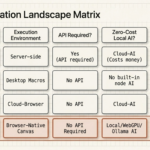
Most AI agents today are built API-first. They connect to databases via REST, read documents from cloud storage, query structured data through GraphQL endpoints, and write outputs back through webhooks. It’s a clean, developer-friendly architecture — and it misses roughly 99% of the real web. The pages your customers use, the tools your team works in every day, the competitor sites you want to monitor: almost none of them have APIs. If your AI agent needs to operate in the real world, it needs a browser — not just an API client. This is a core principle of any true agentic workflow: agents must be able to act where work actually happens.
The API-First Illusion: What AI Agents Can (and Can’t) Access
When developers talk about connecting AI agents to the web, they usually mean connecting them to a curated set of integrations: a Salesforce connector, a Slack API, a Google Sheets webhook. These integrations are powerful, but they represent a tiny, highly structured slice of the information that actually exists on the web.
Consider what an API-first agent cannot do:
- Read a competitor’s pricing page that doesn’t expose an API
- Fill out a vendor registration form on a partner portal
- Monitor a JavaScript-rendered dashboard for changes
- Extract data from a web app that requires login and multi-factor authentication
- Interact with a legacy internal tool that was never built with API access in mind
The moment your use case involves a real web page rather than a structured API response, the API-first architecture hits a wall. The solution is to automate websites directly, without relying on an API at all.
The Real Web Lives in the Browser
The web was built for browsers, not API clients. An estimated 80–90% of the information on the internet is only accessible through a browser: behind JavaScript rendering, session authentication, dynamic loading, and interactive UI flows. Web applications — the tools your team uses every day — are designed to be navigated, clicked, and filled in by a human user sitting in front of a browser window.
An AI agent that only has access to APIs is an agent that can only see the small portion of the web that developers have explicitly chosen to expose. A browser-equipped AI agent can see everything a human can see — which is essentially the entire web.
What a Browser-Equipped AI Agent Can Do Differently
Give an AI agent a browser and it graduates from data retrieval to active participation on the web. Specifically, it can:
- Navigate — follow links, handle redirects, authenticate through login flows
- Extract — read the rendered DOM of any page, including JavaScript-heavy single-page applications
- Interact — click buttons, fill forms, select dropdowns, trigger UI events
- Observe — monitor pages for changes and trigger downstream actions when conditions are met
- Act in context — read the full page context (not just a data field) and use it to inform decisions and outputs
This shifts AI agents from passive readers of structured data to active participants in real workflows — the kind that happen in browsers all day, every day.
The Architecture: How Browser-Native AI Agents Work
A browser-native AI agent runs as a browser extension rather than as a server-side process. This gives it direct, privileged access to the browser’s tab context: the rendered DOM, network requests, cookies, local storage, and the current page’s JavaScript environment.
In Agentic Workflow’s architecture, a visual pipeline of nodes defines what the agent does:
- A Trigger node starts the workflow — on a schedule, on page load, or when a DOM condition is met
- DOM Selector nodes extract content from the current or target pages
- LLM Chain nodes reason over the extracted content and produce structured outputs
- Action nodes write data to external services, fill forms, click elements, or send notifications
The entire pipeline runs inside the browser, with no server required. Local models via Ollama or WebLLM keep data on-device; cloud LLMs can be connected for heavier reasoning tasks.
Browser AI vs API AI: A Capability Comparison
| Capability | API-First Agent | Browser-Native Agent |
|---|---|---|
| Access structured API data | Yes | Yes |
| Read JavaScript-rendered pages | No | Yes |
| Fill web forms | No | Yes |
| Monitor pages for changes | Only if API available | Any page |
| Authenticate via browser session | No | Yes |
| Work on legacy / no-API tools | No | Yes |
| Run without server infrastructure | No | Yes |
| Keep data fully on-device | No | Yes (with local LLM) |
The Privacy Advantage of Browser-Based Agents
Server-side AI agents create a data flow problem: to process information from your browser, they need to ship that information off your device, through a server, and into an LLM API. Every page you browse, every form you fill, every piece of data your agent processes passes through infrastructure you don’t control.
Browser-native agents running with local models (Ollama, WebLLM) eliminate this entirely. The data never leaves your machine. For teams handling sensitive customer data, proprietary research, or regulated information, this isn’t a nice-to-have — it’s a compliance requirement. Browser-native AI agents are the only architecture that can deliver automation and privacy simultaneously.
Real Use Cases Only Possible with a Browser
To make the contrast concrete, here are workflows that are simply impossible for an API-first agent but routine for a browser-native one:
- Competitor intelligence — visit 20 competitor pricing pages daily, extract current prices, and summarize changes in a Slack message
- Lead enrichment — when a new lead appears in your CRM, visit their LinkedIn profile, extract role and company details, and write them back to the CRM record
- Automated form submissions — fill out partner registration forms, job applications, or procurement portals with data from a structured profile
- Internal tool automation — interact with legacy web apps that were never built with API access, automating repetitive data entry tasks
- Content monitoring — watch a set of industry news pages and summarize new articles into a daily briefing, triggered by the appearance of new content in the DOM
The Future: Agents That Live in Your Browser
The next generation of AI agents won’t live on servers — they’ll live in the browser, running alongside you as you work. They’ll observe what you’re doing, understand the context of the pages you visit, take action on your behalf when you ask them to, and operate continuously in the background on schedules you define.
This shift is already underway. Browser extensions are becoming the deployment target of choice for personal AI agents precisely because the browser is where knowledge workers already spend most of their digital lives — switching between research, CRM, email, and a dozen other tabs all day. An agent that lives where you work doesn’t need to be given data — it already has access to all of it.
Conclusion
API-first AI agents are powerful within their domain, but that domain is a small and shrinking fraction of the work that actually happens on the web. The real web — the pages, forms, dashboards, and tools your business depends on — lives in the browser. An AI agent without browser access is an agent with one hand tied behind its back. Browser-native AI agents, by contrast, can act anywhere a human can act, on any site, without servers, without API integrations, and with full privacy control.
Ready to start? Install the Agentic Workflow Chrome extension and build your first browser-native AI agent today: Get Agentic Workflow on the Chrome Web Store.