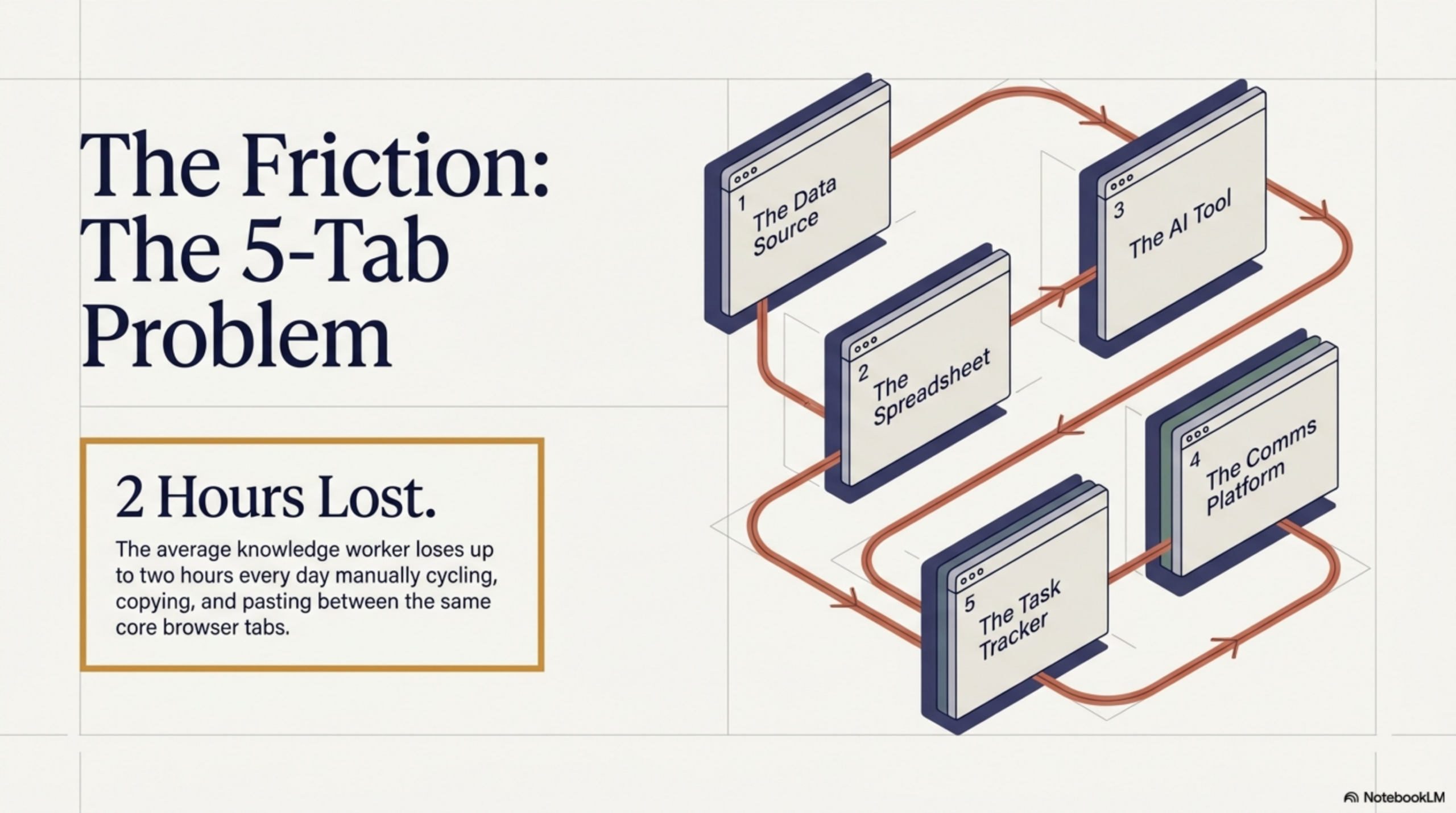
Count the tabs. Right now, as you read this, how many do you have open? For most knowledge workers, the answer is somewhere between eight and thirty. But within that sprawl, there is a specific, painful pattern: a cluster of five core tabs that you cycle through dozens of times every day. A data source. A spreadsheet or doc. An AI assistant. A communication tool. And the task you are actually supposed to be working on. This is the 5-Tab Problem — and it is silently consuming two or more hours of your productive day.
This article breaks down what the 5-Tab Problem actually costs, why it is so hard to escape, and how a new generation of browser-native AI tools built on agentic workflows — specifically Agentic Workflow — can collapse five tabs into one.
What Is the 5-Tab Problem?
The 5-Tab Problem is not really about having too many tabs open. It is about a specific workflow pattern where the tool you need to process information (an AI, a spreadsheet, a CRM) is always in a different tab from the page where the information actually lives.
The cycle looks like this:
- You are reading a page with data or content you need to act on.
- You copy the relevant text or data.
- You switch to your AI assistant or tool tab.
- You paste, configure, and run.
- You copy the output.
- You switch back to your doc or task tab.
- You paste the result.
- You return to the original page — and realize you lost your place.
Repeat this loop twenty, thirty, forty times a day. That is not a productivity workflow. That is a productivity tax.
The Hidden Cost of Context Switching
The cognitive science behind this is well established. A landmark study by researchers at the University of California, Irvine found that it takes an average of 23 minutes and 15 seconds to fully regain focus after a significant interruption. While a brief tab switch is a smaller disruption than a phone call, the accumulation of micro-interruptions throughout a day has the same effect: it fragments attention into pieces too small to do deep work.
Research from the American Psychological Association found that task-switching can cost as much as 40% of productive time. In a standard 8-hour workday, that is 3.2 hours lost not to bad tasks, but to the mechanical friction of moving between tools.
Gloria Mark, a professor of informatics who has studied digital distraction for two decades, found in her research that knowledge workers switch tasks (including switching between applications or browser tabs) on average every 3 minutes and 5 seconds — and that the majority of these switches are self-initiated, not externally triggered. We interrupt ourselves more than any notification does.
The 5 Most Common Tab-Switching Patterns and Their Time Costs
Not all tab switching is equal. Here are the five patterns that collectively account for the majority of lost productive time:
- Data-to-Spreadsheet (avg. 12 min/day): Copying information from a website, report, or portal and manually entering it into a Google Sheet or Excel file.
- Content-to-AI (avg. 18 min/day): Copying text from an article, document, or page and pasting it into ChatGPT or another AI assistant for summarization, analysis, or rewriting.
- Research-to-CRM (avg. 10 min/day): Copying company details, contact information, or news from web pages into a CRM record.
- Page-to-Email/Slack (avg. 8 min/day): Copying and reformatting information from a source page into a message or update for a colleague.
- Source-to-Doc (avg. 15 min/day): Moving quotes, data points, or references from multiple source pages into a working document or report.
Total estimated daily cost from these five patterns alone: 63 minutes. Add in re-orientation time after each switch and you are well past two hours.
Why Copy-Paste Is a Productivity Anti-Pattern
Copy-paste feels like a solution because it is faster than retyping. But it is actually a symptom of a deeper architectural problem: your tools and your data sources are not connected. Every copy-paste action is a manual bridge between two systems that should be talking to each other automatically.
Beyond the time cost, copy-paste introduces errors. Truncated text, missed fields, formatting accidents, stale data pasted into documents hours after it was captured — these are not edge cases. They are the normal failure modes of a manual workflow. Organizations that rely heavily on copy-paste as a data integration method are essentially running on a fragile, error-prone pipeline that no one is responsible for maintaining.
Copy-paste is not a workflow. It is the absence of one.
The Solution: Bring AI to the Page, Not the Other Way Around
The fundamental shift that eliminates the 5-Tab Problem is architectural: instead of pulling data out of pages and taking it to your tools, you bring your tools to the page. The data stays where it is. The AI, the spreadsheet connection, the CRM update — these come to you.
This is the core premise of browser-native automation. When your automation layer runs inside the browser, in the same context as the pages you are reading, you do not need to copy, paste, or switch. The tool sees what you see, processes it in place, and sends the output wherever it needs to go — all without you leaving the page.
How Agentic Workflow Eliminates Tab Switching
Agentic Workflow is a Chrome extension that puts a visual no-code automation builder inside your browser. Instead of switching tabs, you build a workflow that runs on the current page. Here are just a few of the browser tasks AI can handle for you once a workflow is set up:
- A DOM Selector node picks the data or content you need from the page automatically — no manual selection required after the workflow is set up.
- An LLM Chain node processes that content with an AI prompt — summarize, extract, rewrite, analyze — using either a cloud model or a local model via Ollama.
- An Output node sends the result where it needs to go: a Google Sheet, an inline panel on the page, your clipboard, or a saved note.
The first time you run a workflow, the setup takes a few minutes. Every subsequent time, it runs with a single click — or automatically when you land on a matching URL. The tab-switching loop is replaced by a single button press.
From 5 Tabs to 1: A Real-World Workflow Makeover
Let us take a concrete example. A sales development representative researches 20 prospects per day. Their current process: open LinkedIn tab, read the company page, switch to ChatGPT tab, paste and ask for a tailored pitch angle, switch to CRM tab, create a note, copy the pitch, paste it in. Five tabs, eight manual steps, repeated 20 times.
With Agentic Workflow, they build a single workflow that:
- Triggers when they visit a LinkedIn company page
- Extracts company name, description, and recent activity using DOM Selector nodes
- Sends the content to an LLM node with a custom pitch-generation prompt
- Pushes the result directly to their CRM via an output node
Result: one tab, one click, the same output. Time per prospect drops from roughly 6 minutes to under 1. For 20 prospects a day, that is nearly 2 hours saved — every single day.
This is not a theoretical efficiency gain. It is a direct replacement of manual cognitive labor with a browser-native workflow that does the heavy lifting automatically.
Conclusion
The 5-Tab Problem is not a minor inconvenience. It is a structural inefficiency baked into how most knowledge workers interact with information every day. The cognitive cost of context switching, the error rate of manual copy-paste, and the cumulative time lost to tab cycling add up to hundreds of hours per year — for every person on your team.
The fix is not better tab management or a new browser extension that organizes your tabs. The fix is eliminating the need to switch in the first place, by bringing AI and automation directly to the pages where your work actually happens. And the good news is that browser automation is no longer just for developers — you can build your first workflow without writing a single line of code.
Ready to start? Install Agentic Workflow from the Chrome Web Store and build your first tab-eliminating automation today — no code, no server, no API key required.

How to Build a Personal AI Research Assistant That Runs in Your Browser » Agentic Workflow
April 27, 2026[…] slow, and mentally exhausting — not because the individual steps are hard, but because the constant switching erodes focus and makes it nearly impossible to build up a coherent picture across multiple […]
What Is an Agentic Workflow? (And Why It’s Different from Regular Automation) » Agentic Workflow
April 27, 2026[…] Research summarizer: Open a webpage, trigger the workflow, get a structured summary with key insights extracted by an LLM — in seconds […]