You don’t need an OpenAI account to build AI-powered workflows. The open-source model ecosystem has matured to the point where free models can handle the most common automation tasks — summarization, classification, extraction, generation — with quality that’s more than sufficient for most use cases.
This article compares the best free LLMs for workflow automation and explains how to pick the right one for your use case. All of them can be run locally via Ollama or used in compatible automation tools without any API costs.
Why Free Models Are Now a Serious Option for Automation
Two years ago, the quality gap between open-source and commercial LLMs was significant enough to matter for production automations. That gap has closed considerably. Models like Mistral 7B, LLaMA 3, and Gemma 3 now perform at a level that rivals GPT-3.5 on many standard benchmarks — the same capability tier that powers most AI workflow integrations in tools like Zapier or n8n.
For workflow automation specifically, most LLM nodes are doing one of a handful of tasks:
- Summarizing a block of text
- Classifying content into a category
- Extracting structured data from unstructured text
- Generating a short output (a reply draft, a subject line, a report section)
- Answering a question based on provided context
None of these require a frontier-class model. A well-prompted 7B or 8B parameter model handles them reliably.
The Top Free LLMs for Workflow Automation
Mistral 7B
Mistral 7B is still one of the best all-around models at the 7B parameter range. It’s fast, handles instruction following well, and has strong multilingual capability. For most workflow automation tasks — especially text classification and summarization — it’s a reliable first choice.
- Size: ~4.1 GB (4-bit quantized)
- Best for: General-purpose automation tasks, multilingual content
- Weakness: Less strong on complex multi-step reasoning
- Run with:
ollama pull mistral
LLaMA 3 8B (Meta)
Meta’s LLaMA 3 8B is arguably the strongest model at its size class. It follows instructions precisely, produces clean structured output, and handles JSON formatting reliably — which matters a lot when your workflow node needs to extract structured data and pass it to the next step.
- Size: ~4.7 GB (4-bit quantized)
- Best for: Structured output, data extraction, instruction-following tasks
- Weakness: Slightly slower than Mistral on CPU inference
- Run with:
ollama pull llama3
Gemma 3 9B (Google)
Google’s Gemma 3 9B punches above its weight. It has strong reasoning ability relative to its size and does particularly well on tasks that require understanding context and generating coherent, structured outputs. The 9B version requires a bit more RAM but delivers noticeably better results on complex extraction tasks.
- Size: ~5.5 GB (4-bit quantized)
- Best for: Reasoning, document analysis, structured extraction
- Weakness: More resource-intensive than 7B alternatives
- Run with:
ollama pull gemma3
Phi-3 Mini (Microsoft)
Phi-3 Mini is the smallest serious model on this list. At 2.3 GB, it runs on machines with just 4GB of available RAM and returns responses faster than any of the others. If your workflow needs to run many LLM calls quickly (e.g., classifying 50 items in a loop), Phi-3 Mini’s speed advantage is worth the quality trade-off.
- Size: ~2.3 GB (4-bit quantized)
- Best for: Fast binary classification, lightweight generation, resource-constrained machines
- Weakness: Weaker on complex tasks, shorter context window
- Run with:
ollama pull phi3
Qwen 2.5 7B (Alibaba)
Qwen 2.5 is a strong contender that’s often overlooked outside of the ML community. At the 7B level, it competes with LLaMA 3 on instruction-following and handles code generation and data extraction particularly well. Worth considering if you’re automating tasks that involve structured data or technical content.
- Size: ~4.4 GB (4-bit quantized)
- Best for: Code understanding, technical extraction, structured output
- Weakness: Less tested in production automation workflows than Mistral or LLaMA
- Run with:
ollama pull qwen2.5
Comparison Table
| Model | Size | Speed | Instruction Following | Structured Output | Best Use Case |
|---|---|---|---|---|---|
| Mistral 7B | 4.1 GB | Fast | Strong | Good | General automation |
| LLaMA 3 8B | 4.7 GB | Medium | Excellent | Excellent | Data extraction |
| Gemma 3 9B | 5.5 GB | Medium | Strong | Strong | Reasoning tasks |
| Phi-3 Mini | 2.3 GB | Very fast | Good | Limited | High-volume classification |
| Qwen 2.5 7B | 4.4 GB | Fast | Strong | Strong | Technical/code tasks |
How to Choose the Right Model for Your Workflow
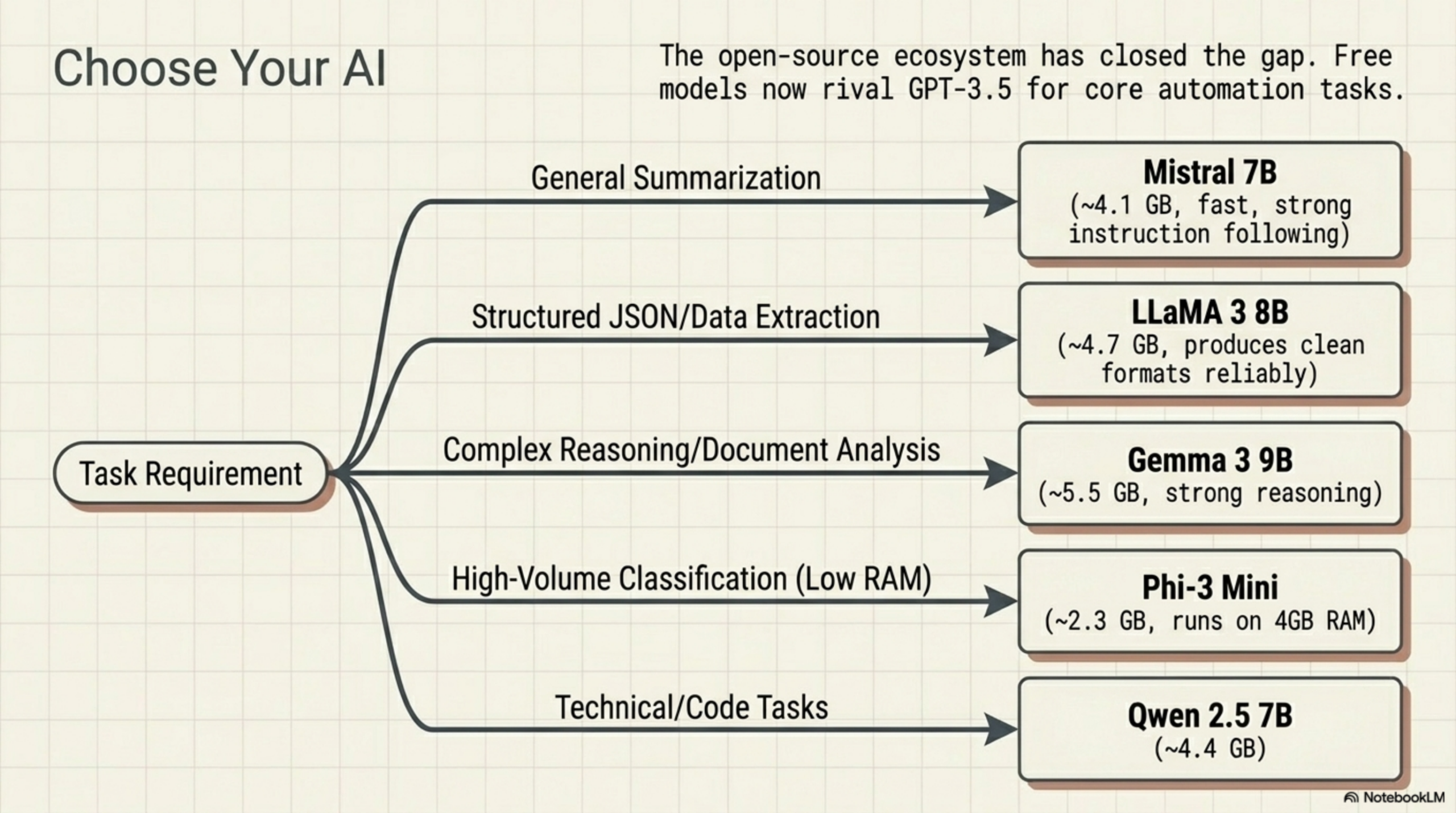
Use this decision guide:
- General summarization or content classification: Start with Mistral 7B. It’s fast, reliable, and handles most tasks well.
- Need clean JSON output from a node: Use LLaMA 3 8B. It follows output formatting instructions more consistently.
- Complex reasoning or multi-document analysis: Use Gemma 3 9B if your machine can handle it.
- Running many LLM calls in a loop (bulk processing): Use Phi-3 Mini for throughput.
- Automating anything involving code or technical content: Try Qwen 2.5.
Using Free LLMs as Nodes in AWflow
Agentic Workflow (AWflow) supports custom LLM endpoints, which means any Ollama-compatible model can power an AI node in your workflow. The configuration is the same regardless of model: set the endpoint to your local Ollama server, choose the model name, and connect the node to the rest of your workflow graph.
This means you can build the same browser-native, node-based automations — DOM extraction, AI processing, display back to the page — at zero API cost. No subscription to OpenAI. No per-token billing. No data leaving your machine.
The workflow builder stays the same. The canvas, the trigger-action model, the visual node graph — all identical to what you’d build with a cloud model. The only thing that changes is where the inference happens.
Try it for free. Install AWflow, pull any of these models with Ollama, and build your first free AI workflow today.
Related Articles
- How to Use Ollama in a Workflow Automation Tool — A step-by-step guide to connecting Ollama to your browser-native workflows
- Node-Based Workflow Automation: Beyond Zapier and n8n — How the browser-native approach extends what Zapier and n8n can do