Every AI workflow tutorial ends the same way: “add your OpenAI API key here.” It’s a fine approach until you’re automating something sensitive — client data, internal reports, confidential research — and you realize every piece of text you’re processing is being sent to a third-party server.
Ollama changes that. It lets you run LLMs locally on your own machine, completely offline. And when you connect Ollama to a node-based workflow automation tool, you get AI-powered automations that process data without any of it leaving your device.
This article walks through what Ollama is, how it integrates with workflow automation, and what that combination unlocks for privacy-conscious users and developers.
What Is Ollama?
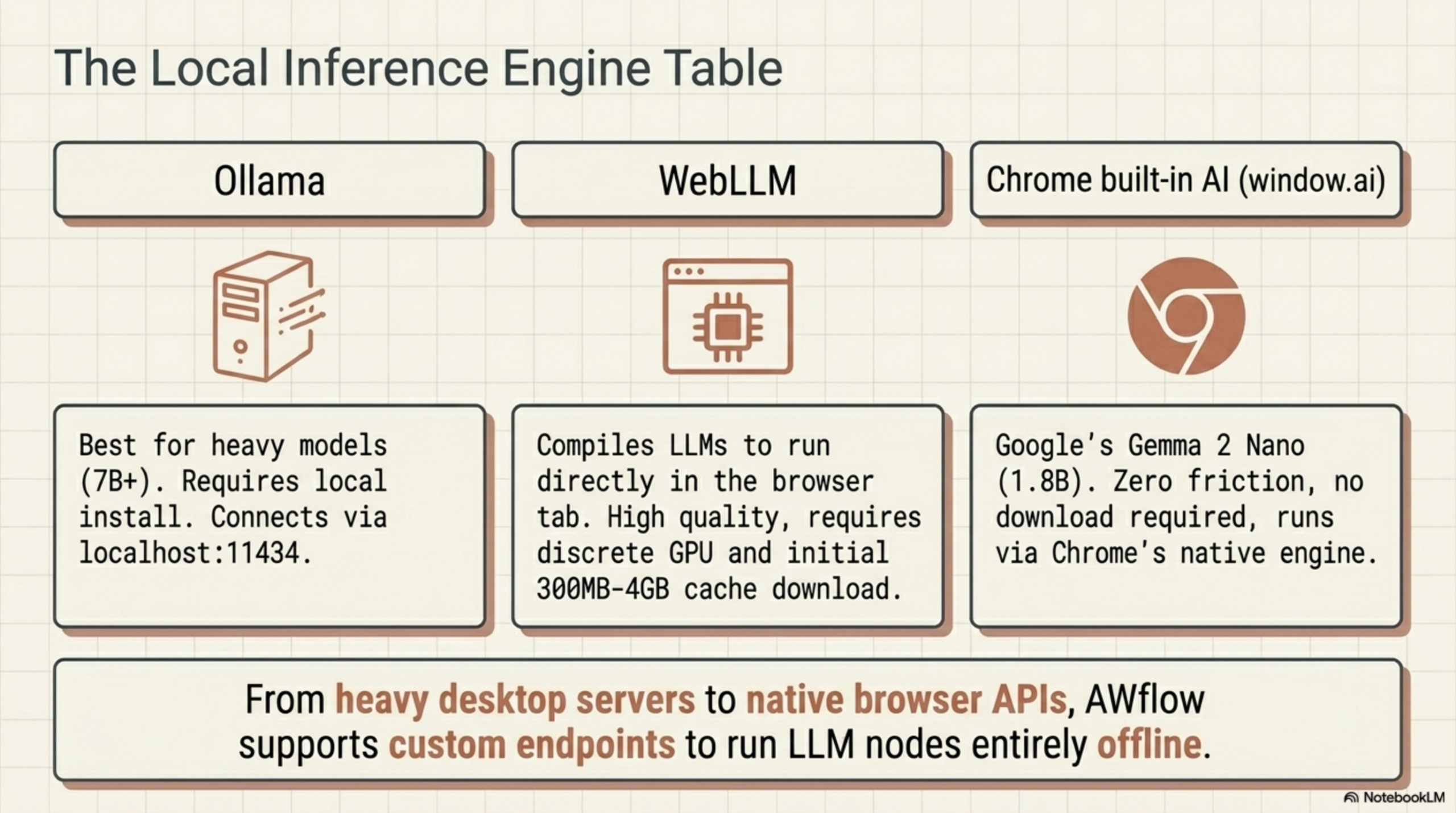
Ollama is an open-source tool that lets you download and run large language models locally, on your own hardware. It wraps the model with a simple HTTP server that mimics the OpenAI API format — meaning any tool that supports OpenAI-compatible endpoints can use Ollama as a drop-in replacement.
Once installed, you interact with it from the command line:
ollama run llama3
ollama run mistral
ollama run gemma3
Ollama handles model download, quantization, and GPU/CPU allocation automatically. On a modern laptop with 16GB of RAM, models like Mistral 7B and LLaMA 3 8B run comfortably. With a GPU, larger models become viable too.
The local HTTP server runs at http://localhost:11434 by default and accepts the same request format as the OpenAI chat completions API. Any tool that lets you configure a custom API endpoint can talk to Ollama.
Why Local LLMs Matter for Workflow Automation
When you build an AI workflow node — a step that summarizes text, classifies data, or generates output — that node sends your data somewhere. With cloud models, it goes to OpenAI, Anthropic, or Google’s servers.
For many use cases, that’s fine. But it’s a hard constraint for:
- Legal and compliance teams that can’t send contract text or case notes to external servers
- Healthcare workflows involving patient data subject to HIPAA or GDPR
- Financial analysts automating reports with non-public earnings data
- Security teams processing internal incident reports or vulnerability data
- Individual users who simply prefer their browsing and research data to stay private
Local LLM execution via Ollama removes that constraint entirely. The model runs on your machine. The data never leaves. The automation works the same way — you just don’t have a cloud dependency.
How Ollama Connects to a Workflow Automation Tool
Because Ollama exposes an OpenAI-compatible endpoint, connecting it to a workflow tool that supports custom LLM providers is straightforward. The configuration typically requires three fields:
- API URL:
http://localhost:11434/v1/chat/completions(orhttp://localhost:11434/api/generatefor the native Ollama format) - Model name: the name of the model you have downloaded (e.g.,
mistral,llama3,gemma3) - API key: can usually be left blank or set to any placeholder string
Once configured, the LLM node in your workflow sends requests to your local Ollama instance instead of the cloud. The node works identically from a workflow perspective — you pass in a prompt and a context, and you get a text response back.
What You Can Build: Local AI Workflow Examples
Here are practical workflows that benefit most from running Ollama locally instead of a cloud model:
Confidential Document Summarizer
- Trigger node — activates when you open a document or internal page
- Page Content node — extracts the text
- Ollama LLM node — summarizes using a locally-running Mistral or LLaMA model
- Display node — injects the summary into the current tab
No text ever leaves your machine.
Email Classifier for Sensitive Inboxes
- Trigger node — activates when you’re viewing an email
- DOM Selector node — extracts the email body
- Ollama LLM node — classifies the email (urgent / action required / FYI / spam)
- Display node — adds a label badge directly on the email thread
Research Extraction from Internal Reports
- Trigger node — runs on a schedule
- Navigate node — opens internal report URL
- Page Content node — extracts the report text
- Ollama LLM node — extracts key metrics and formats them as structured JSON
- Action node — writes results to a spreadsheet
Choosing a Model for Workflow Automation
Not all Ollama models are equally suited for automation tasks. Here’s a quick guide:
| Model | Size | Best For | Hardware Requirement |
|---|---|---|---|
| Mistral 7B | 4.1 GB | General tasks, summarization, classification | 8GB RAM |
| LLaMA 3 8B | 4.7 GB | Instruction following, structured output | 8GB RAM |
| Gemma 3 9B | 5.5 GB | Reasoning, data extraction | 12GB RAM |
| Phi-3 Mini | 2.3 GB | Fast, lightweight classification tasks | 4GB RAM |
| LLaMA 3 70B | 40 GB | Complex reasoning, long documents | GPU recommended |
For most browser-based workflow automation tasks — summarization, classification, extraction — Mistral 7B or LLaMA 3 8B are the sweet spot. They’re fast enough to return results in a few seconds and accurate enough for production-grade automation.
Using Ollama with AWflow
Agentic Workflow (AWflow) is a node-based workflow automation tool that runs as a Chrome extension. Its LLM nodes support custom endpoint configuration, which means you can point any AI node at your local Ollama instance.
The setup is minimal:
- Install Ollama and pull your preferred model (
ollama pull mistral) - Open AWflow and add an LLM node to your workflow
- In the node settings, select “Custom / Ollama” as the provider
- Set the endpoint to
http://localhost:11434and the model name to match what you pulled - Connect the node to your workflow and run it
From that point on, every workflow that uses that LLM node processes your data entirely on your machine. You get the full power of AWflow’s browser-native execution — DOM interaction, browser triggers, page content extraction — combined with completely private AI reasoning.
No API key. No cloud. No data leaving your device.
Ready to build private AI workflows? Install AWflow, spin up Ollama, and automate your browser with local AI — entirely under your control.
Related Articles
- Best Free LLMs for Workflow Automation: Mistral, LLaMA, Gemma — Compare the top open-source models for running as AI nodes in your workflows
- DOM Automation Without Code: Click, Fill, and Extract Any Page — Combine local LLM reasoning with browser DOM automation for fully private workflows