Most automation tools hit APIs. That works great when the service you’re automating has one. But a huge portion of the web doesn’t have an API — or has one that’s locked behind a paid plan, rate-limited, or simply doesn’t expose the data you need.
The web page itself, however, is always there. The button exists. The table exists. The form exists. If you can see it in your browser, the information is there — sitting in the DOM, waiting to be interacted with.
Browser DOM automation is the technique of interacting with that rendered page directly, programmatically, without an API. And the interesting thing is: you no longer need to write code to do it.
What Is the DOM and Why Does It Matter for Automation?
The DOM (Document Object Model) is the live, structured representation of a web page in your browser. When a page loads, the browser parses the HTML and builds a tree of elements — headings, paragraphs, buttons, inputs, tables. JavaScript can read and modify any of it in real time.
This matters for automation because everything you see on a page is addressable. If you can identify an element (by its CSS selector, XPath, or text content), you can:
- Read its text content
- Click it
- Fill it with a value
- Wait for it to appear
- Extract it into structured data
Traditionally, doing this programmatically required either Selenium (a browser testing framework), Playwright, or Puppeteer — all of which require writing code, setting up a runtime, and managing headless browser sessions. That’s a significant barrier for non-developers.
The Gap Between “Has an API” and “Has a Web Page”
Think about the tasks knowledge workers do every day that don’t have an API:
- Checking a competitor’s pricing page for changes
- Filling out a vendor portal form to submit a weekly report
- Extracting a list of job postings from a job board that doesn’t expose them via API
- Copying invoice data from an accounting app’s web UI into a spreadsheet
- Submitting a form in an internal tool built on legacy software
These tasks are extremely common. They’re also exactly what automation is meant to eliminate. But Zapier, n8n, and Make can’t help here — they need an API endpoint to call. They have no concept of “click this button” or “read the text in this cell.”
Browser DOM automation fills that gap entirely.
How No-Code DOM Automation Works
The classic code-based approach uses CSS selectors to target elements:
document.querySelector('.submit-button').click();
document.querySelector('#email-field').value = '[email protected]';
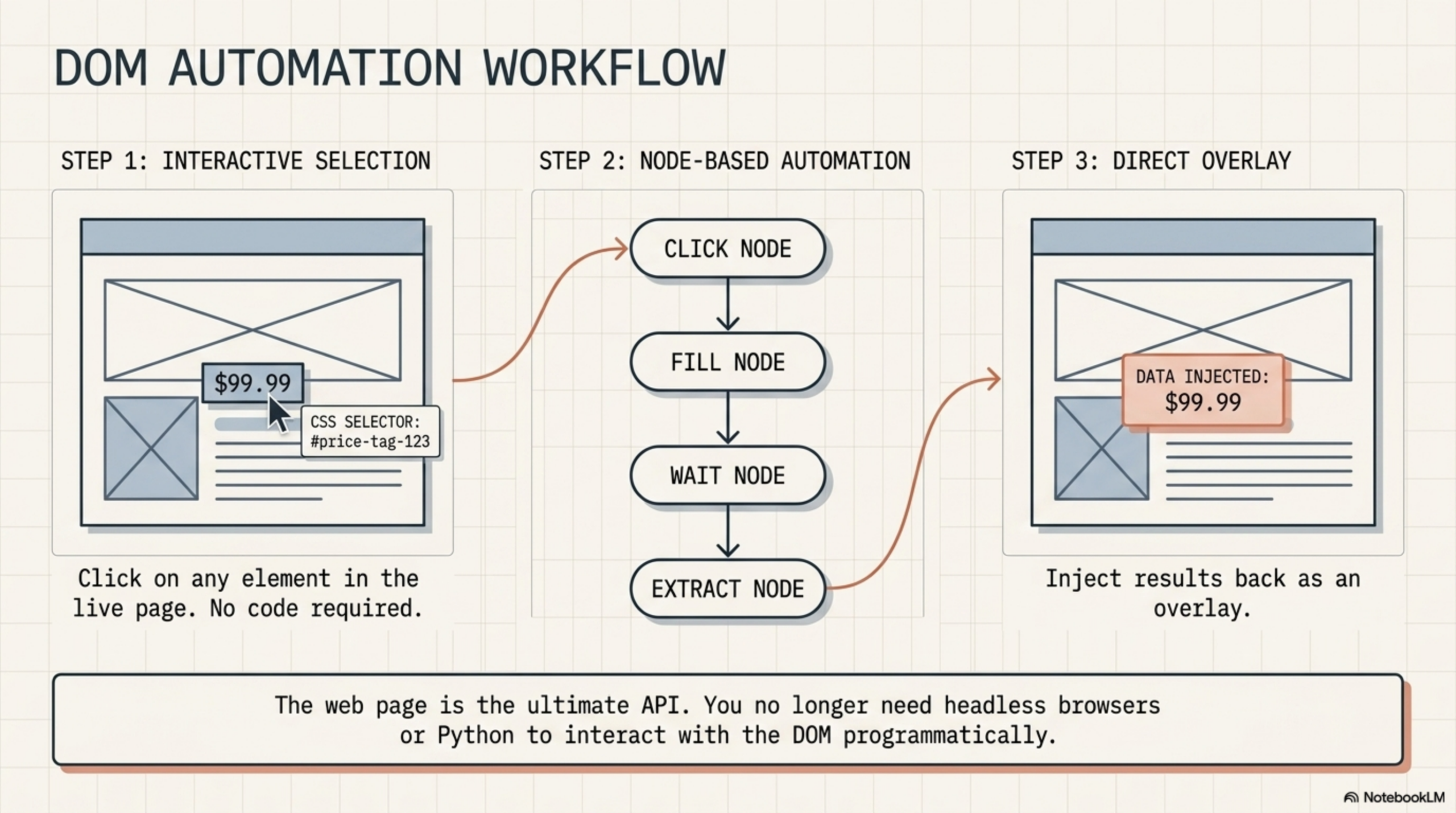
Modern no-code tools replace that with a visual selector. Instead of writing a CSS selector by hand, you click on the element you want in the live page, and the tool generates the selector for you. From there, you configure what to do with that element — click it, read it, fill it — using a form-based interface.
The workflow logic is the same as any node-based automation: a trigger fires, nodes execute in sequence, data flows between them. The difference is that the nodes are browser actions rather than API calls.
What DOM Automation Nodes Can Do
In a browser-native workflow tool, each node type maps to a specific DOM interaction:
| Node Type | What It Does | Example |
|---|---|---|
| DOM Selector | Extracts text from a CSS-targeted element | Pull the price from a product page |
| Click Node | Clicks a button or link | Submit a form, open a dropdown |
| Fill Node | Types text into an input field | Fill in a search box or form field |
| Wait Node | Pauses until an element appears | Wait for a result to load after a search |
| Page Content Node | Extracts all visible text from the page | Grab the full article body for summarization |
| Scroll Node | Scrolls the page to load more content | Trigger infinite scroll for data extraction |
| Display Node | Injects HTML/text back into the page | Show an AI summary overlay on the current page |
Why This Is Different from Headless Scraping
Headless browser tools like Puppeteer and Playwright are powerful but fundamentally different from in-browser DOM automation:
- Headless tools run on a server. They spin up a separate Chrome instance that has no access to your authenticated sessions, cookies, or browser state. If the page requires login, you have to automate the login sequence too — and deal with CAPTCHAs, 2FA, and bot detection.
- In-browser tools run in your actual Chrome session. You’re already logged in. The cookies are already there. The page loads exactly as it does for you manually — because it is you, just with a workflow running alongside it.
This makes in-browser DOM automation significantly simpler for personal and professional use cases that require authentication. There’s no session management, no credential storage, no bot mitigation to fight.
A Practical Example: Extracting Data from a Portal
Say you need to pull weekly metrics from an internal reporting portal that doesn’t have an API. The manual process: log in, navigate to the report, find the number, copy it, paste it into a spreadsheet. Thirty seconds if you’re fast, but it adds up across 50 reports a month.
With a browser DOM workflow:
- Trigger node — runs on a schedule (e.g., every Monday at 9am)
- Navigate node — opens the reporting portal URL in a tab
- Wait node — waits for the data table to finish loading
- DOM Selector node — extracts the target metric using a CSS selector you configured by clicking on it once
- Action node — writes the value to a Google Sheet via the Sheets API
Once you build it, it runs automatically. The portal never knew the difference — the request came from your real browser, with your real session, just like always.
How AWflow Handles Browser DOM Automation
Agentic Workflow (AWflow) is a Chrome extension that brings node-based workflow automation directly into the browser. DOM automation nodes are first-class citizens in the workflow canvas — not an afterthought or a paid add-on.
The DOM Selector in AWflow works like this: while building your workflow, you click on any element on the live page. AWflow generates a CSS selector for that element and populates the node automatically. You configure what to do with it (extract, click, fill) and connect it to the next node in your graph.
Because it runs inside your browser, it has full access to:
- Pages behind authentication (no re-login required)
- Dynamically rendered content (React, Angular, Vue apps)
- Pages that block server-side scrapers via Cloudflare or bot detection
- Any tab open in your Chrome browser at any time
And because it’s node-based, you can chain DOM actions with AI nodes in the same workflow. Extract content from a page, send it to an LLM for analysis, and display the result — all in one graph, all without leaving the browser.
Start automating your browser. Install AWflow from the Chrome Web Store and build your first DOM automation workflow today — no Selenium, no code, no server required.
Related Articles
- Node-Based Workflow Automation: Beyond Zapier and n8n — Understand the full picture of browser-native, node-based automation and how it compares to Zapier
- Run AI Nodes Directly in Chrome with WebLLM and Chrome AI API — Combine DOM extraction with in-browser AI inference for fully local workflows