Be honest
Which model sorts your emails? Probably one ten times bigger than it needs.
The hook. Say it before anything else.A 3-second opener before the first chapter.
Version texte
- Be honest: Which model sorts your emails? Probably one ten times bigger than it needs.
Most of us choose an AI model the same way: the strongest one we have access to. It is a reasonable habit when you chat with an assistant. In an automation that runs every day, it means paying for, and waiting on, far more model than the job needs.
The opposite mistake is just as easy: someone tells you small models handle “most” tasks, you switch, and your automation quietly gets things wrong. Nobody can give you a percentage for your work. What you can do is measure it, in about an hour. This post shows how.
The job decides, not the model
Start by looking at the shape of each AI step in your automation. Some jobs are narrow: the input is short, the possible answers are known, and a right answer is easy to recognise. Others are open: the model has to plan, reason over a long document or choose between tools.
The rule
Use the smallest model that gets your real inputs right.
Your real inputs, not a benchmark and not a demo.Benchmarks measure general ability; your task has its own distribution of inputs.
Version texte
- The rule: Use the smallest model that gets your real inputs right.
Here is a starting point for common automation steps. It is our rule of thumb, not a measurement, and the test below is how you replace it with facts:
| AI step | Shape | Start with |
|---|---|---|
| Sort messages into a few categories | Narrow | A small on-device model |
| Pull fields (name, price, date) out of a page | Narrow | A small on-device model |
| Summarise a page in a few bullets | Mostly narrow | A small model, check longer pages |
| Rewrite text in another tone | In between | Small first, step up if it reads badly |
| Plan several steps or choose between tools | Open | A larger or cloud model |
| Reason over a very long document | Open, and limited by context | A model with a long context window |
The last row has a trap worth knowing. Small on-device models often come with a short context window, the amount of text they can read at once. WebLLM even lists variants with a 1k-token window, about a page of text. A long article does not fit, whatever the model’s quality.
Petit sondage
Which AI step do your automations run most?
Résultats d’exempleReveal. Most are narrow jobs. (Example results.)Example results, labelled on screen.
Version texte
- Which AI step do your automations run most?
- Sorting or labelling: 34% · Pulling fields from pages: 29% · Summarising: 24% · Planning or tool use: 13%
If your answer is one of the first three, keep reading: those are the jobs where a small model has the best chance.
A bigger model is always the safer choice for automation.
For narrow jobs, a small model is often just as right, and it is free, private and quick. Measure it before paying for more.
The fact. Narrow jobs rarely need that extra power.On constrained outputs, accuracy often saturates early; measure per task.
Version texte
- A bigger model is always the safer choice for automation.
- For narrow jobs, a small model is often just as right, and it is free, private and quick. Measure it before paying for more.
The one-hour test
How would you know?
Version texte
- How would you know?
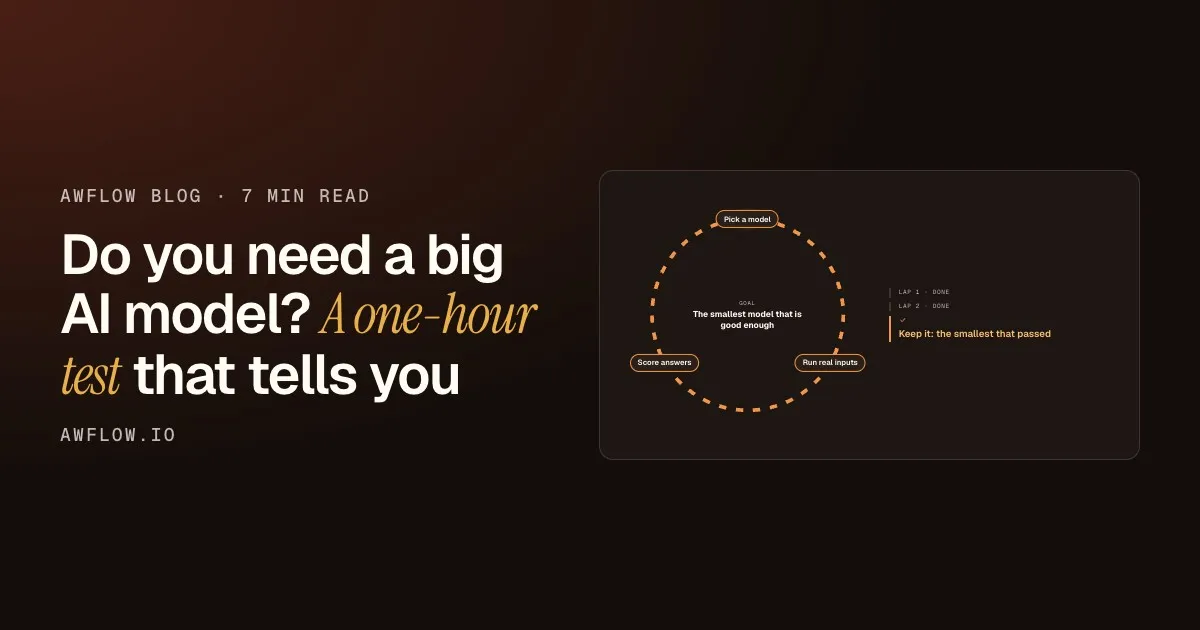
The test compares models on your inputs, against answers you decided in advance. Here is the loop:
- Tour 1Pick a modelThe smallest that fitsRun real inputsYour 10 saved inputsScore answers7 of 10 right
- Tour 2Pick a modelOne size upRun real inputsThe same 10 inputsScore answers10 of 10 right
- Keep it: the smallest that passed
Stop at the smallest model that passes.Smaller means faster, cheaper and more private. Counts are an example.
Version texte
- 1. Pick a model: The smallest that fits · Run real inputs: Your 10 saved inputs · Score answers: 7 of 10 right
- 2. Pick a model: One size up · Run real inputs: The same 10 inputs · Score answers: 10 of 10 right
- Keep it: the smallest that passed
Start small
Take the smallest model your device can run comfortably, and run your saved inputs through it.
Step up only if you must
If too many answers are wrong, try the next size up on exactly the same inputs. Nothing else changes.
Keep the smallest that passes
The first model to pass is your answer. You now know, instead of hoping.
Three details make the test trustworthy:
- Save ten real inputs. Ten emails, pages or rows from your actual work, including two or three awkward ones.
- Write the right answer first. Decide what correct looks like before you run anything, so a confident wrong answer cannot convince you.
- Score each answer. Right or wrong, nothing in between. Then count.
The scoring step looks like this. Your expected answers sit next to what the model said:
| Email subject | Expected |
|---|---|
| Charged twice this month | Billing |
| Can I add a second user? | Sales |
| Password reset missing | Support |
| Invoice for May, please | Billing |
| Email subject | Expected | Model said |
|---|---|---|
| Charged twice this month | Billing | Billing ✓ |
| Can I add a second user? | Sales | Sales ✓ |
| Password reset missing | Support | Billing ✗ |
| Invoice for May, please | Billing | Billing ✓ |
Score them. Here: 3 of 4 right. Not yet good enough.Accuracy against your expected labels. Example data.
Version texte
- Email subject | Expected: Charged twice this month | Billing · Can I add a second user? | Sales · Password reset missing | Support · Invoice for May, please | Billing
- Small model
- Email subject | Expected | Model said: Charged twice this month | Billing | Billing ✓ · Can I add a second user? | Sales | Sales ✓ · Password reset missing | Support | Billing ✗ · Invoice for May, please | Billing | Billing ✓
Correctness is half the story. A model that is right but slow may not suit a workflow that runs on every page you open. So time it too, on your own machine.
Run it in AWFlow
AWFlow’s Local AI page can put up to three models of the same task side by side and measure them on your device: how long each takes to be ready and, where the engine supports it, how many tokens per second it writes.
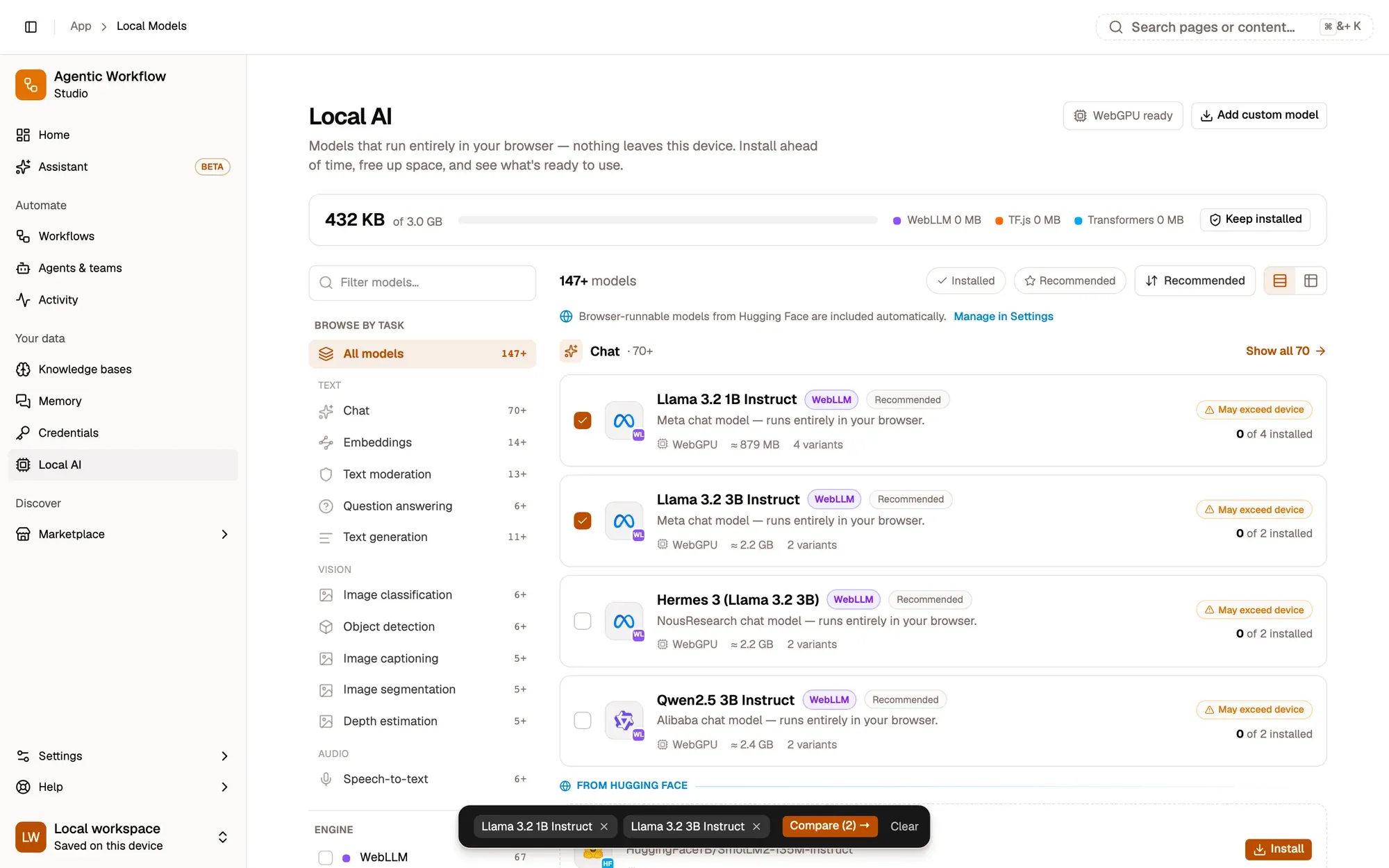
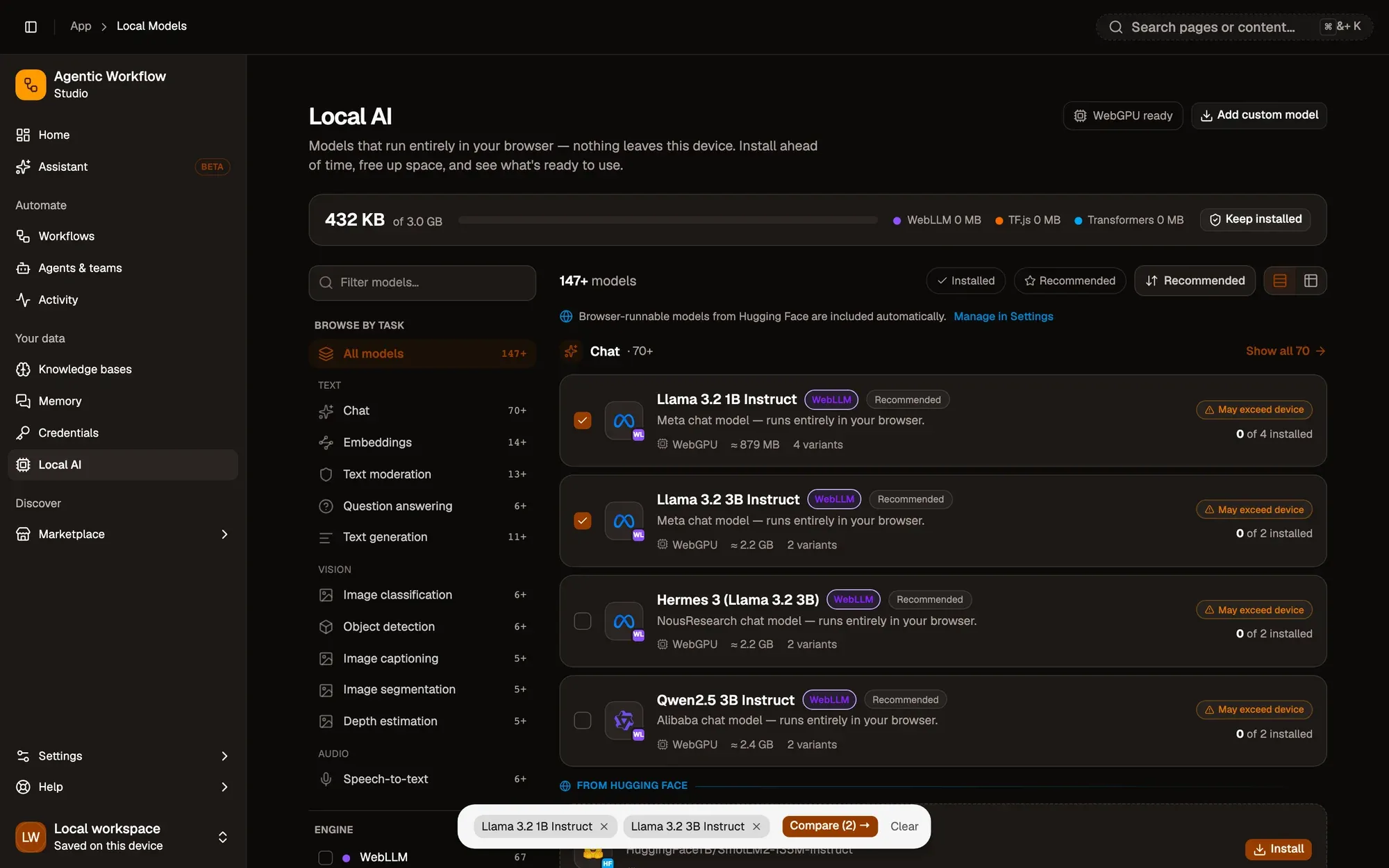
Speed from your machine, not a chart.Measured on the installed variant, or else the smallest.
Version texte
- 1. Tick a model: It sets the task.
- 2. Tick another: Same task, another size.
- 3. Compare: Then measure on this device.
For correctness, put the model into a real workflow and run your ten inputs through it. The workflow below is a good harness: the prompt lives in one step and the model in a slot underneath it, so you swap models without touching anything else. Replace the prompt with your own job, such as “Answer with one word: Billing, Sales or Support.”
Your test harness
Swap the model, keep the prompt
Open the workflow, put your own prompt in the chain, then try each model in its Model slot on the same inputs.
Ouvrir dans AWFlow (s’ouvre dans un nouvel onglet)docs.awflow.io/examples/summarize-page-llm-chain.awfCall to action. Viewers scan the code, readers click the link.Opens the Basic LLM Chain example: a prompt step with a Web LLM model in its Model slot.
Version texte
- Swap the model, keep the prompt · Open the workflow, put your own prompt in the chain, then try each model in its Model slot on the same inputs. · https://docs.awflow.io/examples/summarize-page-llm-chain.awf
If even your largest on-device model fails the test, you have learned something useful too: that step deserves a cloud model. The same slot takes Chat OpenAI, Chat Anthropic or Chat Google with your own key. We cover the costs of that choice in Free AI vs API-key AI.
What we covered
- Narrow jobs suit small models
- Test 10 real inputs, smallest first
- Keep the cloud for what fails
Three. Only pay for size where the test says so.Swap the model slot per step; nothing else changes.
Version texte
- What we covered
- Narrow jobs suit small models
- Test 10 real inputs, smallest first
- Keep the cloud for what fails