Builder notes
An AI step with no API key, and the page never leaves your machine.
The hook. No key, no upload.Goal: model inference inside the extension, no remote provider.
Version texte
- Builder notes: An AI step with no API key, and the page never leaves your machine.
I build AWFlow, a Chrome extension that runs automation workflows in your browser. One of its node types is “summarize, classify or extract this text with AI”. I wanted that step to work without an API key and without sending the page anywhere, which meant running the model inside the extension itself.
This post covers what that took: three runtimes, two Web Workers, one CSP surprise, and a fallback path for machines without WebGPU. If you want the gentler tour of what WebLLM and Chrome’s built-in AI are, read Run AI nodes directly in Chrome with WebLLM and Chrome AI API first. This one is about the plumbing.
Why run the model in the extension
Look at what most “AI automation” steps actually do: summarize a page, tag a sentiment, pull five fields out of some HTML. You don’t need a frontier model in a data center for that. A 1–4B parameter model running locally does it well enough, for free, and the text never leaves the machine.
When a step really does need deep reasoning, the user can switch that one node to OpenAI, Anthropic, Google or a local Ollama. The point is to make local the default, not the only option.
The design rule
Local by default, not local only.
Not local only. Any step can switch to a bigger model.Each node can be pointed at OpenAI, Anthropic, Google or a local Ollama instead.
Version texte
- The design rule: Local by default, not local only.
Three runtimes, one job each
There’s no single “run a model in the browser” library that covers everything, so the extension ships three:
| Runtime | Used for |
|---|---|
WebLLM (@mlc-ai/web-llm) |
Chat-style LLMs on WebGPU, the “Web LLM” node |
transformers.js (@huggingface/transformers, ONNX Runtime underneath) |
Task pipelines: summarization, classification, embeddings, speech, small chat models |
| TensorFlow.js | A few classic models (for example legacy embeddings) |
There’s also a node for Chrome’s built-in AI when the browser exposes it. A Local Models page lists what’s installed for every runtime and lets you download or delete models, so users never have to care which engine a model runs on. (If you are choosing a model rather than building one in, this guide is the practical side.)
Keep inference off the main thread
The extension’s UI is a Svelte app in the side panel and in a tab. If a 2 GB model compiles on that thread, the canvas freezes. So the first rule is simple: every runtime runs in a dedicated worker.
Every model runs in a Web Worker, so the canvas keeps responding while a model loads.
A background thread a web page can start. It does heavy work without freezing what you see.
A separate JavaScript thread with its own event loop and no DOM access; it talks to the page with postMessage.
A background thread. The page stays smooth.Inference, download and compilation all happen off the UI thread.
Version texte
- Every model runs in a Web Worker, so the canvas keeps responding while a model loads.
- Web Worker: A background thread a web page can start. It does heavy work without freezing what you see. A separate JavaScript thread with its own event loop and no DOM access; it talks to the page with postMessage. (postMessage, main thread, WebGPU)
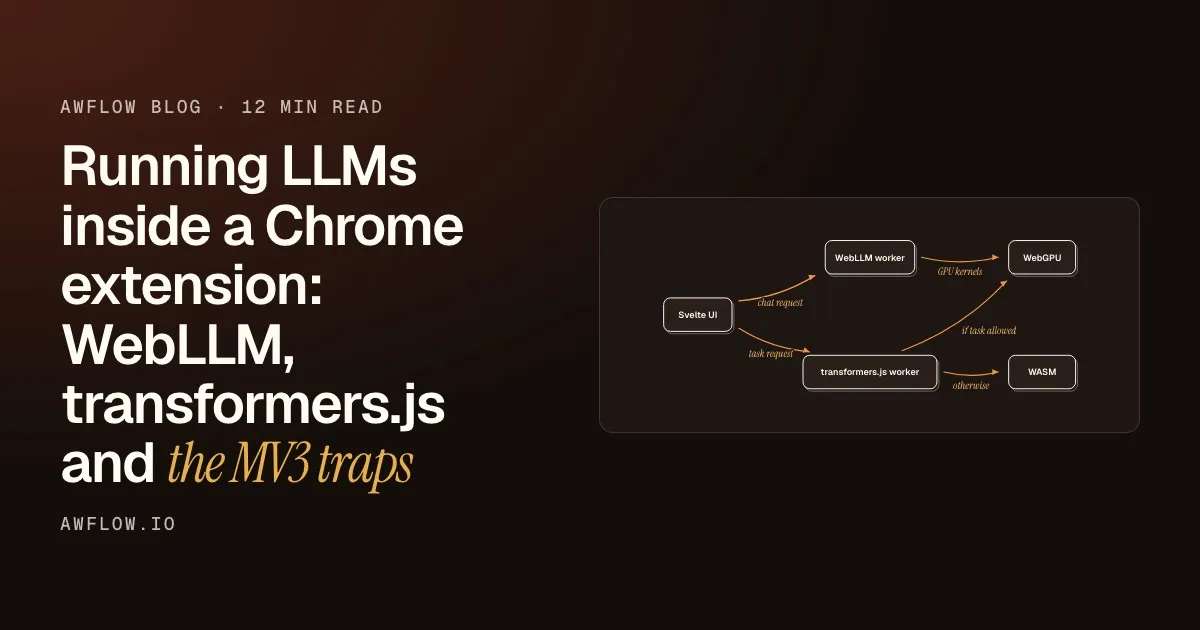
Here is the whole layout. Two workers do the heavy work, and the UI only sends requests and draws results.
Otherwise they use WASM. Slower, but it always runs.ONNX Runtime Web's WASM backend is the fallback device.
Version texte
- Svelte UI · WebLLM worker · transformers.js worker · WebGPU · WASM
- Svelte UI → WebLLM worker: chat request
- Svelte UI → transformers.js worker: task request
- WebLLM worker → WebGPU: GPU kernels
- transformers.js worker → WebGPU: if task allowed
- transformers.js worker → WASM: otherwise
Five parts
The UI draws the canvas. Two workers do the heavy work, on the graphics card when they can and on WASM when they can’t.
Chat goes to the WebLLM worker
Downloading, compiling and generating all happen in the worker, so the side panel stays responsive.
Tasks go to a second worker
transformers.js and TensorFlow.js share one worker. It caches one pipeline per model id, so the second run of a workflow doesn’t reload anything, and it streams download progress back to the UI.
WebLLM runs on the graphics card
Its runtime is WebAssembly, and the heavy math runs as WebGPU kernels.
Tasks use the GPU when it is safe
A task pipeline goes to WebGPU only if the adapter exists and the task is on the list of tasks known to work there.
Otherwise they use WASM
Slower, but it runs on any machine.
The WebLLM worker is three lines
WebLLM makes the worker side fairly clean:
// worker.ts
import { WebWorkerMLCEngineHandler } from '@mlc-ai/web-llm';
const handler = new WebWorkerMLCEngineHandler();
self.onmessage = (msg: MessageEvent) => handler.onmessage(msg);
The catch: I use LangChain’s ChatWebLLM wrapper so the local model plugs into the same agent code as the cloud models (the same agent that builds your workflows). ChatWebLLM builds its own main-thread engine in its constructor and has no way to accept one from outside. But WebWorkerMLCEngine implements the same MLCEngineInterface, so you can build the worker engine yourself and swap it in.
Tokens come back from the worker.Streaming responses return over the same message channel.
Version texte
- Our code → Worker engine: create worker engine
- Worker engine → Our code: engine ready
- Our code → ChatWebLLM: replace .engine
- ChatWebLLM → Worker engine: chat.completions.create
- Worker engine → ChatWebLLM: streamed tokens
In code, with the fallback that matters most:
const worker = new Worker(new URL('./worker.ts', import.meta.url), { type: 'module' });
try {
  const engine = await CreateWebWorkerMLCEngine(worker, modelId, {
    appConfig: model.appConfig,
    initProgressCallback: onProgress,
  });
  // `engine` is protected and typed as the concrete MLCEngine,
  // but the runtime contract is the interface, which the worker engine satisfies.
  (model as unknown as { engine: MLCEngineInterface }).engine = engine;
} catch (error) {
  worker.terminate();                 // don't orphan the thread
  await model.initialize(onProgress); // fall back to the main-thread engine
}
If the worker path fails (no WebGPU, a download error), it falls back to the old behavior instead of breaking the node.
Probe WebGPU once, keep a WASM path
Not every machine has a usable WebGPU adapter. The inference worker probes it once and remembers the answer:
let webgpu: Promise<boolean> | undefined;
function hasWebGPU() {
  webgpu ??= (async () => {
    try {
      const gpu = (navigator as any).gpu;
      return !!(gpu && (await gpu.requestAdapter()));
    } catch { return false; }
  })();
  return webgpu;
}
Then each pipeline picks its device. Some pipelines are fine on WASM and flaky on WebGPU, so the allowlist is per task, not global. (For the trade-offs between the backends themselves, see WebGPU vs WebGL vs WebAssembly.)
Reuse what is loaded. The second run starts fast.Pipelines are cached per model id inside the worker.
Version texte
- A task request: run a pipeline on this text
- Probe WebGPU once: adapter found: yes or no
- Check the task list: known to work on WebGPU?
- Pick a device: webgpu, else wasm
- Load or reuse: one pipeline per model id
Two MV3 rules nobody warns you about
The first two rules are about performance. The next two are about Manifest V3, and the first of them cost me an afternoon.
The CSP will block your WASM runtime
By default, ONNX Runtime Web (inside transformers.js) loads its WASM loader script and binary from a CDN. A Manifest V3 extension page has this CSP:
script-src 'self' 'wasm-unsafe-eval'; object-src 'self'You can’t add a remote host to script-src in MV3. So the import is blocked, and no local model runs. The error doesn’t make the cause obvious.
If a library works on a web page, it works in an extension page.
An MV3 page can't load scripts from a CDN, so the WASM runtime has to ship inside the extension.
Flip it. Ship the runtime files yourself.MV3 CSP is script-src 'self' 'wasm-unsafe-eval'; remote hosts can't be added.
Version texte
- If a library works on a web page, it works in an extension page.
- An MV3 page can't load scripts from a CDN, so the WASM runtime has to ship inside the extension.
The fix: ship the ONNX Runtime assets inside the extension (a small Vite plugin copies them to /assets/ort/ at build time) and point the runtime at the same-origin copy before the first pipeline() call:
const tf = await import('@huggingface/transformers'); // lazy: keep it out of the main bundle
tf.env.backends.onnx.wasm.wasmPaths = '/assets/ort/';
'wasm-unsafe-eval' is what allows WebAssembly compilation at all. Without it in your manifest CSP, none of this works. (Why WebAssembly is what makes a browser tab capable of this in the first place is the subject of WebAssembly, explained.)
Storage is the user’s, so show it
Models are big. Users need to see what’s on their disk and delete it. transformers.js models live in the Cache API, so that part is easy. WebLLM is harder: it doesn’t expose a per-model byte size. The Local Models page falls back to navigator.storage.estimate() for the total and shows per-model sizes only where a runtime reports them. That’s an honest approximation, not a made-up number.
What small local models are good at
After a few months of this in real workflows, the split is clear. Small local models are good at narrow, well-defined jobs:
After a few months
What a small local model does well
- Summarize an article into bullets (fait)on-device
- Classify a row into one of N labels (fait)on-device
- Extract fields into JSON (fait)on-device
- Tag the sentiment of a text (fait)on-device
- Embed text for search (fait)on-device
Search. Text becomes vectors.Embedding models for semantic search, fully local.
Version texte
- What a small local model does well
- Summarize an article into bullets
- Classify a row into one of N labels
- Extract fields into JSON
- Tag the sentiment of a text
- Embed text for search
Then there are the jobs where they need help, or a bigger model:
- Okay with help: tool use. Small models have no tool-calling API, so you have to prompt and parse (more on that in a later post).
- Not good: long multi-step reasoning, and anything where a wrong answer is expensive. That’s when you switch the node to a bigger model.
The honest cost is the first run: it pays a download, from tens of MB for a classifier to a couple of GB for a chat model. After that it’s cached and starts fast. If you want to test whether a small model is enough for your own inputs before committing, this post walks through how.
To see the local path end to end, here is the simplest workflow that uses it: read the current page, summarize it with a local model, show the result. The model downloads once, then works offline.
Try it
Summarize a page on your own machine
Open it in AWFlow, pick a local model the first time, and run it on any article.
Ouvrir dans AWFlow (s’ouvre dans un nouvel onglet)docs.awflow.io/examples/summarize-this-page.awfCall to action. Viewers scan the code, readers click the link.Docs example: Run now → Read the current page → Summarize it (Local AI model) → Show the summary.
Version texte
- Summarize a page on your own machine · Open it in AWFlow, pick a local model the first time, and run it on any article. · https://docs.awflow.io/examples/summarize-this-page.awf
If you’re doing this in your own extension, here is the short version.
If you build this yourself
- Put every runtime in a Web Worker
- Probe WebGPU once, keep a WASM path
- Self-host every WASM runtime asset
- Show users where their disk went
- Keep a cloud or Ollama option per step
Local by default, not local only.Per-node provider switch to OpenAI, Anthropic, Google or Ollama.
Version texte
- If you build this yourself
- Put every runtime in a Web Worker
- Probe WebGPU once, keep a WASM path
- Self-host every WASM runtime asset
- Show users where their disk went
- Keep a cloud or Ollama option per step
AWFlow is free to install. I’m happy to go deeper on any of this, especially if you’ve solved the WebLLM model-size problem better than I have.