Every AI workflow tutorial ends the same way: “add your OpenAI API key here.” That’s fine until you automate something sensitive (client data, internal reports, confidential research) and realise every piece of text you process is sent to a third-party server.
Ollama changes that. It runs LLMs on your own machine, offline. Connect it to a node-based workflow tool and you get AI automations that process data without any of it leaving your device.
With a local model, it never leaves.Ollama on your computer (or WebLLM in the browser); no network for inference.
Text version
- Your device: Your browser · A cloud AI provider: Cloud model
- Your browser → Cloud model: client notes + your prompt
- Cloud model → Your browser: the summary
- Round trip: ≈ 1.5 s · Leaves your device: yes
- Cloud model → Your device · Network: none · Leaves your device: no · Works offline: yes
This article covers what Ollama is, how it plugs into workflow automation, and what that combination unlocks.
What is Ollama?
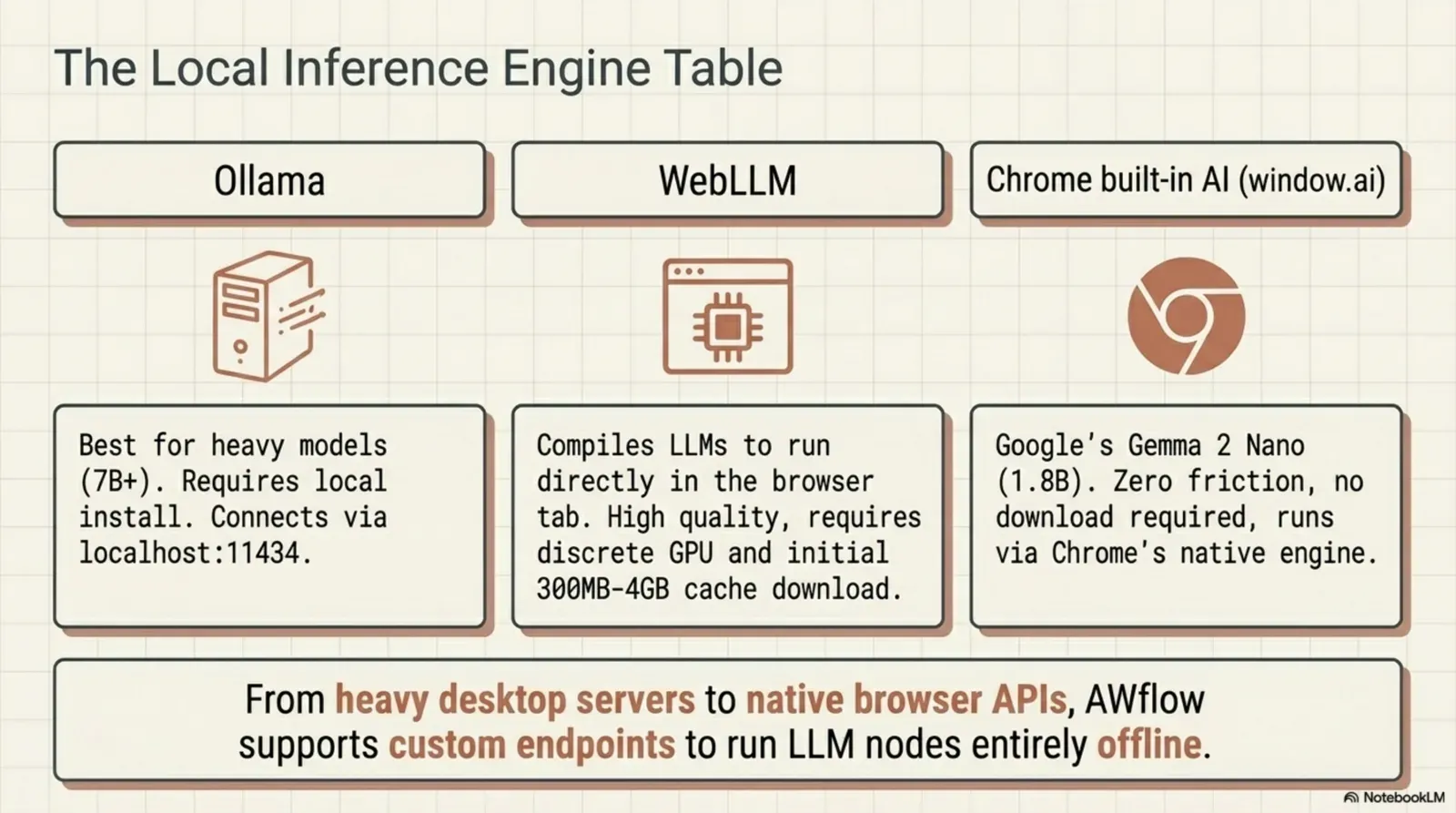
Ollama is an open-source tool to download and run large language models locally, on your own hardware. It serves the model through a small HTTP server on http://localhost:11434, with its own API and an OpenAI-compatible one, so many tools can use it in place of a cloud provider.
Once it’s installed, you use it from the command line:
ollama pull llama3.2
ollama run mistral
ollama run gemma3
Ollama handles the download, the quantised model files and the choice of GPU or CPU. On a recent laptop with 16 GB of RAM, models like Mistral 7B and Llama 3 8B run comfortably; with a good GPU, bigger models become practical.
Why local models matter for automation
When a workflow step summarises text, classifies data or writes something, it sends your data to a model. With cloud models, that’s OpenAI, Anthropic or Google. Often that’s fine. It’s a hard limit for:
When the cloud is a no
Who needs the AI step to stay local
- Legal and compliance teams (done)automated
- Healthcare workflows (done)automated
- Finance with non-public data (done)automated
- Security teams (done)automated
- Anyone who wants privacy (done)automated
Or you simply prefer your research to stay yours.Personal privacy preference.
Text version
- Who needs the AI step to stay local
- Legal and compliance teams
- Healthcare workflows
- Finance with non-public data
- Security teams
- Anyone who wants privacy
Running the model with Ollama removes that limit. The model runs on your machine, the data stays there, and the automation works the same, minus the cloud dependency.
How Ollama connects to Agentic Workflow
Agentic Workflow is a node-based workflow tool that runs as a Chrome extension. It has an Ollama model node you plug into any AI step: Basic LLM Chain, Summarization, Text Classifier, Information Extractor, agents and more.
Inputs
prompttextSettings
Outputs
the AI step's resulttextThe AI step returns the result, made on your machine.Ollama only decides which model answers; inference is local.
Text version
- Ollama (AI model)
- prompt (text)
- Model: llama3.2:latest, from your Ollama · Temperature: 0.2 for extraction · Max Tokens: 4096
- the AI step's result (text)
Install Ollama and pull a model
Install Ollama from ollama.com, then pull a model, for example ollama pull llama3.2.
Let the extension talk to it
Ollama only accepts requests from origins you allow. Start it with the extension allowed: OLLAMA_ORIGINS=chrome-extension://linlkeaipfpnhddjkpcbmldionajfifa ollama serve.
Plug it into an AI step
Add an AI node (say, Summarization), then add Ollama in its Model slot and pick your model from the list.
Run it
From then on, that step runs on your machine. When you share the workflow, the model choice is cleared, so whoever installs it picks a model from their own Ollama.
Running Ollama models also show up automatically in the assistant’s and agents’ model pickers, and you can add Ollama as a provider in Settings › Providers. If Ollama isn’t an option on a machine, the Web LLM node runs a smaller model inside the browser instead.
What you can build: local AI workflow examples
Confidential document summariser
The summary appears. No text left your machine.Display Markdown in the side panel.
Text version
- An internal document: a page on your intranet
- Context Menu: right-click: Summarise
- Get All Text: the document text
- Summarization + Ollama: 5 bullets, on your machine
- Display Markdown: shown beside the page
Email triage for a sensitive inbox
- Context Menu trigger while you’re viewing an email
- Get Element Data reads the email body you picked once
- Text Classifier with Ollama sorts it: urgent, action needed, FYI or spam
- Highlight Elements or Show Notification shows the label
Metrics from internal reports
- Schedule trigger
- Tab Control opens the internal report
- Get All Text reads it
- Information Extractor with Ollama pulls the key metrics as structured fields
- Google Sheets (or a local file) records them
Choosing a model
Not every model suits automation equally. Sizes are Ollama’s default 4-bit downloads:
| Model | Size | Best for | Memory, roughly |
|---|---|---|---|
| Mistral 7B | 4.1 GB | General tasks, summaries, classification | 8 GB RAM |
| Llama 3 8B | 4.7 GB | Instruction following, structured output | 8 GB RAM |
| Gemma 3 4B / 12B | 3.3 / 8 GB | Reasoning, data extraction | 8 / 16 GB RAM |
| Phi-3 Mini | 2.2 GB | Fast, light classification | 4–8 GB RAM |
| Llama 3 70B | about 40 GB | Complex reasoning, long documents | A strong GPU or lots of memory |
For most automation tasks (summarising, classifying, extracting), Mistral 7B or Llama 3 8B are the sweet spot: answers in seconds and accurate enough for real use. More in best free LLMs for workflow automation, and test on your own inputs with do you need a big AI model?.
Detailed and careful.
Large: better answers, slower, a bigger download.~8B parameters: more memory bandwidth per token.
Text version
- Model size 1B: Speed fast · Quality basic · Download 0.9 GB · Short, sometimes off.
- Model size 3B: Speed ok · Quality good · Download 2 GB · Clear and mostly right.
- Model size 8B: Speed slow · Quality great · Download 4.5 GB · Detailed and careful.
Try it
You get Agentic Workflow’s browser-native execution (page interaction, browser triggers, reading page content) with private AI reasoning on your own machine. No API key, no cloud, no data leaving your device.
Your turn
Swap in your Ollama model
Open it in AWFlow, replace the Web LLM node with Ollama, pick your model, and summarise any page locally.
Open in AWFlow (opens in a new tab)docs.awflow.io/examples/summarize-page-llm-chain.awfCall to action. Scan the code or click the link.Opens the Summarize page (LLM chain) docs example in AWFlow's import page.
Text version
- Swap in your Ollama model · Open it in AWFlow, replace the Web LLM node with Ollama, pick your model, and summarise any page locally. · https://docs.awflow.io/examples/summarize-page-llm-chain.awf
In short
- Ollama runs models on your computer
- One model node, any AI step
- Allow the extension with OLLAMA_ORIGINS
Three. One setup step.OLLAMA_ORIGINS=chrome-extension://<id> ollama serve.
Text version
- In short
- Ollama runs models on your computer
- One model node, any AI step
- Allow the extension with OLLAMA_ORIGINS