You add your documents to an AI assistant, it says they are indexed, and then it answers as if it had never seen them. Most people conclude the AI is dumb. Often the pipeline behind it is quietly returning less than it should.
That is the story of our own knowledge bases. They live entirely in the browser: documents are chunked and embedded on your machine, stored in a database that runs inside the tab, and searched from chats, agents and workflows. Nothing goes to a server unless you choose a cloud model.
We recently rebuilt the whole thing: 28 issues covering storage, ingestion, search, citations and privacy. The audit before it started with a bad surprise.
The audit
No knowledge base had ever had a single searchable chunk.
And the indexer said success every time.The Indexer node reported success because the writes did not throw.
Text version
- The audit: No knowledge base had ever had a single searchable chunk.
This post is the list of what we changed, one lesson per section. RAG rarely fails loudly. It fails by returning less, and each lesson below is a place where it did.
Indexing that tells the truth
First, what sits under the hood. Each layer runs on your machine.
- Knowledge basesSearched from chats, agents and workflows.
- MiniLM, 384-dThe embedding model, in a Web Worker.
- SurrealDB (Wasm)A real database compiled to WebAssembly, in the tab.
- IndexedDBThe browser's own storage, on your disk.
Four layers, all on your device: storage, database, model, search.IndexedDB, SurrealDB 2.x on WebAssembly, all-MiniLM-L6-v2 via transformers.js in a Web Worker, then retrieval.
Text version
- Knowledge bases / MiniLM, 384-d / SurrealDB (Wasm) / IndexedDB
- Knowledge bases: Searched from chats, agents and workflows. · MiniLM, 384-d: The embedding model, in a Web Worker. · SurrealDB (Wasm): A real database compiled to WebAssembly, in the tab. · IndexedDB: The browser's own storage, on your disk.
If the database-in-a-tab part sounds unlikely, WebAssembly, explained covers how a browser tab became a small computer.
1. Count what you actually wrote
The vector field was declared TYPE array in a SCHEMAFULL table, and SurrealDB saved every vector as []. The Indexer node reported success every time. Users indexed documents, got a green badge, and then searched nothing.
The fix for the empty vectors was one type (array<number>). The real fix was making the writer honest:
- Every write returns
added / updated / failed / removed. - A partial failure says “N of M passages could not be saved”.
- Writing nothing is an error, not a success with zero.
- The canvas badge reads “24 added · 3 updated”, not “Success”.
Before
Before: the badge
- Write
- No error
- Green badge
Success
Shown even when nothing was saved.
After
After: the counts
- Write
- Count real rows
- Report
24 added
3 updated. Writing nothing is an error.
Drag the line to compare the two badges.Same indexer, honest reporting.
Text version
- Before: Before: the badge, Success. Shown even when nothing was saved.
- After: After: the counts, 24 added. 3 updated. Writing nothing is an error.
- Compare before and after
Lesson: an indexer that can’t fail can’t be trusted. Count real rows with real vectors, and treat zero as a failure.
2. Re-adding a document should never duplicate it
Every chunk gets a deterministic id: chunkId(kb, source, index). Writes are upserts. So:
- Re-adding the same page replaces it in place.
- If the new version is shorter, the extra chunks (index ≥ new count) are deleted.
- If the text hash hasn’t changed, the source is skipped.
Each chunk carries its provenance: source id, hash, type, title, URL or file name, chunk index and count, page number for PDFs, and the workflow that indexed it.
Lesson: if your ingestion isn’t idempotent, every re-run makes retrieval worse, because duplicates crowd out everything else in the top-k.
3. Vectors need a birth certificate
Vectors from different embedding models live in different spaces. Comparing them gives confident nonsense. We also had a migration in the past: the old default was TF.js Universal Sentence Encoder (512-d), the new one is MiniLM (384-d).
So each knowledge base records the model that first filled it, and each model has its own table, because a vector index has one fixed dimension. Every reader and writer opens a knowledge base through one function that routes to that model and that table.
The function picks the table from the model on record.The knowledge base's recorded model decides the table; a mismatch cannot happen by accident.
Text version
- Chat assistant · Agents · Workflow nodes · One open function · MiniLM table (384-d) · USE table (512-d)
- Chat assistant → One open function
- Agents → One open function
- Workflow nodes → One open function
- One open function → MiniLM table (384-d): model on record
Before, the chat assistant had its own routing and read the legacy table, so knowledge bases built with MiniLM returned 0 passages in chat.
Switching models is a re-embed: copy every chunk into the target model’s table, catch up chunks added in the meantime, then switch with one catalogue update. Any failure rolls back, and searches keep reading the old table until the switch. It’s safe to interrupt.
Lesson: store the model next to the vectors, and make “which model?” impossible to get wrong.
Search that misses, and why
Once the vectors were real, the next failures were about what search returns, or doesn’t.
4. Vector search can’t find ERR_4521
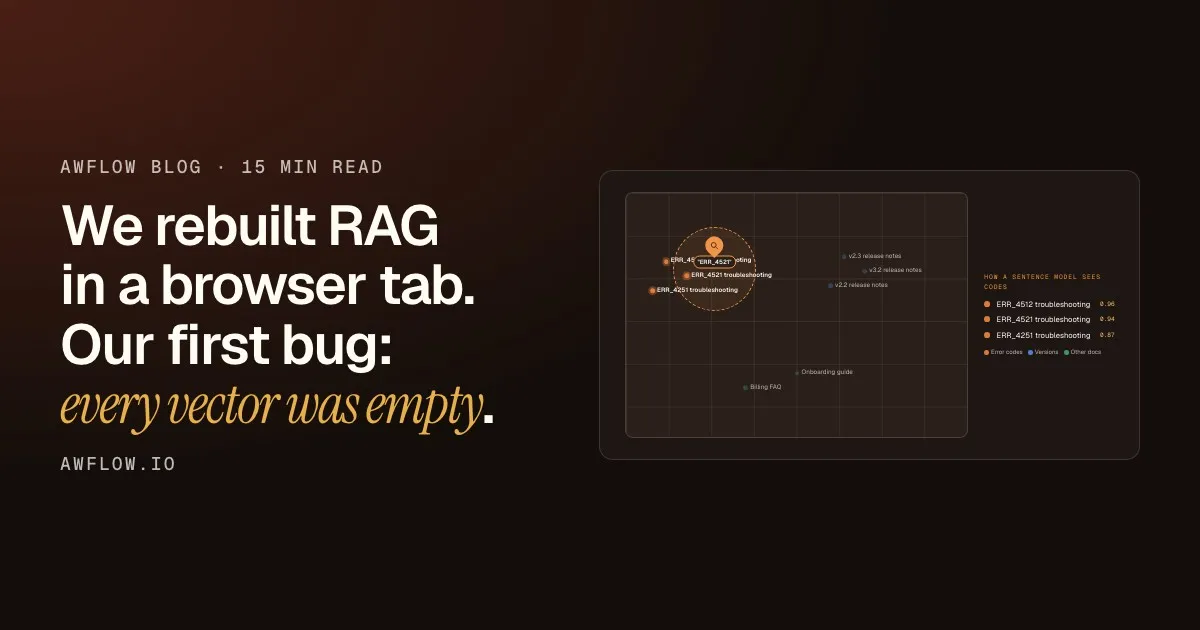
Embeddings are great at meaning and bad at exact strings. ERR_4521 and ERR_4512, v2.3 and v3.2: to a sentence model, these are nearly the same thing.
How a sentence model sees codes
- ERR_4512 troubleshooting0.96
- ERR_4521 troubleshooting0.94
- ERR_4251 troubleshooting0.87
Its neighbours are all lookalikes. The right one is not guaranteed to win.Near-identical strings get near-identical vectors, so cosine ranking cannot separate them reliably.
Text version
- Error codes: ERR_4512 troubleshooting, ERR_4521 troubleshooting, ERR_4251 troubleshooting · Versions: v2.3 release notes, v3.2 release notes, v2.2 release notes · Other docs: Billing FAQ, Onboarding guide
- "ERR_4521"
- ERR_4512 troubleshooting · ERR_4521 troubleshooting · ERR_4251 troubleshooting
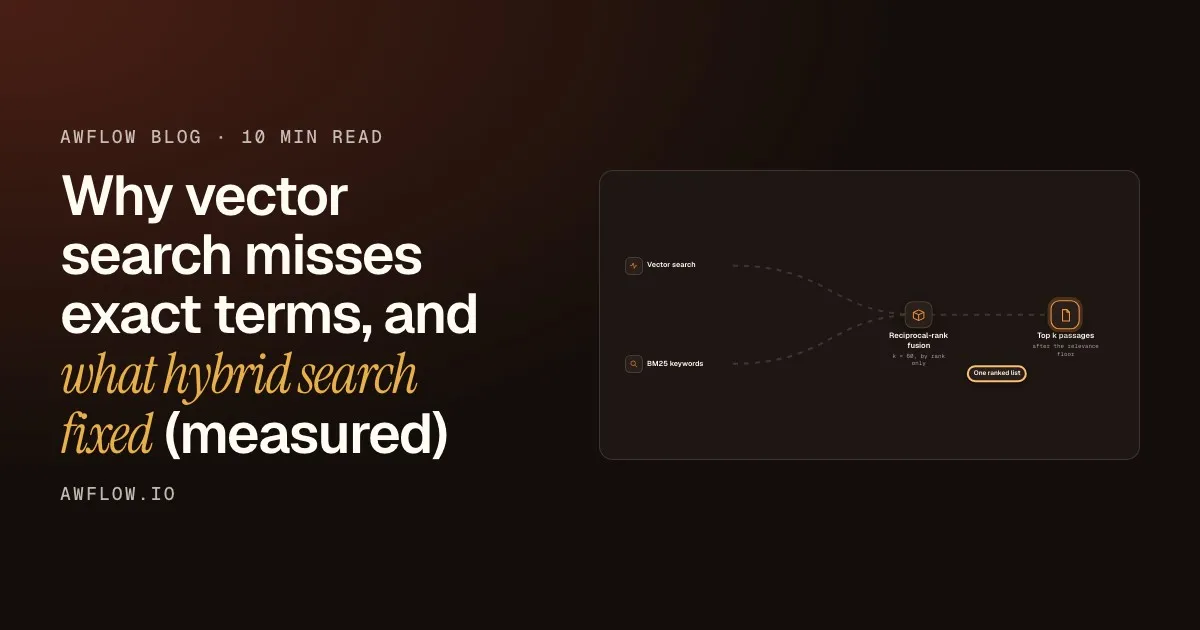
We added BM25 keyword search next to vector search and fused the two ranked lists with reciprocal-rank fusion. On our test set (20 questions over 27 documents full of near-duplicate error codes and versions), with the real MiniLM model:
| recall@1 | Vector | Hybrid | Hybrid + rerank |
|---|---|---|---|
| All questions | 0.90 | 0.95 | 0.95 |
| Exact-term questions | 0.83 | 0.92 | 1.00 |
| Paraphrase questions | 1.00 | 1.00 | 0.88 |
Hybrid never did worse than vector, so it’s the default. The cross-encoder rerank fixed the last exact-term misses but hurt paraphrases, so it’s opt-in.
It’s a small test set, and I won’t pretend otherwise. The point is the method: build the eval from the failures your users hit, and keep it. The full details, including a SurrealDB full-text gotcha, are in part 2: Why vector search misses exact terms, and what hybrid fixed.
5. Filtered vector search can return nothing
Most apps keep many collections in one vector table and filter by collection. We found that in our engine, the plain KNN operator on an HNSW index does a top-k of the whole table first and filters afterwards.
Then it filters. Nothing from the small one survives.Post-filtering a global top-k leaves 0 rows when the big collection dominates the neighbours.
Text version
- Search a small KB: top 4, please
- Top-k of the whole table: 4 chunks, all from the big KB
- Filter to the small KB: none of the 4 match
A small knowledge base that shares a table with a big one can get zero hits: its chunks simply never make the global top-k.
The fix: a query form that applies the filter during the graph walk, over-fetching (fetchK = min(max(3k, k+8), 200)), plus an exact filter-first fallback when the approximate query returns too few rows. Measured on 3,000 × 384-d vectors: about 14 ms approximate vs 160–556 ms exact, so the fallback is a safety net, not the main path.
Lesson: test retrieval on a small collection next to a big one. That’s where filtering bugs hide.
6. Follow-ups retrieve nothing
User: What does the contract say about termination? User: And the notice period?
“And the notice period?” has almost nothing to search for. Now, when a message is short and anaphoric (≤ 12 words with “it/that/and…”, or ≤ 3 words), it’s rewritten into a standalone query from the last 4 turns.
The answer cites what it found.Passages come back with citations you can open.
Text version
- You → Assistant: "And the notice period?"
- Assistant → Knowledge base: contract notice period
- Knowledge base → Assistant: matching passages
- Assistant → You: an answer with citations
There’s an 8 s timeout, and on failure it falls back to the original text.
Lesson: retrieval sees one message. Conversations don’t work that way.
Explain, protect, and share
The last four lessons are about what the user sees, what the cloud never sees, and what happens to the data.
7. When retrieval finds nothing, say why
“I couldn’t find anything in your documents” is the most frustrating sentence in RAG. Now every knowledge base gets one step in the reply:
Docs · 3 passages· 2 weaker matches· nothing relevant, with the best score against the cut-off (0.35 by default)· empty· skipped · on this device only, naming the cloud model
Lesson 7
An empty retrieval is a UX state, not an edge case.
Show the score and the cut-off, and they can fix it.Best score vs the 0.35 cut-off, plus one-click actions to use weaker matches or test the search.
Text version
- Lesson 7: An empty retrieval is a UX state, not an edge case.
The steps come with two actions: Use weaker matches for this reply and Test this search, which opens a search panel with scores and the cut-off line. Citations open a passage card showing the knowledge base, chunk, page and score, with a link to the source.
Lesson: show the score and the threshold, and the user can fix it in one click.
8. “Private” has to be a gate, not a setting
Each knowledge base is Device only or Cloud OK. A device-only one never goes into a prompt for a cloud model, and that’s enforced on every path: chats, agents, team threads, routines and workflow nodes. “Auto” or unknown models count as cloud. The assistant skips the knowledge base and says so. Workflow nodes fail by default (or skip, if you choose).
A privacy setting keeps private documents private.
Only a check in the one function every path uses does. Unknown models count as cloud.
The fix: one gate that every path goes through.Device-only knowledge never reaches a cloud-model prompt on chats, agents, teams, routines or nodes; auto or unknown models count as cloud.
Text version
- A privacy setting keeps private documents private.
- Only a check in the one function every path uses does. Unknown models count as cloud.
Retrieved passages are always fenced as “reference data, not instructions”. The only model-driven write (add_to_knowledge_base) asks before every call, and teams don’t get it.
Lesson: if privacy depends on each feature remembering a flag, one of them will forget. Put the check in the one function every path uses.
9. One single-threaded engine, one lock
The knowledge base database and the app’s local database are two IndexedDB databases on one SurrealDB WebAssembly module, which isn’t re-entrant. When two calls interleaved, it crashed with errors like “FnOnce called more than once” and “memory access out of bounds”. The knowledge base page went blank.
The engine sees one call at a time, and stops crashing.No interleaving, so no 'FnOnce called more than once' or out-of-bounds errors.
Text version
- Knowledge bases: a search · App's local database: a save
- a search + a save → One lock
- One lock → One SurrealDB Wasm module: One call at a time
The fix: every engine call, from both databases, goes through one promise-chain lock. And each JS context now shares one connection, instead of one engine per knowledge base (about +10 MB each).
Lesson: WebAssembly modules are often single-threaded under the hood. If two subsystems share one, they share its limits too.
10. Make the data portable
A knowledge base exports to a .awkb file: gzip JSON with the model reference and every chunk with its vector as float32 base64, about 4× smaller than JSON numbers. Importing never re-embeds and always creates a new knowledge base. Every file is validated as untrusted input (size caps, schema, version).
Lesson: if the data lives on the user’s device, export is part of the core design, not a nice-to-have.
What’s still limited, and your checklist
Some things don’t work yet, and I’d rather you hear it here:
- Web URLs are fetched with plain
fetch, so sign-in or CORS-blocked sites fail. Adding the open tab works (extension). - Project-file search is vector-only, not hybrid yet.
- No sync between the web app and the extension (different origins).
- Knowledge base text sits in IndexedDB unencrypted, like the rest of local mode.
- Extension-only flows (right-click save, a real re-embed on a big knowledge base) are still being tested by hand.
If you run the embedding model on device as we do, running an LLM in the browser explains the runtimes behind it. And whatever your stack, these are the questions I’d ask of any RAG pipeline:
Check your own pipeline
Eight questions for any RAG pipeline
- Does zero written count as an error? (done)automated
- Is re-adding a document idempotent? (done)automated
- Is the model stored with the vectors? (done)automated
- Can you find an exact error code? (done)automated
- Does a small collection still get hits? (done)automated
- What happens to "and the price?" (done)automated
- When nothing is found, is the reason shown? (done)automated
- Is privacy enforced in one place? (done)automated
One gate for privacy.Check device-only data in the one function every path uses.
Text version
- Eight questions for any RAG pipeline
- Does zero written count as an error?
- Is re-adding a document idempotent?
- Is the model stored with the vectors?
- Can you find an exact error code?
- Does a small collection still get hits?
- What happens to "and the price?"
- When nothing is found, is the reason shown?
- Is privacy enforced in one place?
What’s the sneakiest RAG bug you’ve shipped? Ours was the empty vectors.
The knowledge bases described here are part of AWFlow, a browser extension for workflows and AI agents that runs locally.