You attach a few tools to an AI agent, pick a small model that runs on your own machine, and press run. With a cloud model this is routine. With a model running in the browser, the agent refuses to start.
In AWFlow you can build agents: an LLM node with tools attached (search the page, call a sub-workflow, query a vector store). With OpenAI or Anthropic you pass tool schemas and get structured tool_calls back. With a model running in the browser (transformers.js or WebLLM), you don’t. Those runtimes give you text in and text out. LangChain’s tool-calling agents check for bindTools() and refuse local models outright:
Error: bind_tools() must be implementedSmall on-device models can't call tools.
They can, if you describe the tools in the prompt and parse what the model actually writes back.
The fix: tools in the prompt, calls parsed from the reply.Prompt-based tool calling: tool schemas rendered into the system prompt, calls extracted from the generated text.
Text version
- Small on-device models can't call tools.
- They can, if you describe the tools in the prompt and parse what the model actually writes back.
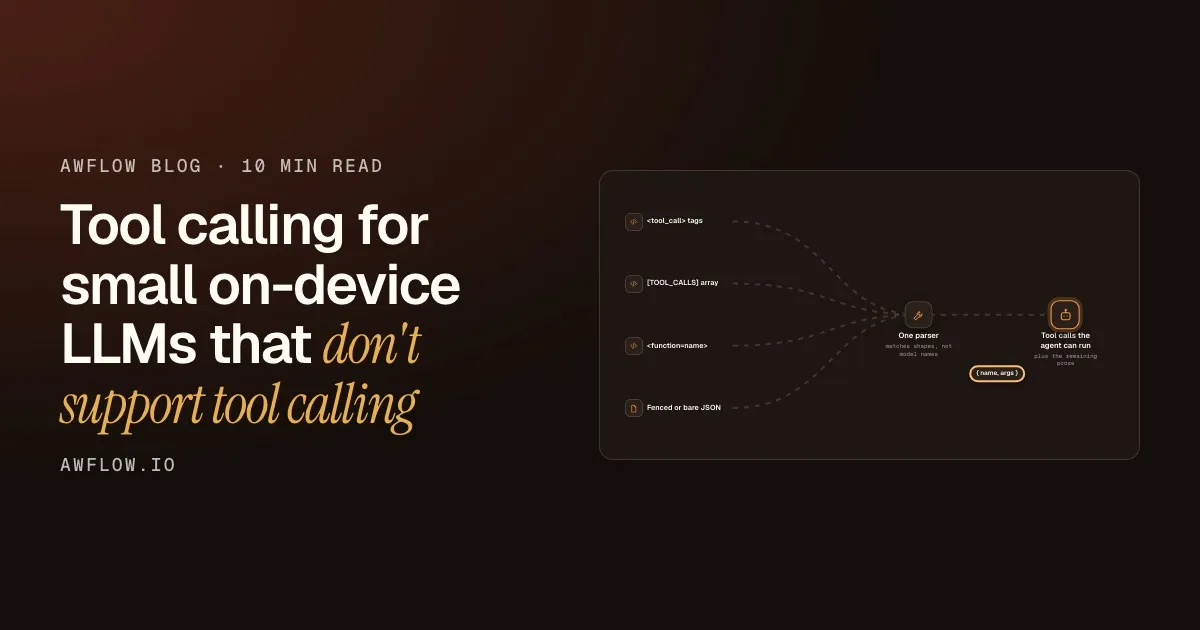
So I implemented it with prompt-based tool calling. Prompting the model is the easy part. The interesting part is parsing what it actually sends back, because every model family answers in the format it was trained on, whatever you asked for.
How the agent itself is wired (the graph, the loop, the pause) is covered in LangChain and LangGraph in the browser. This post zooms into one piece of it: tool calls on models that have no tool-calling API.
Describe the tools in the prompt
The tools are converted to OpenAI-style definitions (name, description, JSON Schema parameters) and rendered into a system-prompt section, one JSON object per line:
# Tools

You can call the following tools. Each is described as JSON (name, description, JSON Schema parameters):
{"name":"search_page","description":"Find text on the current page","parameters":{...}}
{"name":"save_row","description":"Append a row to the sheet","parameters":{...}}

To call a tool, reply with exactly this, one block per call, and nothing else:
<tool_call>
{"name": "<tool name>", "arguments": {<arguments matching the parameters>}}
</tool_call>

Only call the tools listed above. You will receive each result in a <tool_response> block.
When you have what you need, answer the user in plain text, without a tool call.
Earlier tool calls in the conversation are re-rendered in that same <tool_call> format, and results go back wrapped in <tool_response>. That way the transcript keeps showing the model the format you want.
The model answers in plain text when it has enough.No tool call in the reply ends the loop.
Text version
- Agent runtime → Local model: prompt + # Tools section
- Local model → Agent runtime: <tool_call> search_page
- Agent runtime → Tool: search_page("price")
- Tool → Agent runtime: the matching text
- Agent runtime → Local model: <tool_response> result
- Local model → Agent runtime: plain-text answer
I picked <tool_call> tags because many open models (Qwen-style chat templates, for one) were trained on something close to it. But “close” is the key word.
Accept what models actually write
Here’s what small models really return when asked for that format:
<tool_call>{"name": "search_page", "arguments": {"query": "price"}}</tool_call>   as asked
<function_call>{"name": "search_page", ...}</function_call>                      tag drift
[TOOL_CALLS] [{"name": "search_page", "arguments": {...}}]                         Mistral style
<function=search_page>{"query": "price"}</function>                                Llama style
```json
{"name": "search_page", "parameters": {"query": "price"}}
```                                                                                  fenced JSON
{"function": {"name": "search_page", "arguments": "{\"query\":\"price\"}"}}        nested + stringified args
…plus <think>…</think> reasoning blocks in front, and replies cut off at the token limit before the closing tag.
The rule
Ask for one format. Parse many.
Accept the formats models were trained on.The parser recognises tag drift, Mistral-style, Llama-style, fenced and bare JSON.
Text version
- The rule: Ask for one format. Parse many.
Rejecting all of that gives you an agent that “never calls tools”. Accepting all of it naively gives you an agent that runs things nobody offered it. So the parser is a list of patterns plus a strict filter:
const CALL_FORMATS = [
  // <tool_call>…</tool_call> / <function_call> / <tools>; closing tag optional (truncation)
  { pattern: /<(?:tool_call|function_call|tools)>\s*([\s\S]*?)\s*(?:<\/(?:tool_call|function_call|tools)>|$)/g },
  // [TOOL_CALLS] [ … ] — array runs to the end
  { pattern: /\[TOOL_CALLS\]\s*(\[[\s\S]*\])/g },
  // <function=name>{…}</function> — the name lives outside the JSON
  { pattern: /<function=([\w.-]+)>\s*([\s\S]*?)\s*(?:<\/function>|$)/g, nameGroup: 1 },
  // ```json {…} ```
  { pattern: /```(?:json|tool_call)?\s*([[{][\s\S]*?[\]}])\s*```/g },
];One shape comes out: a name and its arguments.A pure function: string in, { content, toolCalls } out.
Text version
- <tool_call> tags: as asked, or drifted · [TOOL_CALLS] array: Mistral style · <function=name>: Llama style · Fenced or bare JSON: no wrapper at all
- as asked, or drifted + Mistral style + Llama style + no wrapper at all → One parser
- One parser → Tool calls the agent can run: { name, args }
Each match goes through one normaliser that accepts the usual spellings:
- name:
nameorfunction.name - arguments:
arguments,parameters,argsorinput, as an object or a JSON-encoded string - a single call or an array of calls
function toRawCall(value: unknown, forcedName?: string) {
  if (!isPlainObject(value)) return undefined;
  const fn = isPlainObject(value.function) ? value.function : value;
  const name = forcedName ?? fn.name;
  if (typeof name !== 'string' || !name) return undefined;
  // With <function=name>{…}, the object IS the arguments.
  let args = forcedName ? value : (fn.arguments ?? fn.parameters ?? fn.args ?? fn.input ?? {});
  if (typeof args === 'string') args = tryParseJson(args);
  if (!isPlainObject(args)) return undefined;
  return { name, args };
}
Keep the leniency safe
A lenient parser is only useful if it can’t be talked into running things. Here is the path a reply takes, step by step.
Out come prose and calls. Nothing the model said is lost.Returns { content, toolCalls }; rejected blocks stay in content.
Text version
- Raw model reply: <think>…</think> <tool_call>{…}
- Strip reasoning: the <think> block is gone
- Match known shapes: one <tool_call> block found
- Normalise the keys: name + args object
- Offered tools only: search_page: offered, accepted
Reasoning is stripped first
<think>…</think> blocks are removed (including an unclosed one) before parsing, so a model that thinks about calling a tool doesn’t actually call it.
Shapes are matched, not model names
Each pattern runs over the reply. A closing tag is optional, because replies often stop at the token limit before it.
Keys are normalised
The name and arguments are read in whichever spelling the model used, and string arguments are parsed as JSON.
Only offered tools count
A block is accepted only if every call in it names a tool that was actually bound. A model that invents delete_all_rows gets nothing.
Nothing is silently dropped
If a block looks like a call but is malformed or names an unknown tool, it stays in the prose. The user sees exactly what the model said instead of an empty reply.
Last resort: if nothing matched and the whole reply is JSON that parses as calls, accept that too. Some small models just answer {"name": …} with no wrapper.
Here is what that means for a few real-looking replies:
| Model reply |
|---|
| <tool_call> search_page |
| <function=search_page> |
| call: delete_all_rows |
| <think>search?</think> |
| {"name": "search_pa |
| Model reply | Result |
|---|---|
| <tool_call> search_page | call: search_page |
| <function=search_page> | call: search_page |
| call: delete_all_rows | kept as text |
| <think>search?</think> | no call |
| {"name": "search_pa | kept as text |
Only real calls to offered tools become calls.An unknown tool or malformed JSON stays in the prose; reasoning never triggers a call.
Text version
- Model reply: <tool_call> search_page · <function=search_page> · call: delete_all_rows · <think>search?</think> · {"name": "search_pa
- Tool-call parser
- Model reply | Result: <tool_call> search_page | call: search_page · <function=search_page> | call: search_page · call: delete_all_rows | kept as text · <think>search?</think> | no call · {"name": "search_pa | kept as text
Why model-agnostic matters
My first version special-cased the model I was testing with. It worked great until the next model. A user can add chat models from the Hugging Face Hub to the extension (any with a browser-runnable ONNX build), so the parser can’t know the family. Matching on shapes instead of model names means any model that writes one of these formats works, with no per-family lookup table. Even the prompt itself is checked by a test to make sure it never names a model family.
It’s also a pure function: string in, { content, toolCalls } out. So every accepted format, malformed call and edge case has a unit test, with no model in the test run.
Does it actually work?
With 1–4B models, for agents with a few well-described tools: yes, well enough for things like “find the price on this page and save it to the sheet”. Where it breaks down:
- many tools with overlapping descriptions (the model picks the wrong one)
- long multi-step plans (it loses the thread after a few calls)
- deeply nested argument schemas
For those, the same agent node can switch to a cloud model or a bigger local one via Ollama (Ollama with workflow automation). Same workflow, different brain. If you are choosing an on-device model in the first place, how to choose, install and compare a local AI model walks through it.
If you’re doing this yourself:
Your own parser
Four rules for prompt-based tool calling
- Ask for one explicit format, but parse many (done)automated
- Accept only offered tool names; leave the rest in the text (done)automated
- Strip <think> first; tolerate a missing closing tag (done)automated
- Keep the parser pure; test it on real model replies (done)automated
Pure and tested. Grow tests from what models actually wrote.String in, { content, toolCalls } out: unit tests without a model.
Text version
- Four rules for prompt-based tool calling
- Ask for one explicit format, but parse many
- Accept only offered tool names; leave the rest in the text
- Strip <think> first; tolerate a missing closing tag
- Keep the parser pure; test it on real model replies
If you’ve seen tool-call formats I haven’t covered, I’d like to see them in the comments.
The agents described here are part of AWFlow, a free browser extension for workflows and AI agents that runs in your browser.