You don’t need an OpenAI account to build AI-powered workflows. The open-model ecosystem has matured to the point where free models handle the most common automation tasks (summarisation, classification, extraction, generation) with quality that’s more than enough for most uses.
This article compares the best free LLMs for workflow automation and explains how to pick the right one. All of them run locally with Ollama, and smaller versions of several run directly in your browser, with no API costs.
The short version
Most automation steps don't need a frontier model. A small free one will do.
Small and free is usually enough.A well-prompted 3–9B parameter model handles them reliably.
Text version
- The short version: Most automation steps don't need a frontier model. A small free one will do.
Why free models are now a serious option
A couple of years ago, the gap between open and commercial models was big enough to matter for production automation. It has narrowed a lot. Models like Mistral 7B, Llama 3 8B and Gemma 3 do well on the kind of short, focused tasks that workflow AI steps perform.
What AI steps actually do
Five jobs a small model handles well
- Summarise a block of text (done)automated
- Sort content into a category (done)automated
- Pull fields out of messy text (done)automated
- Write a short draft or subject line (done)automated
- Answer a question from given context (done)automated
Answer: from text you provide.Question answering over supplied context (RAG).
Text version
- Five jobs a small model handles well
- Summarise a block of text
- Sort content into a category
- Pull fields out of messy text
- Write a short draft or subject line
- Answer a question from given context
None of these needs a frontier-class model. And most of these models are shrunk (“quantised”) before you download them, which is why a 7B model fits in about 4 GB:
About a quarter of the size for a small quality loss.~3.5× smaller and less memory bandwidth per token; small perplexity increase.
Text version
- Original model (16-bit)
- Quantise → Smaller model (4-bit)
- Download: 16 GB → 4.5 GB (−72%) · Memory: 17 GB → 5.2 GB (−69%) · Quality: 100% → 96% (−4%)
The top free LLMs for workflow automation
Sizes below are the default 4-bit downloads in Ollama; check the Ollama library for current tags.
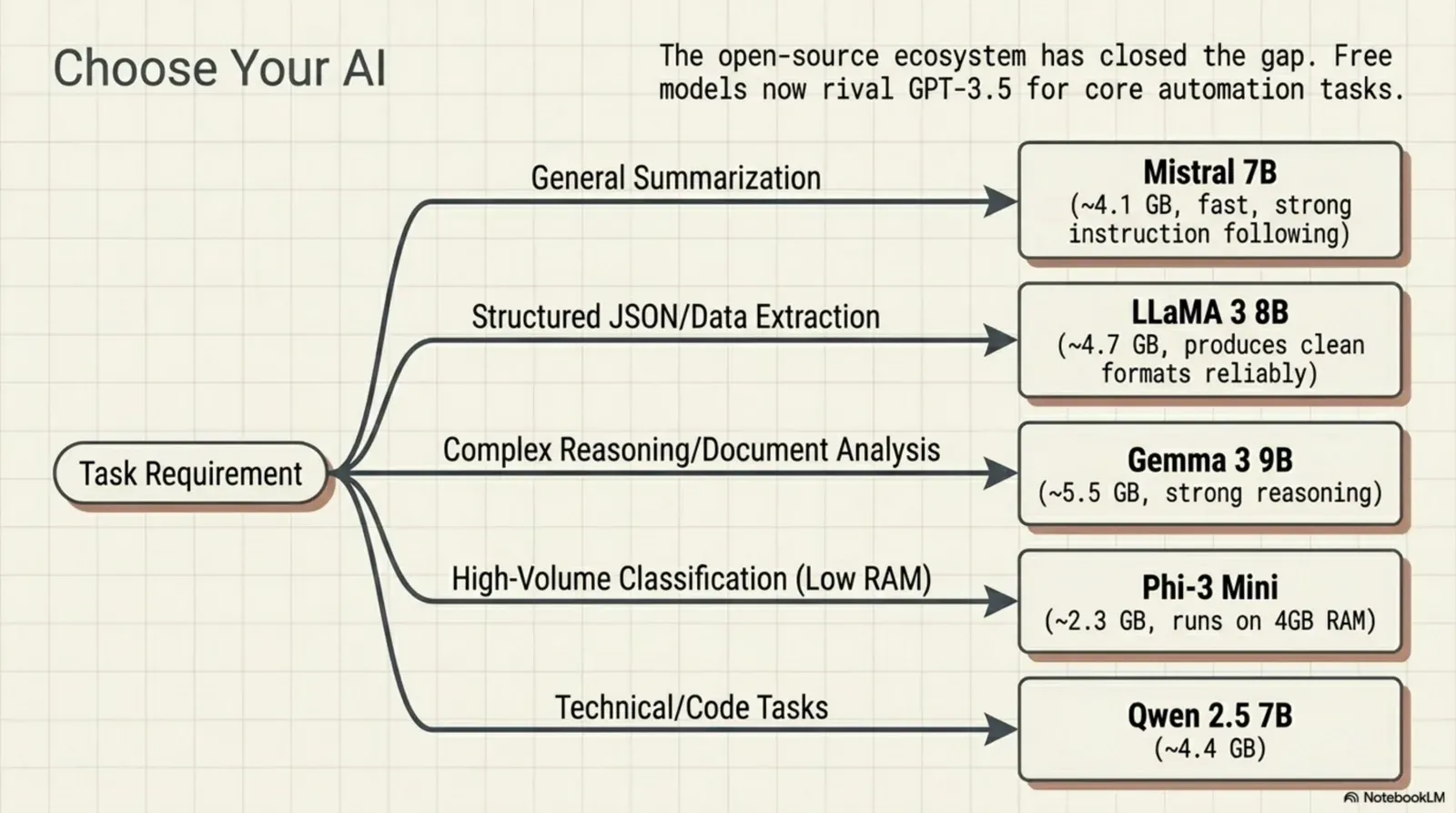
Mistral 7B
Mistral 7B is still one of the best all-round models at its size. It’s fast, follows instructions well and is good with several languages. For most automation tasks, especially classification and summarisation, it’s a reliable first choice.
- Size: about 4.1 GB
- Best for: general-purpose automation, multilingual content
- Weakness: less strong on complex multi-step reasoning
- Run with:
ollama pull mistral
Llama 3 8B (Meta)
Meta’s Llama 3 8B is one of the strongest models in its class. It follows instructions precisely, produces clean structured output and handles JSON formatting reliably, which matters when a node has to extract data and pass it on.
- Size: about 4.7 GB
- Best for: structured output, data extraction, instruction following
- Weakness: a little slower than Mistral on CPU
- Run with:
ollama pull llama3(orllama3.1for the newer version)
Gemma 3 (Google)
Google’s Gemma 3 punches above its weight, with good reasoning for its size and coherent structured output. It comes in several sizes: the 4B model (about 3.3 GB) is light and quick, and the 12B model (about 8 GB) is noticeably better on harder extraction if your machine has the memory.
- Size: about 3.3 GB (4B) or 8 GB (12B)
- Best for: reasoning, document analysis, structured extraction
- Weakness: the 12B needs much more memory than the 7B models
- Run with:
ollama pull gemma3(4B) orollama pull gemma3:12b
Phi-3 Mini (Microsoft)
Phi-3 Mini is the smallest serious model here. At about 2.2 GB it runs on modest machines and answers faster than the others. If your workflow makes many AI calls in a row (classifying 50 items in a loop, say), its speed is worth the quality trade-off.
- Size: about 2.2 GB
- Best for: fast classification, light generation, smaller machines
- Weakness: weaker on complex tasks
- Run with:
ollama pull phi3
Qwen 2.5 7B (Alibaba)
Qwen 2.5 is a strong contender that’s often overlooked. At 7B it competes with Llama 3 on instruction following and is particularly good at code and data extraction.
- Size: about 4.7 GB
- Best for: code, technical extraction, structured output
- Weakness: less widely used in automation setups than Mistral or Llama
- Run with:
ollama pull qwen2.5
Comparison table
| Model | Size (4-bit) | Speed | Instruction following | Structured output | Best use |
|---|---|---|---|---|---|
| Mistral 7B | 4.1 GB | Fast | Strong | Good | General automation |
| Llama 3 8B | 4.7 GB | Medium | Excellent | Excellent | Data extraction |
| Gemma 3 4B / 12B | 3.3 / 8 GB | Fast / slower | Strong | Strong | Reasoning tasks |
| Phi-3 Mini | 2.2 GB | Very fast | Good | Limited | High-volume classification |
| Qwen 2.5 7B | 4.7 GB | Fast | Strong | Strong | Technical and code tasks |
The ratings are our general guide, not benchmark results. The best test is your own inputs: see do you need a big AI model? Test small ones on your own inputs.
How to choose the right model
Bigger is not automatically better for a workflow step. Size buys quality and costs memory and speed:
Detailed and careful.
Large: better answers, slower, a bigger download.~8B parameters: more memory bandwidth per token.
Text version
- Model size 1B: Speed fast · Quality basic · Download 0.9 GB · Short, sometimes off.
- Model size 3B: Speed ok · Quality good · Download 2 GB · Clear and mostly right.
- Model size 8B: Speed slow · Quality great · Download 4.5 GB · Detailed and careful.
Then pick by task:
- General summarisation or classification: start with Mistral 7B.
- Clean JSON from a node: Llama 3 8B follows formatting instructions most consistently.
- Complex reasoning or multi-document analysis: Gemma 3 12B, if your machine can handle it.
- Many calls in a loop: Phi-3 Mini, for throughput.
- Code or technical content: Qwen 2.5.
Answer one question on a laptop
The small one is far faster. The large one writes better answers.Trade-off: tokens per second vs answer quality.
Text version
- Answer one question on a laptop
- Large model · 8B: 6.2 s · Small model · 1B: 1.1 s
- Pick per task
Using free LLMs as nodes in Agentic Workflow
Agentic Workflow has an Ollama model node: start Ollama with the extension allowed (OLLAMA_ORIGINS, see the Ollama guide), pick one of your models in the node, and plug it into an AI step like Basic LLM Chain, Information Extractor or Text Classifier. Models running in Ollama are also listed automatically in the assistant and agent model pickers. You can also skip Ollama entirely: the Web LLM node runs small models (Llama, Phi, Qwen, Gemma variants) directly in your browser.
Inputs
prompttextSettings
Outputs
completiontextWhat comes out: the answer, free and local.Inference on your machine; no per-token billing.
Text version
- Ollama (AI model)
- prompt (text)
- Model: mistral, from your Ollama · Temperature: 0.2 · Max Tokens: 4096
- completion (text)
You build the same browser-native automations (reading a page, AI processing, showing the result) at zero API cost: no subscription, no per-token billing, no data leaving your machine. The canvas, the triggers and the nodes are identical to a workflow with a cloud model. The only thing that changes is where the AI runs.
More on this: how to use Ollama in a workflow automation tool, how to choose, install and compare a local AI model, and node-based workflow automation beyond Zapier and n8n.
Try it
Your turn
Summarise a page with a free model
Open it in AWFlow. It uses Web LLM in your browser; swap in an Ollama node to use any model from this list.
Open in AWFlow (opens in a new tab)docs.awflow.io/examples/summarize-page-llm-chain.awfCall to action. Scan the code or click the link.Opens the Summarize page (LLM chain) docs example in AWFlow's import page.
Text version
- Summarise a page with a free model · Open it in AWFlow. It uses Web LLM in your browser; swap in an Ollama node to use any model from this list. · https://docs.awflow.io/examples/summarize-page-llm-chain.awf
In short
- Small free models handle most AI steps
- Pick by task, not by size
- Plug any of them into a workflow node
Three. Ollama or Web LLM, same canvas.A model node attached to any AI step.
Text version
- In short
- Small free models handle most AI steps
- Pick by task, not by size
- Plug any of them into a workflow node