A lesson
Our AI ran faster on the GPU. Its answers were useless.
The hook. Say it before anything else.A 3-second opener before the first chapter.
Text version
- A lesson: Our AI ran faster on the GPU. Its answers were useless.
When an AI model runs in a browser, something has to do the maths. Browsers offer three options: WebGPU, WebGL and WebAssembly. The usual advice is simple: use the GPU when you can, it is faster.
That advice is mostly right. This post explains the three options in plain words and how libraries pick between them, then tells the story of a test where the faster choice gave us answers that looked fine and were worthless. If you build or choose AI tools, it is the part worth remembering.
Why AI wants the graphics card
Running a model is mostly one operation repeated millions of times: multiply two numbers and add the result. A processor core does that quickly, one at a time. A graphics card has thousands of small cores that each do a little of it at once.
That is why AI loves the GPU. The times here are only an illustration.Inference throughput is dominated by parallel matrix maths. Example figures.
Text version
- 64 · One processor core (1) · A graphics card (16)
- One processor core: 1 × 64 · A graphics card: 16 × 4
- One processor core: 6.4 s · A graphics card: 0.4 s
Three doors to your hardware
A web page cannot use your graphics card directly. It has to go through what the browser allows:
Newer AI engines run on WebGPU, which lets a web page use the graphics card for maths.
The modern way for a web page to use your graphics card for general computing, not just drawing.
A browser API for GPU compute and rendering with compute shaders, the successor to WebGL. Availability depends on the browser, the operating system and the driver.
What it means: the page can use the graphics card for maths.General-purpose GPU compute from the browser.
Text version
- Newer AI engines run on WebGPU, which lets a web page use the graphics card for maths.
- WebGPU: The modern way for a web page to use your graphics card for general computing, not just drawing. A browser API for GPU compute and rendering with compute shaders, the successor to WebGL. Availability depends on the browser, the operating system and the driver. (WebGL, WebAssembly, GPU)
| Backend | Runs on | Built for | Good to know |
|---|---|---|---|
| WebGPU | Graphics card | General computing | The newest and usually the fastest. Not available on every browser and device yet. |
| WebGL | Graphics card | Drawing 3D graphics | Older and widely supported. AI libraries repurpose it for maths. |
| WebAssembly | Processor | Running compiled code | Works everywhere, no graphics card needed. Slower for big models. |
Good libraries do not make you choose. They try the best option and fall back when it is missing. This is the order AWFlow uses for its TensorFlow.js models:
Last resort: the processor. Slow, but it always works.The CPU backend is the guaranteed floor.
Text version
- A TensorFlow.js model: needs somewhere to run
- Try WebGPU: fastest, newest
- Else WebGL: older, widely supported
- Else the processor: slower, always works
A fallback chain like this protects you from loud failures: a backend that is missing, or that crashes. Keep that word in mind.
The day the fast path lied
Our transformers.js models run on a different engine, and the natural plan was the same: WebGPU first. On 27 September 2026 we tested it in Chromium with a zero-shot text classifier, a model that scores how well a message fits labels such as “billing” or “sales”. To keep downloads small, we used compact 8-bit weights.
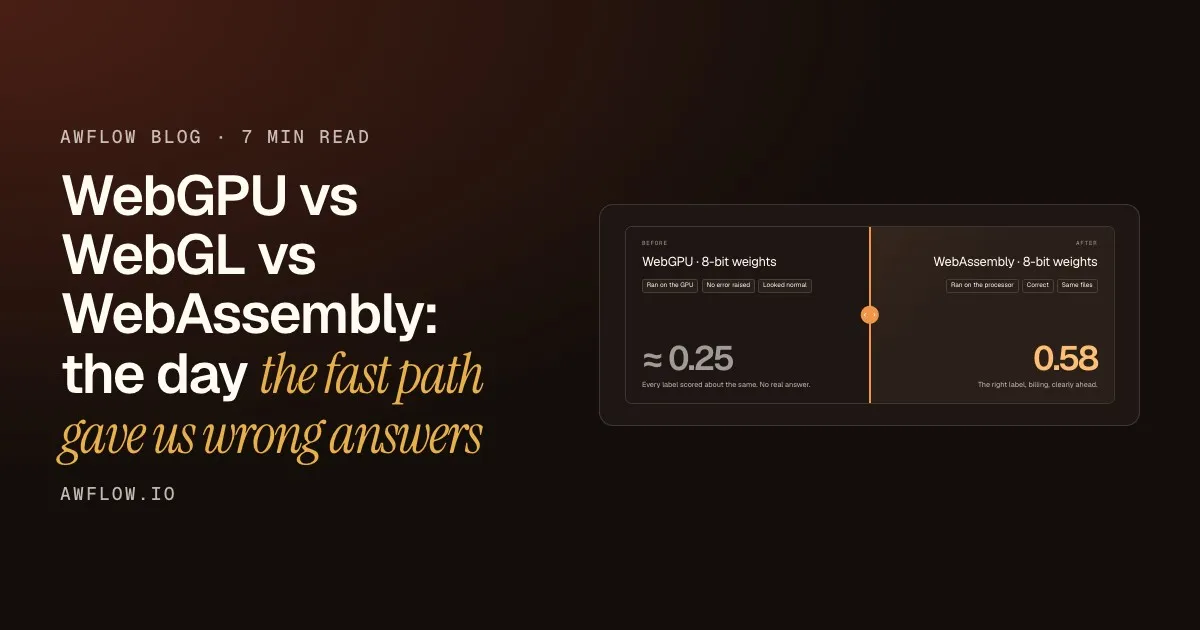
The model ran. It returned scores. No error, no warning. And the scores were useless:
Before
WebGPU · 8-bit weights
- Ran on the GPU
- No error raised
- Looked normal
≈ 0.25
Every label scored about the same. No real answer.
After
WebAssembly · 8-bit weights
- Ran on the processor
- Correct
- Same files
0.58
The right label, billing, clearly ahead.
Drag the line. Same model, same files, different backend.One model on one browser: a measurement, not a general rule.
Text version
- Before: WebGPU · 8-bit weights, ≈ 0.25. Every label scored about the same. No real answer.
- After: WebAssembly · 8-bit weights, 0.58. The right label, billing, clearly ahead.
- Compare before and after
It looked fine
The GPU run finished without complaint. But every label scored around 0.25: the model was not choosing anything.
The same files, on the processor
On WebAssembly, with exactly the same weights, the correct label scored 0.58, well ahead of the rest.
Nothing warned us
No crash, no error message. A fallback chain only reacts to loud failures, and this one was silent.
With full-precision weights, the WebGPU run was coherent again, but that meant a download two to four times larger. We chose correctness: AWFlow runs its transformers.js models on WebAssembly until a safe GPU mode exists. A wrong answer is worse than a slow one, because a slow answer at least announces itself.
This was one model on one browser, and libraries improve quickly. Treat it as a reason to test, not as a rule about WebGPU.
The GPU is always the best place to run a model.
Speed only counts if the answer is right. Check the output on every backend, not just the clock.
The fact. Test the answer, then the speed.Compare against a known-good output before enabling a backend for a task.
Text version
- The GPU is always the best place to run a model.
- Speed only counts if the answer is right. Check the output on every backend, not just the clock.
If you build with in-browser AI
Four habits would have caught our problem on day one:
For builders
Choosing a backend without surprises
- Keep a few inputs with known answers (done)habit
- Check answers on every backend you ship (done)habit
- Fall back when a backend fails loudly (done)habit
- Treat new precisions as new models (done)habit
A new precision is a new model. Test it again.Quantised weights can behave differently per backend; q8 on WebGPU did here.
Text version
- Choosing a backend without surprises
- Keep a few inputs with known answers
- Check answers on every backend you ship
- Fall back when a backend fails loudly
- Treat new precisions as new models
What this means if you just use AWFlow
You do not have to think about any of this. Each engine runs on the backend that works best for it today:
| Engine | What it runs | Backend in AWFlow |
|---|---|---|
| WebLLM | Chat and text-generation models | WebGPU |
| TensorFlow.js | Vision, text and embedding models | WebGPU, then WebGL |
| transformers.js | Translation, Whisper speech-to-text and more | WebAssembly |
The one thing you may notice is on a machine or browser whose graphics setup cannot run WebLLM: its chat models then show Not supported here. Choose a Transformers Chat model instead. It runs on WebAssembly, so it works on any device, just more slowly.
What we covered
- WebGPU, WebGL, WebAssembly
- Fallbacks catch loud failures only
- Test the answer, not just the speed
Three. Keep known answers and check every backend.In our test, WebGPU with 8-bit weights returned flat scores.
Text version
- What we covered
- WebGPU, WebGL, WebAssembly
- Fallbacks catch loud failures only
- Test the answer, not just the speed