Every automation tool hits the same wall: it has integrations for the top N apps, and then your API isn’t on the list. You can wait for someone to build a connector, or write a backend to glue it in.
In AWFlow (a workflow builder that runs in a browser extension), the answer is a Custom API node: paste the URL of an OpenAPI spec, pick an operation, and the node renders that operation’s fields and calls it. No codegen step, no server. This post walks through how it works, and what I deliberately left out.
The idea
The spec's author has already written your UI.
So the form can come from the spec, not from a connector someone builds.Each operation's inputs become a JSON Schema, rendered as the node's form at runtime.
Version texte
- The idea: The spec's author has already written your UI.
Paste the URL of an OpenAPI spec and the node builds its fields for you.
A standard file, usually JSON, where an API describes its endpoints, their fields and how to sign in.
OpenAPI 3 (formerly Swagger): paths, operations, parameters, request bodies as JSON Schema, servers and security schemes.
What it means: the API's own description of itself.A machine-readable contract the node can turn into a form.
Version texte
- Paste the URL of an OpenAPI spec and the node builds its fields for you.
- OpenAPI: A standard file, usually JSON, where an API describes its endpoints, their fields and how to sign in. OpenAPI 3 (formerly Swagger): paths, operations, parameters, request bodies as JSON Schema, servers and security schemes. (Swagger, JSON Schema, REST API)
From a spec URL to a request
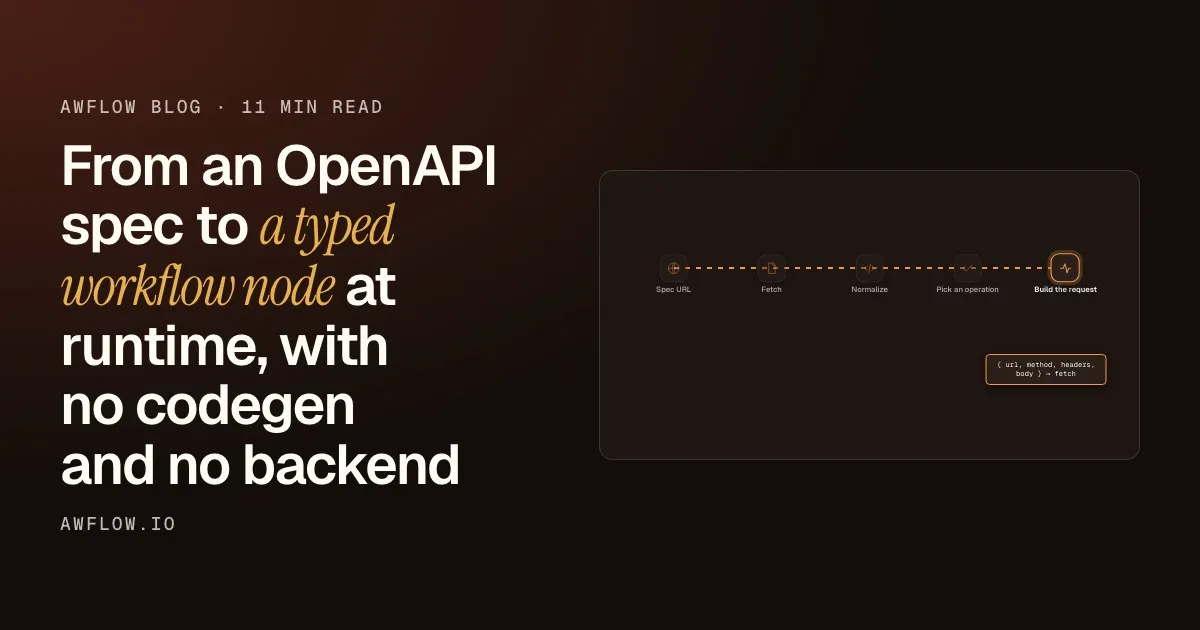
The whole node is a short pipeline. Each arrow is a small, pure function, which makes the whole thing easy to test.
Your values become a request, sent with your credential.Path, query and header params, JSON body, auth from the operation's security scheme.
Version texte
- Spec URL: https://…/openapi.json
- Fetch: raw JSON, cached by URL
- Normalize: baseUrl, operations[], securitySchemes
- Pick an operation: JSON Schema → validated fields
- Build the request: { url, method, headers, body } → fetch
You paste a URL
The node only needs the address of the JSON spec, not the human-readable docs page.
Fetch it once
The spec is downloaded and cached by URL, so the form doesn’t re-fetch it on every keystroke.
Keep the slice you need
OpenAPI is a big spec. The node turns it into a flat list of operations.
Pick an operation
The chosen operation becomes one JSON Schema, and the schema becomes the form.
Send it
Your values and your credential become a real HTTP request.
Inside each step
1. Fetch (and cache) the spec
const res = await fetch(specUrl, { headers: { Accept: 'application/json' } });
const text = await res.text();
try { return JSON.parse(text); }
catch { throw new Error('The OpenAPI spec could not be read as JSON. Only JSON specs are supported for now.'); }
Parsed specs are cached by URL in a Map<string, Promise<Spec>>. The operation dropdown and the dynamic form both need the spec, and without the cache every keystroke in the form re-fetched it. Failures are evicted from the cache so a retry actually retries.
YAML is rejected on purpose, with a clear message.
Partial support is better than no support.
A half-working YAML path would be worse than a clear "not yet".
The choice: refuse it with a message that says why.Non-JSON input throws "Only JSON specs are supported for now."
Version texte
- Partial support is better than no support.
- A half-working YAML path would be worse than a clear "not yet".
2. Normalize the spec into a flat operation list
The node needs a small slice of the spec:
interface OApiOperation {
  operationId: string;   // from the spec, or synthesized: `get_/pets/{id}` → "get_pets_id"
  method: string;        // GET, POST…
  path: string;          // /pets/{petId}
  parameters: { name: string; in: 'path' | 'query' | 'header'; required: boolean; schema: JsonSchema }[];
  requestBody?: { required: boolean; schema: JsonSchema };  // application/json only
  security?: Record<string, string[]>[];
}
Some details came from real specs rather than the spec document:
Learned from real specs
Four details the spec document doesn't warn you about
- Cut $ref cycles (fait)automatisé
- Path params are always required (fait)automatisé
- Resolve the base URL against the spec URL (fait)automatisé
- Synthesize a stable operationId (fait)automatisé
No operationId? One is made from method and path, so saved workflows keep pointing at it.`get /pets/{id}` → `get_pets_id`.
Version texte
- Four details the spec document doesn't warn you about
- Cut $ref cycles
- Path params are always required
- Resolve the base URL against the spec URL
- Synthesize a stable operationId
3. Turn an operation into a form
This is the part that makes it feel native. Each operation becomes one JSON Schema object: one property per parameter, plus a body property for a JSON request body, with required carried over:
function buildOperationSchema(op: OApiOperation): JsonSchema {
  const properties = {}, required = [];
  for (const p of op.parameters) {
    properties[p.name] = { ...p.schema, ...(p.description ? { description: p.description } : {}) };
    if (p.required) required.push(p.name);
  }
  if (op.requestBody) {
    properties.body = op.requestBody.schema;
    if (op.requestBody.required) required.push('body');
  }
  return { type: 'object', properties, ...(required.length ? { required } : {}) };
}
The node system already renders forms from Zod schemas, so the JSON Schema is converted to Zod at runtime and handed to the same form renderer every other node uses. Enums become dropdowns, required fields are marked, descriptions become tooltips. Here is what that looks like on the canvas, with the public Petstore spec:
Entrées
Previous stepitemRéglages
Sorties
OutputJSON or textWhat comes out: the API's response.Parsed JSON for JSON responses, otherwise text; 204 returns `{ success: true }`.
Version texte
- Custom API (Integration)
- Previous step (item)
- Credential: optional: Bearer Token or Basic Auth · OpenAPI spec URL: petstore3.swagger.io/api/v3/openapi.json · Operation: GET /pet/findByStatus · Parameters: status = available
- Output (JSON or text)
4. Build the request and apply auth
for (const p of op.parameters) {
  const v = values[p.name];
  if (v == null || v === '') continue;
  if (p.in === 'path')   path = path.replace(`{${p.name}}`, encodeURIComponent(scalar(v)));
  if (p.in === 'query')  query.set(p.name, scalar(v));
  if (p.in === 'header') headers[p.name] = scalar(v);
}
Auth follows the operation’s security scheme, using a credential from the extension’s local store. Secrets never come from node parameters, so they’re never stored in the workflow itself or carried along when you share it.
The response comes back, errors included.Errors carry the status and the first 500 characters of the body.
Version texte
- Custom API node → Local credential store: credential for this scheme
- Local credential store → Custom API node: the token
- Custom API node → The API: Authorization: Bearer …
- The API → Custom API node: status + response body
apiKey→ header (default) or query parameter, under the name the spec declareshttp+bearer→Authorization: Bearer …http+basic→Authorization: Basic …
The JSON body is serialized with Content-Type: application/json, and the response is parsed by content type (JSON → object, otherwise text, 204 → { success: true }). Errors include the status and the first 500 characters of the body. That’s usually exactly the validation message you need.
Why the extension, and what’s left out
5. Why it has to run in the extension
Arbitrary API hosts don’t send CORS headers for random web origins. So the Custom API node is extension-only: the request is made from the extension, which can reach hosts the user has granted. (The difference between running in a browser and on a server has its own post.)
The extension calls only the hosts you granted.The run is gated on that grant; you can see and revoke it per host.
Version texte
- A web page · You · AWFlow extension · The API host
- A web page → The API host: blocked: no CORS
- You → AWFlow extension: Grant access
- AWFlow extension → The API host: granted host only
The spec URL field is a “URL with permission” field: entering it shows a Grant access button for that origin, and the run is gated on that grant. You can see and revoke exactly which hosts a workflow can talk to.
(Known limitation: the API’s servers[] host is assumed to match the spec’s host for that grant. That’s the common case, but not universal.)
What I deliberately didn’t build (yet)
Not yet
What the Custom API node leaves out
- YAML specs (fait)automatisé
- allOf / oneOf / anyOf and remote $refs (fait)automatisé
- Request bodies other than JSON (fait)automatisé
- OAuth 2 flows from the spec (fait)automatisé
- More than one security requirement (fait)automatisé
Only the first security requirement is applied.Alternative requirements are ignored.
Version texte
- What the Custom API node leaves out
- YAML specs
- allOf / oneOf / anyOf and remote $refs
- Request bodies other than JSON
- OAuth 2 flows from the spec
- More than one security requirement
Each of these is real work, and none of them was blocking the common case: “this SaaS has a JSON OpenAPI spec and an API key”. I’d rather ship the 80% with clear errors than a 100% that half-works. When the API has no spec or needs a non-JSON body, the plain HTTP Request node is the fallback; the Custom API node docs list both.
Runtime vs. codegen
Codegen (openapi-generator, orval…) gives you types at build time, which is great when you own the code. In a no-code tool the user brings the spec at runtime, so there’s no build step to generate into.
| Critère | AWFlow | Codegen |
|---|---|---|
| Who brings the spec | The user, inside the app | The developer, in the repo |
| When the fields exist | At run time, from the pasted URL | At build time |
| Where type safety lives | Schema validation in the form | The compiler |
| Best when | You call an endpoint with a few fields | You own and ship the code |
Different jobs. Pick by who owns the code.Runtime forms for user-supplied specs; codegen for owned clients.
Version texte
- Who brings the spec: AWFlow: The user, inside the app; Codegen: The developer, in the repo
- When the fields exist: AWFlow: At run time, from the pasted URL; Codegen: At build time
- Where type safety lives: AWFlow: Schema validation in the form; Codegen: The compiler
- Best when: AWFlow: You call an endpoint with a few fields; Codegen: You own and ship the code
The trade-off is that type safety moves from the compiler to schema validation in the form. In practice, for “call this endpoint with these five fields”, that’s the right place for it.
AWFlow is free. If you point the Custom API node at a spec and it chokes, send me the spec URL. That’s how this list of limitations gets shorter.