Be honest
How many of these five did you do by hand today?
The hook. Ask it, then start the list.A 3-second opener before the first chapter.
Version texte
- Be honest: How many of these five did you do by hand today?
How much of your day disappears into the same browser rituals? You open a product page and copy a price into a spreadsheet. You paste a long article into a chatbot to get the gist. You fill out the same contact form for the fifteenth lead this week. You refresh a competitor’s pricing page hoping something changed. None of this feels like work, but it eats your time like it is.
The uncomfortable truth
Most of what you do by hand in a browser, AI can already do.
Already. Not next year, and without code.A no-code workflow in the browser extension, running on the pages you have open.
Version texte
- The uncomfortable truth: Most of what you do by hand in a browser, AI can already do.
Not with a complex server-side script or a developer-built bot, but with a no-code workflow running directly in your browser. Here are five tasks that cost you hours every week, and how to hand each one to AI today.
The list
5 browser tasks AI can take off your hands
- Summarising web pages (fait)automatisé
- Copying prices, names and emails (fait)automatisé
- Filling the same forms (fait)automatisé
- Checking pages for changes (fait)automatisé
- Translating and reformatting text (fait)automatisé
Translating and rewording text.Transformation: selected text in, rewritten text out.
Version texte
- 5 browser tasks AI can take off your hands
- Summarising web pages
- Copying prices, names and emails
- Filling the same forms
- Checking pages for changes
- Translating and reformatting text
Task 1: Summarising web pages
You probably open dozens of articles, reports and product pages every day. Most of the time you skim for one or two key facts and move on. That skimming still takes time and attention.
AI can read a page, pull out the core ideas and show you a short summary right next to it. No copy-paste, no switching tabs, no prompt engineering. Whether you are doing market research, competitive analysis or keeping up with an industry newsletter, a summary turns passive reading into a quick answer.
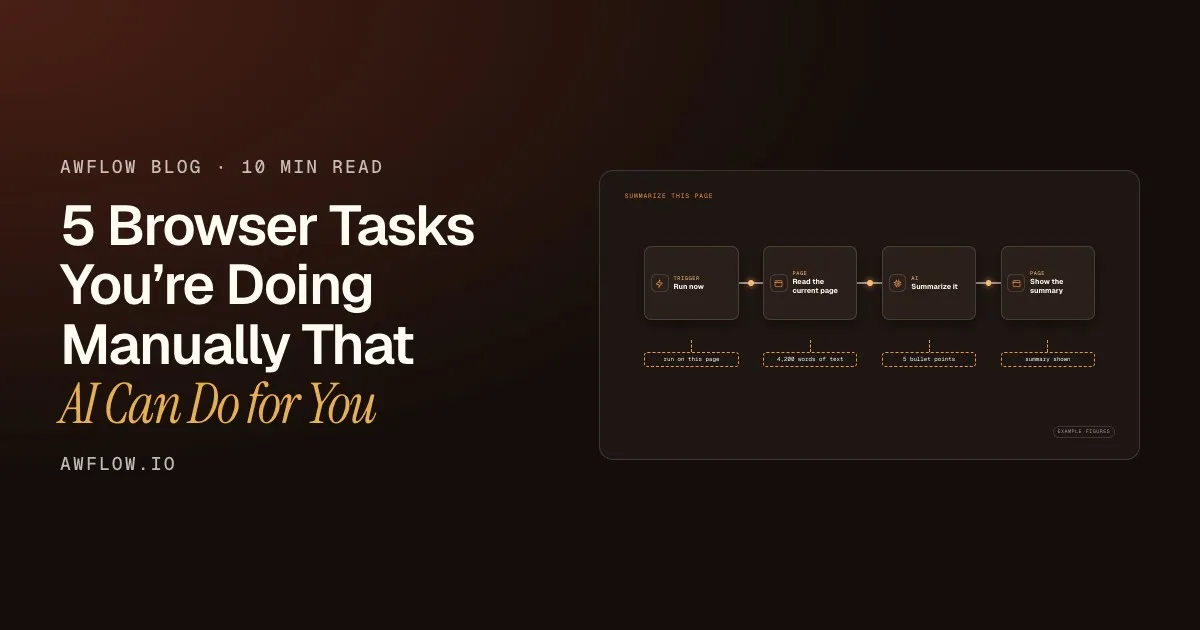
Summarize This Page
One click, a few seconds. Every node shows its result.One run, outputs per node (example values).
Version texte
- summarize-this-page.awf
- run on this page
- 4,200 words of text
- 5 bullet points
- summary shown
Start on the page
Open any article, report or product page and run the workflow. It works on the page you have open, including pages you are signed in to.
Read the text
The first step collects the page’s text, so you never copy-paste it anywhere.
Summarise with a local model
An AI step turns thousands of words into a few bullet points. The model runs inside your browser: the article does not leave your device.
Show the result
The summary appears in AWFlow’s side panel, next to the page.
Done in seconds
The whole run takes seconds, and each step shows what it produced.
What gets summarised: articles and blog posts, product descriptions, research abstracts, news briefings.
Task 2: Extracting structured data (prices, names, emails)
Web scraping used to mean writing Python scripts and wrestling with CSS selectors. Now AI can look at a page and pull out exactly the data you need in a structured format, even when the layout is irregular or the markup is messy.
Think of how often you copy a list of company names from a directory, grab product prices from several shops to compare them, or collect contact emails from a results page. Each of those can be described to an AI model in plain words and done for you, even when the site has no API to work with.
| Page text |
|---|
| Desk lamp now €39 (€49) |
| Steel kettle · €29.90 |
| Barista Pro: €389, free |
| Page text | Price |
|---|---|
| Desk lamp now €39 (€49) | €39 |
| Steel kettle · €29.90 | €29.90 |
| Barista Pro: €389, free | €389 |
A clean column comes out, ready for a sheet.The extracted field is added to each item; Google Sheets can append the rows.
Version texte
- Page text: Desk lamp now €39 (€49) · Steel kettle · €29.90 · Barista Pro: €389, free
- Information Extractor
- Page text | Price: Desk lamp now €39 (€49) | €39 · Steel kettle · €29.90 | €29.90 · Barista Pro: €389, free | €389
Common uses: lead lists from business directories, price comparison across competitor sites, job posting details from recruitment boards, contact details from company websites. The extracted data can go straight to a Google Sheet, a CRM or the next step of your workflow.
Task 3: Filling out forms automatically
Repetitive form filling is one of the most soul-crushing browser tasks there is. Sales outreach forms. Job application portals. Support tickets. Every form is slightly different, yet what you enter is almost always the same.
A browser workflow can keep your answers in one place, find the matching fields on the page and fill them, with a confirmation click before anything is sent. When you submit the same kind of form fifty times a week, that adds up to real hours. We cover it in detail in build an AI form-filler that works on any website.
You stay in control
It shows you what it will send, and waits for your OK.
Your OK comes first, every time.Nothing is typed or submitted until you approve the request.
Version texte
- You stay in control: It shows you what it will send, and waits for your OK.
Task 4: Monitoring pages for changes
Are you refreshing a competitor’s pricing page? Checking a job board every morning for new listings? Waiting for a product to come back in stock? These are monitoring tasks, and they are pointless to do by hand.
A browser workflow can watch a part of a page, notice when it changes, decide whether the change matters, and tell you only when it does. A rule (or an AI step) is what separates this from basic change detection: a typo fix stays quiet, a price drop pings your phone.
shop.example.com/barista-pro
- Price changedwatched element .price
- Price read€389 (last: €449)
- Dropped 13%worth telling you
- Alert shownon this device
It notices the change and decides it matters.Element Change trigger, an extract step and an If rule on the new value.
Version texte
- shop.example.com/barista-pro: Barista Pro espresso machine · €389
- Price watch
- Price changed: watched element .price · Price read: €389 (last: €449) · Dropped 13%: worth telling you · Alert shown: on this device
What you can watch: competitor pricing and feature pages, job postings and deadlines, product availability, regulatory updates, news mentions of your brand.
Task 5: Translating and reformatting content
If you work with international sources or reuse content across formats, you know the friction. You copy text from a French product listing, paste it into a translator, clean up the output, reformat it to match your template, then paste it somewhere else. Four manual steps where one would do.
Ready to paste, in a few seconds instead of minutes.Example figures. Clipboard Write can copy the result for you.
Version texte
- French product listing (raw text)
- Translate + rewrite → English blurb, 3 bullets (your template)
- Manual steps: 4 → 1 (−75%) · Time: 180 s → 10 s (−94%) · Tabs used: 3 → 1 (−67%)
AI can translate, change the tone and restructure text as you browse: a raw product description becomes a clean marketing blurb, a dense paragraph becomes a bullet list, without leaving the page.
How to automate all five with Agentic Workflow
Agentic Workflow is a Chrome extension with a visual, no-code workflow builder inside your browser. You connect nodes (triggers, page actions, AI steps, outputs) on a canvas. No servers, no code, and no API key needed when you use a local model. For the idea behind tools like this, see what is an agentic workflow.
Each of the five tasks maps to a short workflow:
- Page summary: When Started → Get All Text → Summarization (with a local model) → Display Markdown
- Data extraction: When Started → Get All Text → Information Extractor → Google Sheets
- Form filling: Edit Fields (your values) → Wait For Approval → Form Fill → Submit Form
- Page monitoring: Element Change trigger → read the value → IF it changed enough → Push Notification
- Reformatting: Context Menu trigger → Get Selected Text → Translate or Basic LLM Chain → Clipboard Write
If you care about privacy, local models (WebLLM and the on-device AI nodes in the browser, or Ollama on your computer) keep your data on your machine. If you prefer cloud models, OpenAI, Anthropic and other providers work too.
A local model runs inside your browser instead.Weights load into WebGPU; inference is local after the first download.
Version texte
- Votre appareil: Votre navigateur · Internet: Serveur d’une entreprise d’IA
- Votre navigateur → Serveur d’une entreprise d’IA: votre demande + le texte de la page
- Serveur d’une entreprise d’IA → Votre navigateur: la réponse
- Aller-retour: ≈ 1,5 s · Quitte votre appareil: oui
- Serveur d’une entreprise d’IA → Votre appareil · Réseau: aucun · Quitte votre appareil: non · Fonctionne hors ligne: oui
What it adds up to
The tasks draining your time are not too complex to automate; they are waiting for the right tool. You don’t need a developer, an enterprise plan or code. Automate two or three of them and the effect shows quickly. Try your own numbers:
Move the sliders to use your own numbers.
Chiffres d'exempleAn hour a day is about 20 hours a month.× 4.3 weeks ÷ 60 minutes.
Version texte
- Minutes saved per day: 60 min · Working days per week: 5 days
- Hours back per month: 22 h
Try it
Start with the summary workflow: it takes a minute to set up and you will use it every day.
À vous
Summarise any page in one click
Open it in AWFlow, run it on the page you are reading. The model runs in your browser.
Ouvrir dans AWFlow (s’ouvre dans un nouvel onglet)docs.awflow.io/examples/summarize-this-page.awfCall to action. Scan the code or click the link.Opens the Summarize this page docs example in AWFlow's import page.
Version texte
- Summarise any page in one click · Open it in AWFlow, run it on the page you are reading. The model runs in your browser. · https://docs.awflow.io/examples/summarize-this-page.awf
In short
- Five browser rituals, one pattern
- Each one is a short workflow
- Local AI keeps your data home
Three. It can all stay on your device.In-browser models; no data leaves the machine.
Version texte
- In short
- Five browser rituals, one pattern
- Each one is a short workflow
- Local AI keeps your data home