“Multi-agent” demos usually show a few agents chatting in a shared room until something good comes out. That works in a demo. In a product it gives you loops, duplicate work, agents answering questions nobody asked, and token bills that grow with every round.
AWFlow (a browser extension for automation) recently shipped agents and teams of agents. Each agent has its own model, instructions, memory, skills and rules. This post is about the part that made teams usable: the coordination runtime. If you want the background first, two earlier posts cover what a workflow really is and how agent automation works: an agent is 5 parts, a team is 3 more.
The short version
Treat a team of agents like a team of people.
A team of people has a way of working, a map of who hands work to whom, and budgets.Mode, handoff map and per-thread limits, all enforced in code.
Text version
- The short version: Treat a team of agents like a team of people.
A way of working, not a chat room
Free-for-all coordination is the default in most demos, and it is the source of the problems above.
More agents talking in one room gives better results.
Without a way of working, more agents means loops, duplicate work and a bill that grows every round.
What happens in a product: loops, duplicate work and growing token bills.Unbounded turns, redundant tool calls and context that grows with every round.
Text version
- More agents talking in one room gives better results.
- Without a way of working, more agents means loops, duplicate work and a bill that grows every round.
A team is a snapshot
When a team thread starts, it takes a snapshot of the team: its members, their roles, the way of working, the handoff map, its rules and its limits. Everything the runtime decides is based on that snapshot, so editing the team can’t silently change the rules under a running conversation. New threads use the new setup, and AWFlow asks whether running threads keep the snapshot or apply the change.
Three ways of working
Every team picks one way of working. The first one is the classic “manager” shape.
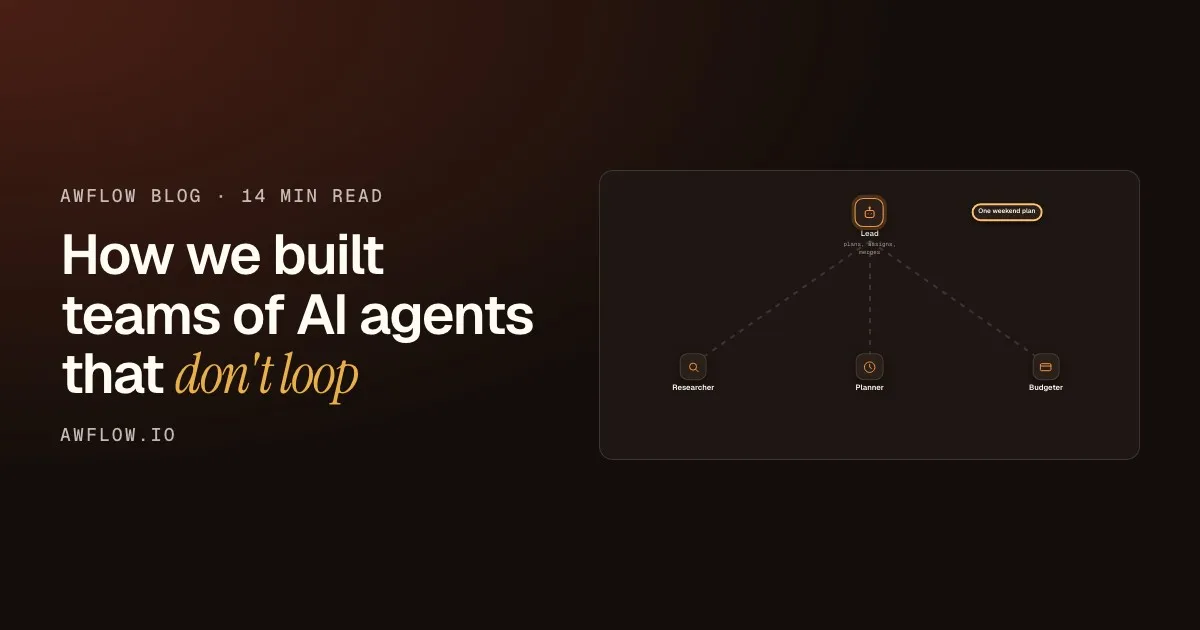
The lead merges them into one answer for you.The lead's final reply combines the handoff results.
Text version
- Plan a weekend in Lisbon → Lead
- Researcher: find areas to stay · Planner: draft the days · Budgeter: price the plan
- Researcher → a short list · Planner → a day-by-day plan · Budgeter → a cost estimate
- One weekend plan
The lead plans
In lead routes, only the lead’s chat turn gets a delegate_to(agent, task) tool. It plans the job and decides who does what.
Members do their part
Each member receives a task, works with its own model, skills and rules, and returns a result.
Results go back to the lead
Nobody else sees the exchange as an open conversation. The result goes back to the agent that asked.
The lead merges
The lead turns the parts into one answer. This mode is best for open-ended goals like “plan a weekend in Lisbon”.
The second way of working removes planning altogether. In a pipeline, members run in a fixed order and each receives the previous result. No agent has to plan. It’s best when the steps are known but each needs judgement (research, then write, then repurpose), and it’s the friendliest mode for small local models.
The last member delivers the posts.Member 3 gets member 2's result; the lead can check the final result when that option is on.
Text version
- The task: Research a topic, make 3 LinkedIn posts
- Researcher: sources and notes
- Writer: a draft built on the notes
- Repurposer: 3 LinkedIn posts
The third, the open table, is for when a human is steering. Whoever you @mention answers (or the lead, if nobody is mentioned), and can hand off from there.
Handoffs follow a map
delegate_to isn’t “message anyone”. It’s generated per agent from the team’s handoff map.
The writer may hand to the editor. The editor has no arrow out, so it gets no tool at all.Targets are derived from outgoing edges; zero targets means `delegate_to` is not bound.
Text version
- Lead · Researcher · Writer · Editor
- Lead → Researcher: may hand to
- Lead → Writer: may hand to
- Writer → Editor: may hand to
In code, the tool only exists when the map gives an agent someone to hand to:
/** `delegate_to` for an agent, or nothing when the map gives it no one to hand to. */
function delegateTools(fromId) {
  const targets = targetsOf(fromId);  // only the teammates the map allows
  if (!targets.length) return [];     // no targets → no tool at all
  // …describe the allowed targets in the tool's schema
}
An agent that the map gives no one to hand to doesn’t even see the tool. That’s cheaper and more reliable than telling the model in a prompt “please only delegate to X”. When a model writes @writer or “Writer”, the runtime resolves the reference against the team’s members (by id, handle or name), and anything else simply isn’t a valid target.
Hand off the task, not the transcript
A handoff carries the task and the context it needs, not the whole conversation. With small local models (2–4k token windows) that’s the difference between working and not working. With cloud models it’s the difference between a cheap thread and an expensive one.
Forward the whole thread and the start falls off. A handoff sends the task and its context instead.
So a handoff carries the task and its context, not the transcript.`delegate_to(agent, task, context)` builds a short brief for the member.
Text version
- A small model's context: 4 messages
- You: plan a weekend in Lisbon · Lead: splitting the job · Researcher: a few areas · Planner: a draft for day one
- Lead: now price it · Task for the budgeter → You: plan a weekend in Lisbon · Lead: splitting the job
- Forward the whole thread and the start falls off. A handoff sends the task and its context instead.
Budgets and rules, enforced in code
Every thread has three limits: steps, handoffs and cloud tokens. Every handoff is checked against them before it runs:
async function handOff(from, to, task, context) {
  check({ handoffs: 1, steps: 1 });        // refuse before spending anything
  usage.handoffs++;
  const result = await gate(() =>          // concurrency gate (parallel teams)
    runMember(to, task, { from, context, tools: delegateTools(to.id), signal, onCloudTokens }));
  count(result);                           // steps + cloud tokens actually used
  check();                                 // the result is kept even if it used up a limit
  return result.reply;
}
Seen as a cycle, each handoff is a lap: check, hand off, count. The thread can’t run forever because the check comes first.
- Lap 1Check limitsRoom leftHand offResearcher worksCount usageSteps and tokens added
- Lap 2Check limitsRoom leftHand offWriter worksCount usageSteps and tokens added
- Lap 3Check limitsNext one would go overHand offNot startedCount usageNothing spent
- The thread pauses with a plain reason
The thread pauses and says why.A limit event with a reason such as "Reached N steps"; the user can continue.
Text version
- 1. Check limits: Room left · Hand off: Researcher works · Count usage: Steps and tokens added
- 2. Check limits: Room left · Hand off: Writer works · Count usage: Steps and tokens added
- 3. Check limits: Next one would go over · Hand off: Not started · Count usage: Nothing spent
- The thread pauses with a plain reason
The details that matter in practice:
Budgets in practice
What the limits actually do
- Cloud tokens are counted as they are spent (done)automated
- A runaway member is stopped mid-turn (done)automated
- A limit pauses the thread with a plain reason (done)automated
- Finished work is kept, even the last straw (done)automated
- Parallel members run up to a concurrency limit (done)automated
Parallel teams are capped; otherwise members run one at a time.A counting semaphore gates member runs.
Text version
- What the limits actually do
- Cloud tokens are counted as they are spent
- A runaway member is stopped mid-turn
- A limit pauses the thread with a plain reason
- Finished work is kept, even the last straw
- Parallel members run up to a concurrency limit
A team can only tighten the rules
Each agent has rules: allow, ask or block per action, plus locked categories like paying, sending, deleting or entering credentials. In a team, the team’s rules are merged so they can only make a member stricter. A permissive agent joining a careful team becomes careful, never the other way around.
Before
The agent on its own
- Submit forms: allow
Allow
Its own rule lets it submit forms.
After
The same agent in a careful team
- Submit forms: always ask
- Paying: always ask
Ask
The team rule can only make it stricter.
Drag to compare. The merge never goes the other way.A team can tighten a member's rules, never loosen them.
Text version
- Before: The agent on its own, Allow. Its own rule lets it submit forms.
- After: The same agent in a careful team, Ask. The team rule can only make it stricter.
- Compare before and after
All of it is enforced in code around each tool call. It isn’t a paragraph in the system prompt, so a web page can’t talk an agent out of it.
Asking a teammate can’t recurse
Outside team threads, an agent can have a “Teammates” skill: ask_teammate(teammate, task) runs the other agent headless on its own model, skills and rules, and returns the answer. One rule keeps this sane: a teammate that’s being asked can’t ask teammates in turn.
You get one answer. No loop is possible.Bounded depth: recursion is ruled out by construction.
Text version
- You → Writer: "Draft a post on WebGPU"
- Writer → Researcher: ask_teammate("find sources")
- Researcher → Writer: sources and notes
- Writer → You: the draft
Asks are one level deep, so they never loop.
Testable by design
The coordinator is pure orchestration. Running one member is injected (runMember), so the whole runtime (modes, map, budgets, concurrency, aborts) is unit-tested with fake agents. The real member runner (model, skills, memory, rules, browser tab group) lives elsewhere.
In the app, the real runner brings the model, skills, memory and rules.The production runner owns models, tools, memory and the browser tab group.
Text version
- Coordinator · runMember (injected) · Fake agents · Real member runner
- Coordinator → runMember (injected): calls
- runMember (injected) → Fake agents: in unit tests
- runMember (injected) → Real member runner: in the app
If you build something similar, this split is the single best decision you can make: you can reason about coordination without ever calling a model.
Workflows and teams aren’t rivals
AWFlow started with deterministic workflows: draw the path, trigger then steps then output. Teams are the other way to automate: describe the outcome and let agents find the path. They combine. An agent can run a workflow as a skill when it needs a reliable step, and a workflow can call an agent (the “Run agent” node) when it needs judgement. An agent’s scheduled routine is itself an ordinary workflow you can open and edit. The teams page in the docs walks through setting one up, and the agents page shows what an agent can do.
The honest limit: agents and teams run in your browser, so a thread works while the browser is open, and local models are smaller than the frontier cloud ones. With a small local model, the pipeline mode is the one to start with.
If you build agent teams
- Give teams a way of working, not a free-for-all
- Generate the delegation tool from a map
- Hand off the task and its context, not the transcript
- Check budgets before spending, pause with a reason
- Merge rules so a team can only tighten them
- Inject the member runner so coordination is testable
Inject the runner and test coordination without models.Dependency injection of `runMember`.
Text version
- If you build agent teams
- Give teams a way of working, not a free-for-all
- Generate the delegation tool from a map
- Hand off the task and its context, not the transcript
- Check budgets before spending, pause with a reason
- Merge rules so a team can only tighten them
- Inject the member runner so coordination is testable
AWFlow is free and runs in your browser. Agents run on the model you pick: in-browser, Ollama, or your own API key.