Builder notes
Fill a form once. Replay it for every row of a sheet.
The hook. Do it once, reuse it forever.Record user actions, replay them as a parameterized UI Automation node.
Text version
- Builder notes: Fill a form once. Replay it for every row of a sheet.
The lowest-effort way to automate a web task is to do it once while something watches. AWFlow, my browser-automation extension, has a recorder: hit record, fill the form, stop, and your actions become steps in a “UI Automation” node you can replay, parameterize, or feed a list of rows into.
The catch
Recording is easy to demo and hard to make reliable.
Reliable is the hard part: tomorrow, on a changed page.Noisy event streams, brittle selectors and lost messages break replays.
Text version
- The catch: Recording is easy to demo and hard to make reliable.
This post covers the parts that matter: which events you listen to, how you turn an element into a selector that still works tomorrow, and how you keep the content script from losing actions. If the DOM and selectors are new to you, DOM automation without code is the friendlier introduction; this one is about building the recorder.
Listen early, map to intent
Listen in the capture phase, to a short list of events
The recorder is a content script injected into the page. It listens on document, in the capture phase, so page handlers that call stopPropagation() can’t hide events from it:
for (const type of ['click', 'dblclick', 'contextmenu', 'input', 'change', 'keydown']) {
  document.addEventListener(type, this.handle, true); // true = capture
}
The recorder listens in the capture phase, so the page can't hide a click from it.
The first pass of an event, from the top of the page down to the element, before the page's own handlers run.
addEventListener(type, fn, true) on document runs before target and bubbling handlers, so a page's stopPropagation() can't stop it.
First in line. The recorder sees the event before the page does.Capture listeners on document fire before handlers on the target and the elements between.
Text version
- The recorder listens in the capture phase, so the page can't hide a click from it.
- capture phase: The first pass of an event, from the top of the page down to the element, before the page's own handlers run. addEventListener(type, fn, true) on document runs before target and bubbling handlers, so a page's stopPropagation() can't stop it. (event bubbling, content script, stopPropagation)
Two guards keep the recording clean:
- Ignore your own UI. The recorder shows a floating badge with an action count, and the extension may have other UI injected in the page. Any event whose target is inside those elements is dropped (
el.closest('[data-awflow-recorder], …')). - Inject once. Content scripts can be injected twice (navigation, re-record). A
window.__actionRecorderguard makes the second injection a no-op.
Map raw events to intent
A raw event stream is noisy. Typing “hello” produces five input events and a change. A select fires both input and change. Most keydowns are just characters you already captured via input. So each event is mapped to an action, or to nothing:
switch (event.type) {
  case 'click':       return { action: 'click', domSelector };
  case 'dblclick':    return { action: 'dblclick', domSelector };
  case 'contextmenu': return { action: 'rightclick', domSelector };
  case 'input':
  case 'change':
    if (el instanceof HTMLSelectElement)       // only on change, or you record it twice
      return event.type === 'change' ? { action: 'select', domSelector, value: el.value } : null;
    if (isCheckboxOrRadio(el))
      return event.type === 'change' ? { action: el.checked ? 'check' : 'uncheck', domSelector } : null;
    if (isTextField(el))                       // only on input; ignore the trailing change
      return event.type === 'input' ? { action: 'type', domSelector, text: el.value } : null;
    return null;
  case 'keydown':
    // only "meaningful" keys (Enter, Escape, Tab, arrows, Backspace…) or combos with Ctrl/Meta/Alt
    return isMeaningful(ke) ? { action: 'keypress', domSelector, key: ke.key, ctrl, shift, alt, meta } : null;
}
Then a tiny coalescer merges the stream: consecutive type actions on the same selector collapse into one with the final value, and repeated scrolls to the same element are dropped.
Merge the run into one step with the final value.Consecutive type actions on the same selector collapse into the last value.
Text version
- You type in a field: "hello" in the email box
- Raw events: 5 × input, 1 × change
- Map to intent: type "h", "he", "hel", …
- Coalesce: one step: type "hello"
Recording type with the field’s value rather than individual keystrokes is the key decision. It replays correctly even when the page reformats input as you type.
Selectors that survive tomorrow’s deploy
This is where most recorders fail. The obvious selector, the nth-child path from body, breaks the first time someone adds a banner to the page.
The element's path from the top of the page is a good selector.
It breaks the first time someone adds a banner. Try stable hooks first: id, test ids, aria-label, name.
Flip it. Prefer what developers keep stable.Ids, test hooks and accessible names survive layout changes far better than positions.
Text version
- The element's path from the top of the page is a good selector.
- It breaks the first time someone adds a banner. Try stable hooks first: id, test ids, aria-label, name.
The recorder tries candidates from most to least stable:
The selector ladder
Candidates, most stable first
- #id (done)automated
- Test hooks: data-testid, data-test, data-cy, data-qa (done)automated
- aria-label, plus role if present (done)automated
- Form controls by name, plus type (done)automated
- A unique combination of classes (done)automated
- Fallback: the shortest nth-child path (done)automated
Last resort: a path, only as long as it needs to be.nth-child segments, climbing only until a segment is unique.
Text version
- Candidates, most stable first
- #id
- Test hooks: data-testid, data-test, data-cy, data-qa
- aria-label, plus role if present
- Form controls by name, plus type
- A unique combination of classes
- Fallback: the shortest nth-child path
It takes the first one that matches exactly one element, and that element is the one clicked:
const uniq = (s: string) => {
  try {
    const found = document.querySelectorAll(s);
    return found.length === 1 && found[0] === el;
  } catch { return false; } // invalid selector → not a candidate
};
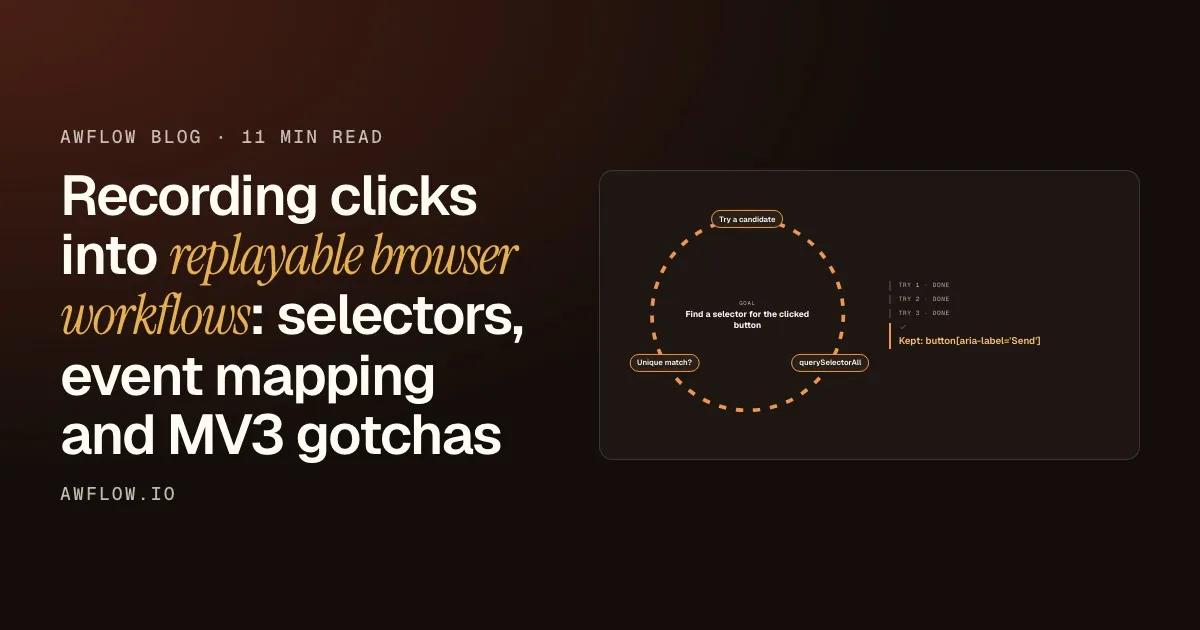
Here is that check running on a single click, on a button with no id and no test hook.
- Try 1Try a candidate#idquerySelectorAllskipped: no idUnique match?no
- Try 2Try a candidate[data-testid]querySelectorAllskipped: no test hookUnique match?no
- Try 3Try a candidatebutton[aria-label='Send']querySelectorAll1 matchUnique match?yes, same element
- Kept: button[aria-label='Send']
That selector is kept with the step.Uniqueness is validated at record time, then stored as the action's domSelector.
Text version
- 1. Try a candidate: #id · querySelectorAll: skipped: no id · Unique match?: no
- 2. Try a candidate: [data-testid] · querySelectorAll: skipped: no test hook · Unique match?: no
- 3. Try a candidate: button[aria-label='Send'] · querySelectorAll: 1 match · Unique match?: yes, same element
- Kept: button[aria-label='Send']
Try the id first
The element has no id, so the first rung is skipped.
Then the test hooks
No data-testid or similar attribute either.
The label matches once
button[aria-label="Send"] matches exactly one element, and it is the one that was clicked.
Keep it
That selector is stored with the step. Validation happened at record time, when you knew what you meant.
Two details that matter in practice:
CSS.escapeeverything. Ids likeemail:1or class names from CSS-in-JS (css-1x2y3z) are valid HTML but break naive selectors.- Validate uniqueness at record time. A selector that matched one element when you recorded is your best guess at what you meant. If it matches zero or two at replay, that’s a real signal, not a silent misclick.
Test hooks being second on the ladder is a nice side effect: apps with good test coverage are also the easiest to automate.
Don’t lose actions, then make replay robust
Reconnect when the background goes to sleep
The content script sends each action to the extension’s background through a long-lived runtime.connect port. In MV3 the background is a service worker that Chrome suspends when idle (Firefox’s event page does the same). When it’s suspended, the port disconnects, and an action posted to a dead port just disappears.
Nothing is lost. The next action arrives.Without the check, the message would go to a dead port and vanish.
Text version
- Content script → Service worker: action 1: click
- Service worker → Content script: port disconnected (idle)
- Content script → Service worker: reconnect, wakes the worker
- Content script → Service worker: action 2: type "hello"
The fix is boring but essential: track disconnects, and reconnect before posting if the port is gone.
private post(action) {
  if (!this.port) this.connect();   // the worker may have been suspended mid-recording
  this.port?.postMessage({ action: 'actionRecorded', recordedAction: action, uid: this.uid });
}
Before this, long recordings occasionally “skipped” a step with no visible error. That’s the worst kind of bug in a recorder.
Replay is where you add robustness
A recording is a starting point, not a finished automation. On replay, the UI Automation node gives you Wait for element steps (and a per-action wait timeout) so you’re not racing a slow page, expressions to swap a recorded value for one read from the incoming item, and normal workflow logic around it: conditions, AI steps, schedules, error branches.
Inputs
itemrowSettings
Outputs
itempass-throughThe row passes through to the next step.Pass-through output: downstream nodes get the same item.
Text version
- UI Automation (in page)
- item (row)
- Actions: the recorded steps: click, type, select… · Wait for element: a step you add before a slow part · Wait timeout: per action · Typed value: {{ $input.email }} instead of the recording
- item (pass-through)
With an expression in the typed value, the same recording fills the form for every row of a sheet. For a complete form-filling workflow that also asks before it touches the page, the docs example below is the closest: it uses a form-filling node rather than a recording, but the shape (values in, approve, fill, submit) is the same one a recording slots into. Build an AI form filler goes further on that use case.
Try it
Fill a web form from saved values
Open it in AWFlow, change the values and field ids, and run it on your form. Swap in a recording when the form needs clicks too.
Open in AWFlow (opens in a new tab)docs.awflow.io/examples/fill-form-from-json.awfCall to action. Viewers scan the code, readers click the link.Docs example: Run now → form values → approval → Fill the form → Submit.
Text version
- Fill a web form from saved values · Open it in AWFlow, change the values and field ids, and run it on your form. Swap in a recording when the form needs clicks too. · https://docs.awflow.io/examples/fill-form-from-json.awf
Honest limits
- Sites that redesign will break recorded selectors sometimes. The stable-first strategy reduces that a lot but doesn’t eliminate it. Re-recording one step is usually the fix.
- Canvas-heavy apps and closed shadow DOM aren’t well covered by DOM events.
- Anything behind a login works only because it runs in your session, which is also why the extension asks for per-site access.
If you’re building a recorder, this is most of the reliability:
A recorder that holds up
- Listen in the capture phase
- Map events to intent, then coalesce
- Stable-first selectors, checked for uniqueness
- A port that reconnects
Reconnect before sending. No silent gaps.Re-open the runtime.connect port when the service worker was suspended.
Text version
- A recorder that holds up
- Listen in the capture phase
- Map events to intent, then coalesce
- Stable-first selectors, checked for uniqueness
- A port that reconnects
AWFlow is free to install. Questions and “here’s how my recorder broke” stories are welcome.