You built an agent that works. Someone asks for it. What do you actually send them?
An AI agent is more than a prompt. In AWFlow (a browser automation tool I build) an agent has a model, instructions, memory, skills, rules and routines, and agents can form teams with a handoff map (the coordination runtime behind teams has its own post). We recently added a marketplace where people can share agents and whole teams as templates.
That raises a design question every “share your agent” feature has to answer: what’s the reusable part, and what’s personal? Get it wrong one way and templates are useless. Get it wrong the other way and people leak their memory, their sites and their credentials. Here’s how we drew the line, and the rules we follow on install.
The principle
Share the setup, never the person.
Never the person: what it knows about its author, or what it is connected to.Strip state and device bindings: memory, history, knowledge contents, credentials, local IDs.
Text version
- The principle: Share the setup, never the person.
What travels and what stays
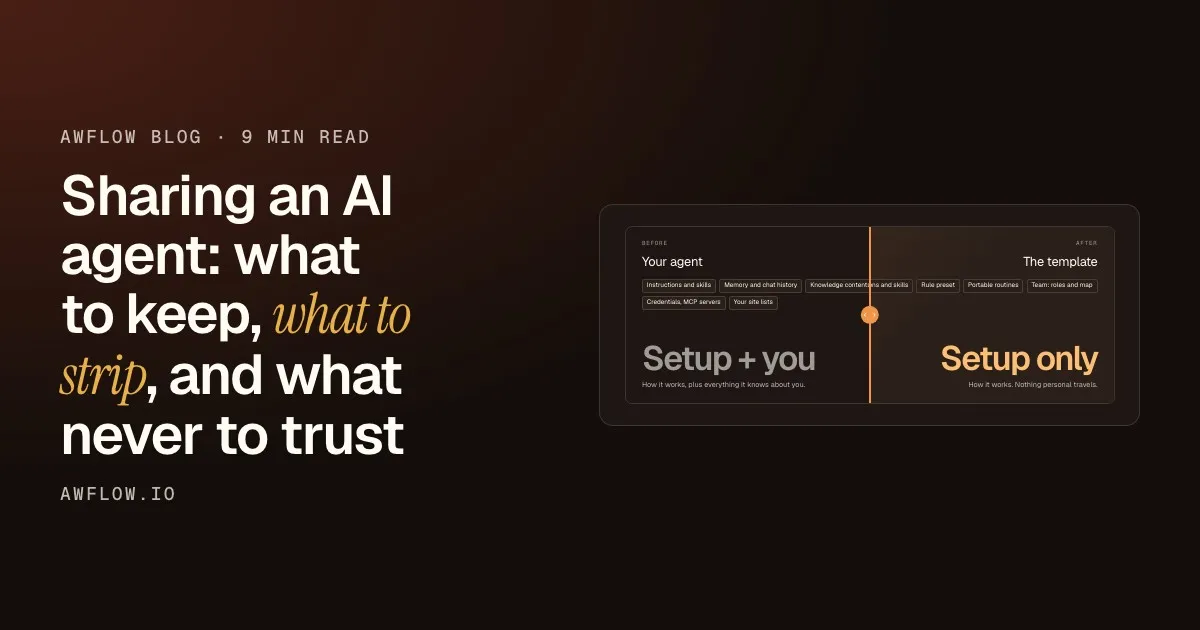
An agent template should carry how the agent works, never what it knows about its author or what it’s connected to on the author’s machine.
Before
Your agent
- Instructions and skills
- Memory and chat history
- Knowledge contents
- Credentials, MCP servers
- Your site lists
Setup + you
How it works, plus everything it knows about you.
After
The template
- Instructions and skills
- Rule preset
- Portable routines
- Team: roles and map
Setup only
How it works. Nothing personal travels.
Drag the line to compare what travels.Kept: identity, instructions, skills, generic rules, portable routines, team structure.
Text version
- Before: Your agent, Setup + you. How it works, plus everything it knows about you.
- After: The template, Setup only. How it works. Nothing personal travels.
- Compare before and after
Here’s the full split:
| Kept (the setup) | Stripped (personal or device-specific) |
|---|---|
| Name, handle, role, avatar, greeting, starter prompts | Memory and chat history |
| Instructions | Knowledge-base contents (the collection references are emptied) |
| Skills it uses (browser, web search, on-device AI…) | Credentials and the author’s MCP servers |
| Rule preset and generic per-action rules | Per-site rules and the author’s allow/block site lists |
| Portable routines (schedule, page triggers…) | Routines tied to a local workflow or a recording |
| Team: members, roles, way of working, handoff map | IDs of the author’s own workflows |
| On-device model choice | Cloud model choice (it names the author’s provider) |
A few of these deserve a word.
Models: on-device travels, cloud doesn’t
If the author picked an in-browser model, the template keeps it: anyone can download the same model. If they picked a cloud model, the template says “inherit” and the installer’s own default applies. A cloud pick names the author’s provider and account setup, which the installer may not have.
On install, your own default applies.`inherit` resolves to the installer's default model.
Text version
- On-device model · Cloud model · Template keeps it · Template: "inherit" · Your default model
- On-device model → Template keeps it: same model id
- Cloud model → Template: "inherit": provider dropped
- Template: "inherit" → Your default model: on install
Rules: keep the intent, drop the specifics
The agent’s rule preset and its generic per-action rules (“ask before submitting forms”) are the safety intent, so they travel. Rules tied to specific sites, and the author’s allow/block site lists, are personal browsing context, so they’re dropped.
- Site listsDropped: the author's allowed and blocked sites.
- Per-site rulesDropped: tied to the author's sites.
- Per-action rulesTravels: "ask before submitting forms".
- Rule presetTravels: the overall level of caution.
Peel them apart: the intent travels, the specifics stay home.Export keeps the preset and generic actions; site-scoped keys and allow/block lists are emptied.
Text version
- Site lists / Per-site rules / Per-action rules / Rule preset
- Site lists: Dropped: the author's allowed and blocked sites. · Per-site rules: Dropped: tied to the author's sites. · Per-action rules: Travels: "ask before submitting forms". · Rule preset: Travels: the overall level of caution.
Dependencies become “needs”, not secrets
If an agent uses one of the author’s workflows as a skill, or an MCP server, the template can’t include those. Instead it records what’s needed: the workflow’s name, the MCP server’s host.
You're told exactly what to add.The missing list is shown after install, pointing to the agent's Skills tab.
Text version
- The author's agent: uses a workflow and an MCP server
- Export: needs: a workflow name, an MCP host
- Install: new agent, without those tools
- After install: "Add these to finish setting it up"
The agent depends on the author’s things
A workflow that lives on the author’s device, an MCP server they connected. Neither can travel.
Export records the need
The template keeps the workflow’s name and the server’s host, so the installer knows what is missing.
Install creates the agent
The new agent starts without those tools, rather than pretending to have them.
You get a plain note
After installing, the user sees “Add these to finish setting it up: …”.
That’s much better than an agent that silently has fewer tools than its description promises.
Routines: only the portable ones
A routine triggered by a schedule or a page event travels. A routine that depends on a local workflow or a recorded sequence can’t work on someone else’s machine, so it’s left out rather than shipped broken.
On install: never trust the file
A template is just data, and data from strangers is untrusted.
A template is a trusted copy of someone's agent.
A template is data from a stranger: fresh IDs, remapped references, the same guardrails as your own agents.
The rule: treat the file as untrusted input.Validate every field, recreate records, never reuse IDs or flags from the file.
Text version
- A template is a trusted copy of someone's agent.
- A template is data from a stranger: fresh IDs, remapped references, the same guardrails as your own agents.
Install follows a few rules:
On install
Four rules for an untrusted template
- Never trust IDs, flags or timestamps (done)automated
- Re-map the team to the new agents (done)automated
- Report what's missing (done)automated
- Apply the same rules as your own agents (done)automated
Same guardrails: "ask" asks, locked categories always ask.Installed agents go through the same rules engine: paying, sending, deleting and credentials always ask.
Text version
- Four rules for an untrusted template
- Never trust IDs, flags or timestamps
- Re-map the team to the new agents
- Report what's missing
- Apply the same rules as your own agents
The re-mapping is worth seeing, because it’s where a careless importer leaks or overwrites things.
The built-in assistant is reused, not duplicated.The `aria` key resolves to the installer's own Aria.
Text version
- Template agent 1 · Template agent 2 · Template: Aria · New agent, new ID · New agent, new ID · Your own Aria
- Template agent 1 → New agent, new ID: created fresh
- Template agent 2 → New agent, new ID: created fresh
- Template: Aria → Your own Aria: reused
The marketplace on top
The marketplace adds the social layer. Listings are reviewed by a moderator before they go live, and anyone can browse agent and team templates in Marketplace › Agents & teams without signing in. Installing is one click, plus a single confirmation when the template’s agents can act in your browser or run on their own. The install is counted on the server (once per signed-in person), but the agents themselves are created locally on your device.
One honest limit: stripping protects your state and your connections, not your words. Instructions are shared as written. The marketplace checks a template again when it is submitted and refuses anything that looks like a key or personal data, but read your instructions before you share. The templates page in the docs lists everything that is and isn’t shared.
If you’re building “share your agent” in your own product, this is the short list:
If you're building "share your agent"
- Split setup from state in your data model early
- Replace dependencies with declared needs
- Keep local models, inherit cloud ones
- Fresh IDs, remapped references, same guardrails
Untrusted on install: fresh IDs, remapped references, same guardrails.Validate, recreate, rewire, then enforce the normal rules engine.
Text version
- If you're building "share your agent"
- Split setup from state in your data model early
- Replace dependencies with declared needs
- Keep local models, inherit cloud ones
- Fresh IDs, remapped references, same guardrails
AWFlow is free and runs in your browser.