Lesson 3 5 min
Lock credentials in the vault
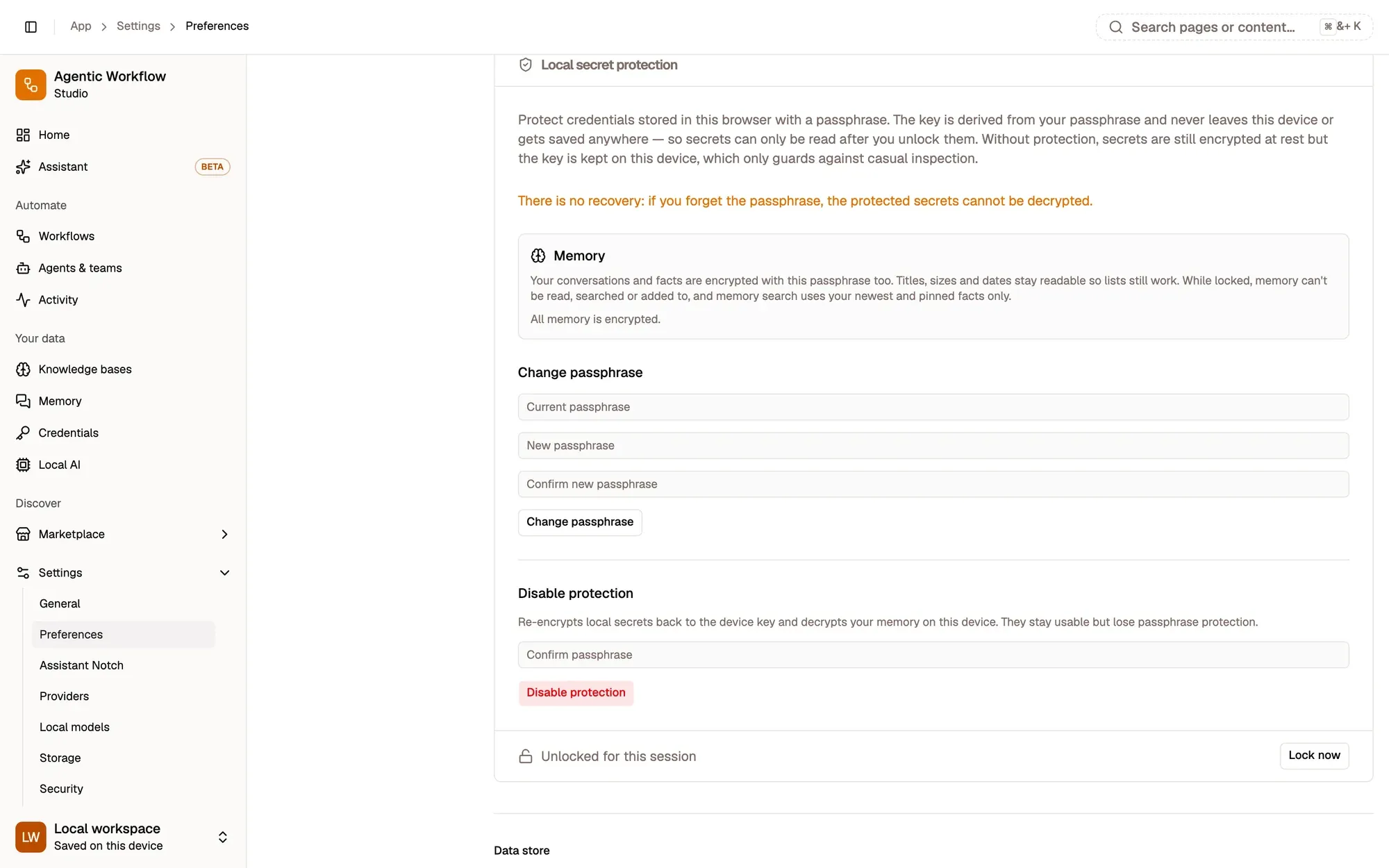
Local credentials are always encrypted. The secret vault adds a passphrase only you know.
How credentials are protected
Local credentials are encrypted in the browser, with a key stored on the same device: enough against casual inspection. Cloud credentials are stored encrypted on the AWFlow server. Exporting a workflow checks for secrets written into it and offers to strip them before the file is saved.
Add a passphrase
Open Settings › Preferences › Local secret protection, type a passphrase of at least 8 characters, confirm it and click Enable. The key is then made from your passphrase and saved nowhere. The vault protects every credential in a local workspace, local credentials when you’re signed in, and your conversations and remembered facts.
The vault locks every time the app reloads. Type your passphrase and click Unlock: it stays unlocked for this session, or click Lock now.
Good habits
- One credential per account and purpose, reused across workflows.
- Tokens with only the permissions the workflow needs.
- Never a secret in a node’s normal fields: those travel with the workflow when you share it.
Key takeaways
- By default the key sits on the same device, which only stops casual snooping.
- The vault's key is made from your passphrase and never saved.
- Give each token only the permissions it needs.