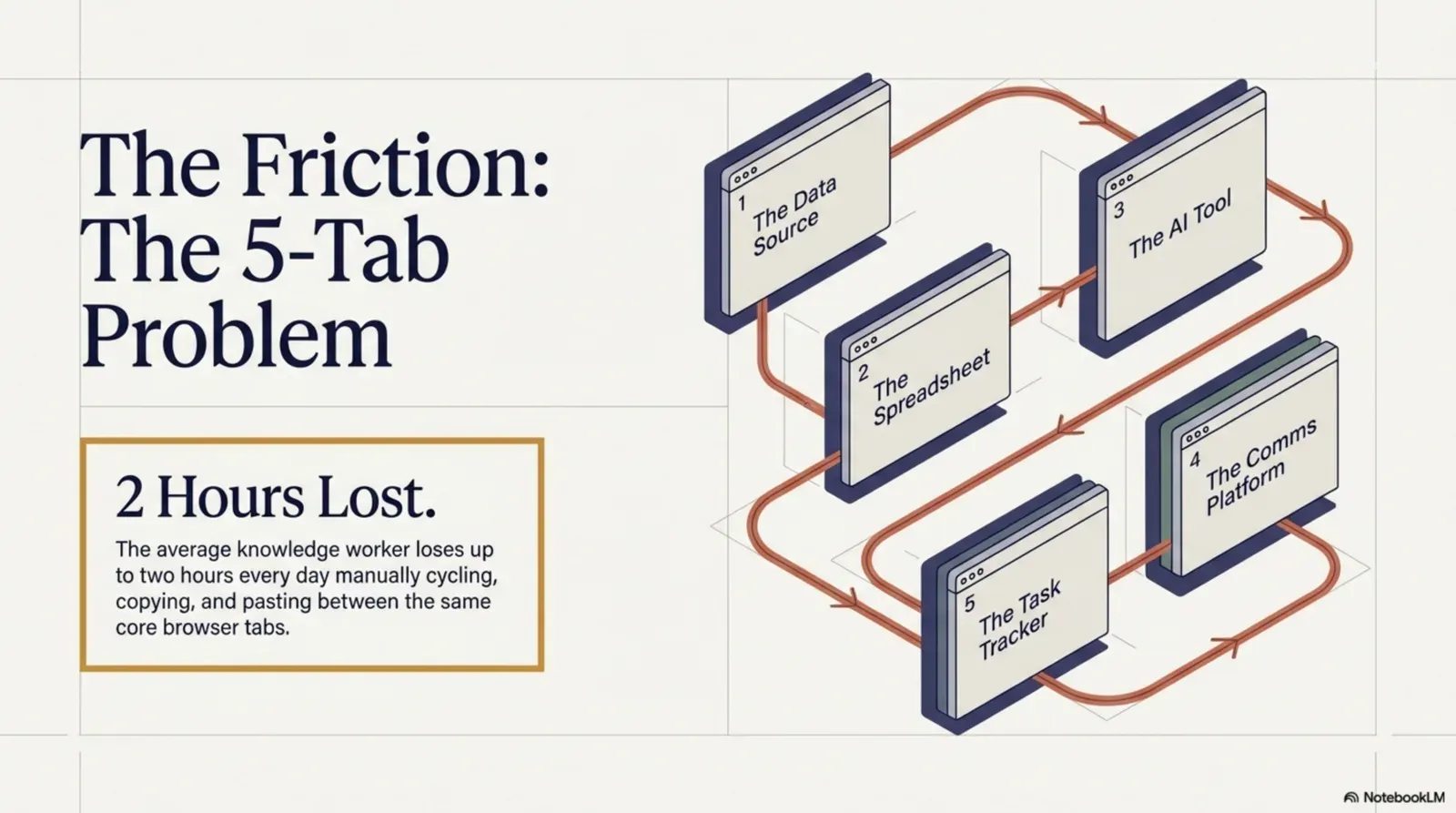
Count the tabs. Right now, as you read this, how many do you have open? For most knowledge workers, somewhere between eight and thirty. Within that sprawl is a specific, painful pattern: a cluster of five core tabs you cycle through dozens of times a day. A data source. A spreadsheet or doc. An AI assistant. A communication tool. And the task you’re actually supposed to be doing. This is the 5-Tab Problem, and it can quietly eat a large part of your day.
This article breaks down what the 5-Tab Problem costs, why it’s hard to escape, and how browser-native AI tools built on agentic workflows, specifically Agentic Workflow, can collapse five tabs into one. (For the short, interactive version of the idea, see The 5-tab problem: let your browser do the copy-paste.)
What is the 5-Tab Problem?
It isn’t really about having too many tabs open. It’s a workflow pattern where the tool you need to process information (an AI, a spreadsheet, a CRM) is always in a different tab from the page where the information lives. The cycle:
- You’re reading a page with data or content you need to act on.
- You copy the relevant text or data.
- You switch to your AI assistant or tool tab.
- You paste, set it up and run it.
- You copy the output.
- You switch to your doc or task tab.
- You paste the result.
- You go back to the original page, and realise you’ve lost your place.
The pattern
Copy-paste is not a workflow. It's the absence of one.
It's a missing connection between your tools and your pages.Every paste is a manual bridge between two systems that could talk to each other.
Text version
- The pattern: Copy-paste is not a workflow. It's the absence of one.
Repeat that loop twenty, thirty, forty times a day. That isn’t a productivity workflow; it’s a productivity tax.
The hidden cost of context switching
Research on interruptions and task switching is consistent: switching has a cost beyond the seconds it takes. Gloria Mark’s team at the University of California, Irvine has studied digital work for two decades; their research shows that interrupted work comes with more stress and frustration, and Mark has reported that it can take over 20 minutes to get back to an interrupted task. Her studies also found that people switch between screens and tasks every few minutes, and that many of those switches are self-initiated: we interrupt ourselves more than notifications do.
Up to 40% of productive time, in the worst cases.Source: APA, 'Multitasking: Switching costs' (summary of Rubinstein, Meyer and Evans, 2001).
Text version
- Productive time task-switching can cost: 40%
The American Psychological Association summarises task-switching research this way: the mental “switching cost” of shifting between tasks can add up to as much as 40% of someone’s productive time. A quick tab switch is a smaller interruption than a phone call, but a day full of them fragments attention into pieces too small for deep work.
Five common tab-switching patterns
Not all switching is equal. Here are five patterns that account for much of the lost time, with rough daily estimates for a busy knowledge worker:
- Data to spreadsheet (about 12 min a day): copying information from a website, report or portal into Google Sheets or Excel.
- Content to AI (about 18 min a day): pasting text from an article or page into a chatbot to summarise, analyse or rewrite it.
- Research to CRM (about 10 min a day): copying company details, contacts or news from web pages into a CRM.
- Page to email or Slack (about 8 min a day): reformatting information from a page into a message for a colleague.
- Source to doc (about 15 min a day): moving quotes, figures and references from several pages into a working document.
That’s about an hour a day from these five patterns alone (our estimates). Add the time to re-orient after each switch and, for heavy researchers, it can approach two hours.
Why copy-paste is a productivity anti-pattern
Copy-paste feels like a solution because it beats retyping. But it’s a symptom of a deeper problem: your tools and your data sources aren’t connected. Every paste is a manual bridge between two systems that could talk to each other.
It also introduces errors: truncated text, missed fields, formatting accidents, stale data pasted hours after it was captured. These aren’t edge cases; they’re the normal failure modes of a manual process. Teams that rely on copy-paste to move data are running a fragile pipeline that nobody maintains.
The solution: bring AI to the page
The shift that removes the 5-Tab Problem is architectural: instead of pulling data out of pages and carrying it to your tools, bring your tools to the page. The data stays where it is; the AI, the spreadsheet connection and the CRM update come to you.
And you stay on the page.No tab switch at all.
Text version
- Five tabs: The page with the data ≈ One workflow: Trigger on that page
- Five tabs: Copying the text ≈ One workflow: A node reads it
- Five tabs: The chatbot tab ≈ One workflow: An AI step
- Five tabs: The spreadsheet or CRM ≈ One workflow: An output node
- Five tabs: Back to where you were ≈ One workflow: You never left
That’s the premise of browser-native automation. When your automation runs inside the browser, next to the pages you read, you don’t copy, paste or switch. The tool sees what you see, processes it in place and sends the result where it needs to go.
How Agentic Workflow removes tab switching
Agentic Workflow is a Chrome extension with a visual, no-code automation builder inside your browser. Instead of switching tabs, you build a workflow that runs on the current page. Some of the browser tasks AI can handle for you:
- A page node (Get All Text, Get Element Data) reads the content you need, every time, after you’ve picked it once.
- An AI node processes it: summarise, extract, rewrite, analyse, with a cloud model or a local one (WebLLM in the browser, or Ollama).
- An output node sends the result where it belongs: a Google Sheet, the side panel, your clipboard, a CRM.
The first setup takes a few minutes. After that it runs with one click or a hotkey, or automatically on a matching page.
From 5 tabs to 1: a workflow makeover
A sales development rep researches 20 prospects a day. Today: open the company’s page, read it, switch to a chatbot, paste and ask for a pitch angle, switch to the CRM, create a note, copy the pitch, paste it in. Five tabs, eight manual steps, twenty times.
It lands in your CRM.HTTP Request to the CRM's API (or the HubSpot, Pipedrive or Attio node).
Text version
- A prospect's company page: open in a tab
- Hotkey: pressed on the page
- Get All Text: name, description, news
- Basic LLM Chain: a tailored pitch angle
- HTTP Request: a note on the CRM record
Start on the prospect’s page
Open the company’s page as usual. That’s the only tab you need.
Run it
Press your hotkey. The workflow starts on the page you’re on.
Read the essentials
It reads the company name, description and recent news from the page.
Write the angle
An AI step turns that into a tailored pitch angle with your prompt.
Save it
The result goes straight to the CRM record: no copy, no paste.
Move the sliders to use your own numbers.
Example figuresNearly two hours a day at 20 prospects.Prospects × minutes ÷ 60.
Text version
- Prospects a day: 20 · Minutes saved each: 5 min
- Hours back per day: 1.7 h
One tab, one key, the same output. From roughly 6 minutes per prospect to under 1: for 20 prospects, nearly 2 hours back every day.
Try it
The 5-Tab Problem isn’t a minor inconvenience. It’s a structural inefficiency in how most knowledge workers handle information. The fix isn’t better tab management; it’s removing the need to switch, by bringing AI and automation to the pages where the work happens. And browser automation is no longer just for developers: you can build your first workflow without code.
Your turn
Your first one-tab workflow
Open it in AWFlow: it reads the page and asks a model, right where you are. Change the prompt to your pitch, research or summary.
Open in AWFlow (opens in a new tab)docs.awflow.io/examples/summarize-page-llm-chain.awfCall to action. Scan the code or click the link.Opens the Summarize page (LLM chain) docs example in AWFlow's import page.
Text version
- Your first one-tab workflow · Open it in AWFlow: it reads the page and asks a model, right where you are. Change the prompt to your pitch, research or summary. · https://docs.awflow.io/examples/summarize-page-llm-chain.awf
In short
- Five tabs, one job, many switches
- Bring the tools to the page
- One key instead of eight steps
Three. Hours back each week.Example figures.
Text version
- In short
- Five tabs, one job, many switches
- Bring the tools to the page
- One key instead of eight steps