Lesson 11 4 min
Review and edit facts
See every fact Aria and your agents remember, add your own, fix or forget them, and decide on suggestions.
Find the facts
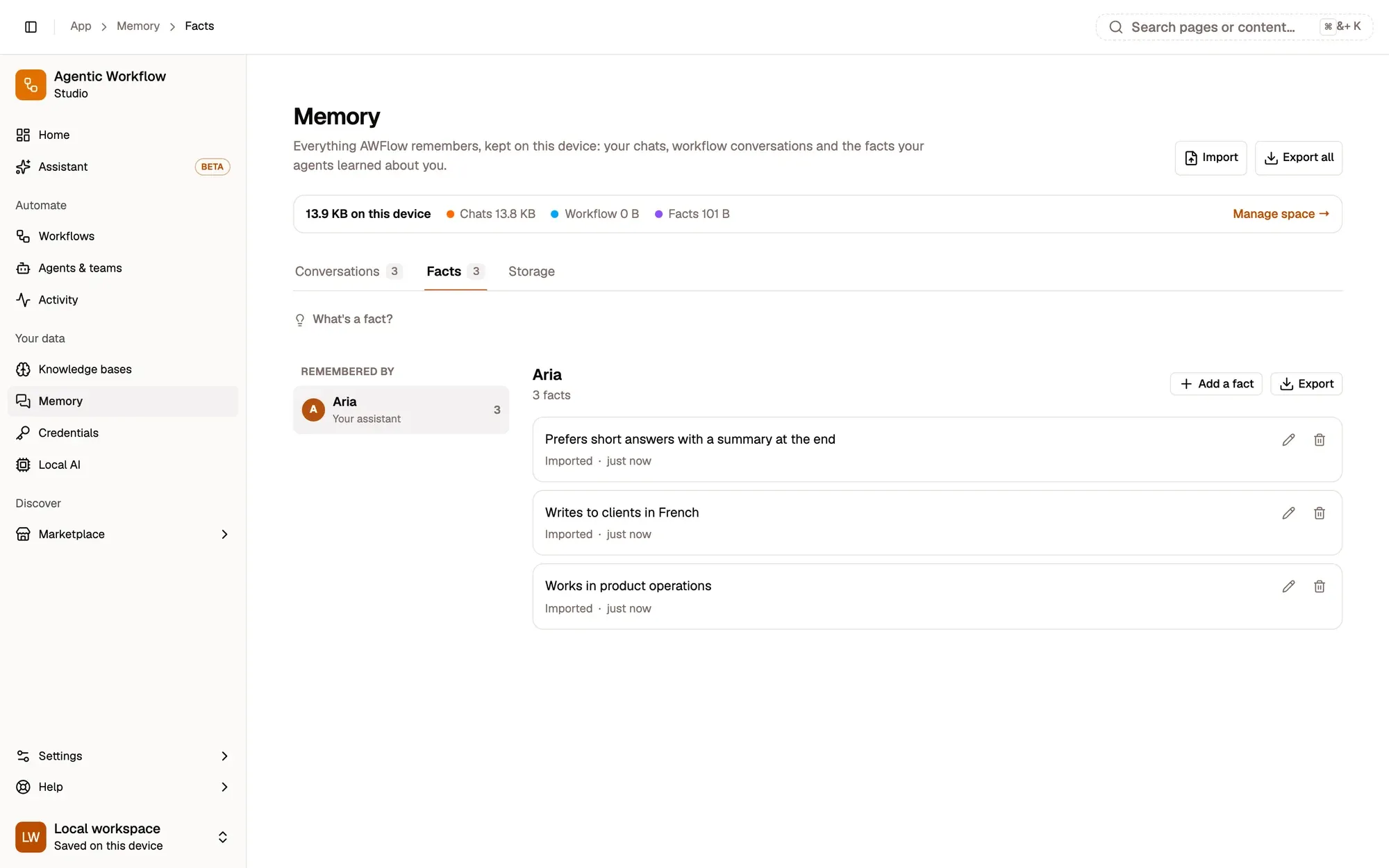
Open Memory › Facts. Remembered by, on the left, lists Aria and each agent, team and project that has facts, with how many. Each fact says where it came from (such as You added this), when, and when it was last used.
Add, edit, forget
Select an owner, then Add a fact: one short sentence, up to 500 characters, so it can be found and fits in the model’s context. Click the pencil to edit a fact, or forget it (it goes at once, with Undo). A fact marked Pinned · always included is sent with every message.
In a chat you can also just say “Remember that my budget is €600”: the fact is saved right away, with View and Undo under the reply. Facts reach the model as reference data about you, never as instructions.
Suggestions
When you mention a lasting preference without asking, your assistant only suggests it. Suggested, at the top of the Facts tab, lists those facts. Nothing there is used until you choose Remember (or Edit it first); Dismiss throws it away, and unanswered suggestions are removed after 14 days.
Key takeaways
- Facts are grouped by who remembers them.
- A fact is one short sentence, up to 500 characters.
- A suggested fact is used only after you choose Remember; unanswered ones are removed after 14 days.